Table of Contents
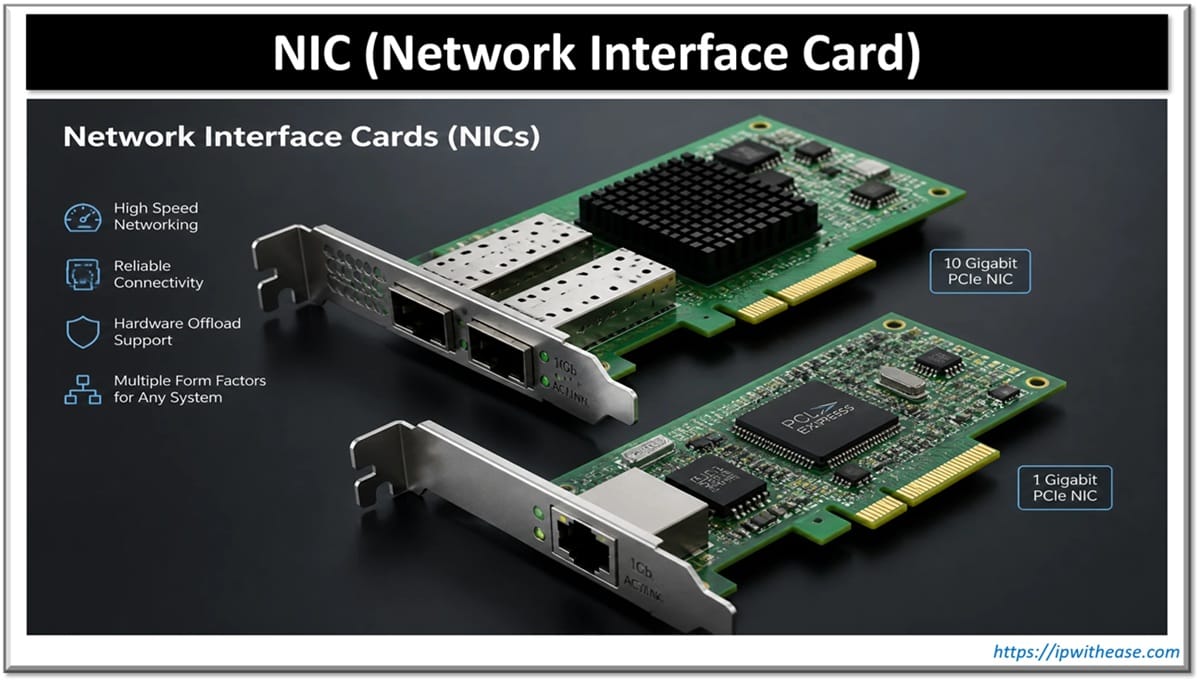
Network Interface Card is in-short called NIC. It is also referred to as an Ethernet card and network adapter. It is an expansion card or hardware interface that enables a computer to connect to a network; such as a home network, or the Internet using an Ethernet cable with an RJ-45 connector.
Understanding Network Interface Cards
Some Network Interface cards are meant for wired networks while others are for wireless network. Most widely used wired LAN Technology is Ethernet. Ethernet based NICs are available in every local electronic hardware shops. Normal speed rating of Ethernet based wired NIC available these days are 10/100/1000 Mbps (Mega bits per second).
Every computer participating in network must have at least one NIC. Computers can have more than one NIC card also. Network interface cards also provide a buffer for incoming and outgoing data, so that the computer can compensate for latency issues. Many modern devices have network interface cards built into them, as standards have made Ethernet and IEEE 802.11 (used for wireless local access network connections) widespread and compact.
Every NIC (Network Interface Card) has a 48-bit globally unique identifier called as MAC Address (Media Access Control Address) burned into its ROM chip. This MAC address is used to deliver Ethernet Frames (packets) to a computer.
The NIC driver software passes the data between the Operating System and the NIC. Latest Operating Systems include different NIC driver software for almost all major NIC vendors.One NIC can handle a number of Ethernet connections by attaching a switch or router to it. While most people are used to standalone routers, many enterprise and server-grade routers are full servers attached to switches. In some cases, two or more NICs might be used to provide more throughput.
Offices often use Ethernet connections for workstations and desktops. Ethernet cables are easier to configure than wireless cards, and they can provide better throughput in certain scenarios. As more offices move to cloud-based operations, Ethernet cables are likely to be used to prevent wireless channels from becoming congested.
Types of Network Interface Cards
Network Interface Cards (NICs) connect a device to a network and come in several types based on connectivity, form factor, and use case:
By connectivity
- Ethernet NIC – Wired connection using RJ45 ports; most common in desktops, servers, and enterprise environments. Available in speeds from 1 Gbps up to 100 Gbps+ for data centers.
- Wireless NIC (Wi-Fi adapter) – Connects via radio signals (802.11 standards); built into laptops or added as USB/PCIe cards for desktops.
- Fiber NIC – Uses fiber-optic ports (SFP/SFP+/QSFP) for high-speed, long-distance connections, common in data centers and backbone links.
By form factor
- PCIe NIC – Installed directly into a motherboard’s PCIe slot; standard for desktops and servers needing high throughput.
- USB NIC – External adapter plugged into a USB port; useful for laptops lacking a built-in port or for quick network access.
- Onboard/Integrated NIC – Built directly into the motherboard, common in most modern PCs and laptops.
- PCMCIA/ExpressCard NIC – Older laptop card-slot format, largely obsolete now.
By function
- Server NIC – Often multi-port, supports features like teaming, RDMA, or SR-IOV for virtualization and high-throughput workloads.
- Smart NIC (DPU) – Offloads networking, security, or storage tasks from the CPU, increasingly used in cloud and hyperscale environments.
- Virtual NIC (vNIC) – Software-defined interface used in virtualized or cloud environments, mapped to physical NICs by the hypervisor.
Which one to choose?
Points to Consider While Choosing a NIC:
- Speed requirements – Match NIC throughput (1G/10G/25G/100G) to your network infrastructure and workload needs; no point in a 100G NIC on a 1G network.
- Connector/port type – Ensure compatibility with your switch/infrastructure (RJ45 for copper, SFP+/QSFP for fiber).
- Form factor & compatibility – PCIe slot availability, motherboard chipset support, or laptop port limitations.
- Number of ports – Servers often need multi-port NICs for redundancy, link aggregation (LACP), or network segmentation.
- Offload capabilities – Look for TCP/IP offload, checksum offload, or RDMA support to reduce CPU load on high-traffic systems.
- Virtualization support – SR-IOV, VMQ, or vNIC support matters if the NIC will serve virtualized/cloud workloads.
- Driver and OS compatibility – Verify stable driver support for your OS (especially important in Linux/enterprise environments).
- Power consumption – Relevant for dense server deployments and green IT initiatives.
- Redundancy/failover needs – Dual-port NICs with teaming/bonding support for high-availability setups.
- Vendor ecosystem and support – Compatibility with existing hardware (Intel, Broadcom, Mellanox/NVIDIA) and long-term firmware/driver support.
- Budget vs. use case – Consumer-grade NICs suffice for basic use; data centers need enterprise-grade NICs with better reliability and features.
- Security features – Some NICs support hardware-level encryption or secure boot for sensitive environments.
ABOUT THE AUTHOR

You can learn more about her on her linkedin profile – Rashmi Bhardwaj