Table of Contents
Most ERP projects look calm at the beginning. The team has a few vendor names. The demos are booked. Everyone agrees the current systems are too disconnected, too manual, or too hard to report from. Someone says the new ERP will finally give the business “one source of truth,” and for a while, that sounds like progress.
Then the uncomfortable questions start showing up.
Who owns the customer master data? Why does finance define a location differently from operations? Can the ERP connect to the warehouse system without a custom workaround? Will the approval workflow match what managers actually do? What happens to the reports executives rely on every Monday morning?
This is where many ERP decisions get exposed. The software may be capable, but the selection process was too shallow.
For IT teams, ERP selection is not just about helping the business buy new software. It is about protecting the company from a project that looks good in procurement and painful in production.
ERP Selection Is Really a Risk Conversation
An ERP system does not sit quietly in one department. It reaches into finance, purchasing, inventory, HR, reporting, compliance, order management, and sometimes manufacturing or supply chain operations.
That is the promise. It is also the risk.
A poor fit can create problems that are hard to unwind later: brittle integrations, weak permissions, unreliable reports, slow adoption, messy data migration, and expensive customization that nobody budgeted for properly.
This is why companies need ERP selection criteria that reduce implementation risk. Not a generic checklist copied from a vendor brochure, but a practical set of questions that forces the team to look at fit, readiness, ownership, and long-term maintainability before anyone signs.
The best ERP choice is not always the biggest platform or the one with the nicest dashboard. It is the one that can support the business as it really operates, including the exceptions people forget to mention in meetings.
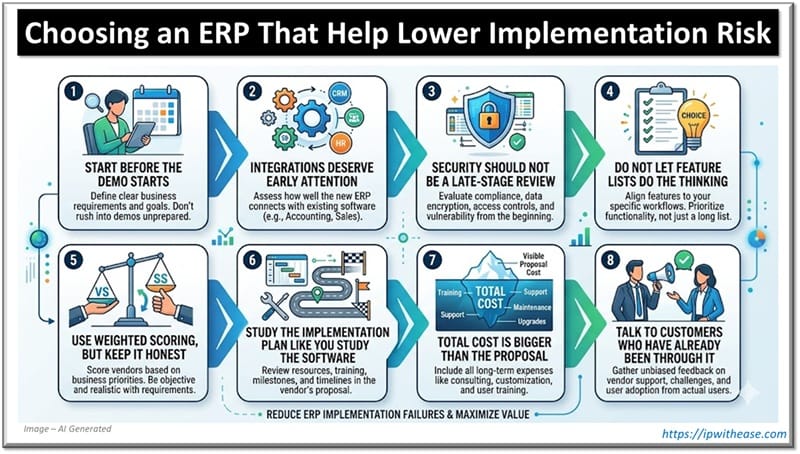
Start Before the Demo Starts
Vendor demos can be useful. They can also be misleading.
A demo usually shows the happy path: clean data, simple approvals, neat dashboards, and workflows that move exactly as planned. Real businesses are not that tidy. A customer changes an order after approval. A supplier invoice does not match the purchase order. A manager wants a report sliced three different ways. A legacy system still needs to feed data into the ERP because replacing it is not in scope this year.
Before vendors lead the conversation, the business should define what the ERP actually needs to handle.
That means documenting core workflows, integration points, reporting needs, compliance requirements, approval levels, user roles, data migration challenges, and likely growth over the next five to ten years.
This step is not glamorous, but it is where the project becomes safer. When requirements are clear, the team can judge vendors against reality instead of judging them against presentation skills.
A better question than “Which ERP do we like?” is: “Which ERP can survive our operating model with the least unnecessary friction?”
Integrations Deserve Early Attention
IT teams know this already: integrations are where good-looking ERP projects can get ugly.
Most companies are not replacing every system at once. The ERP may need to work with a CRM, eCommerce platform, payroll tool, warehouse system, business intelligence software, payment gateway, or a few industry-specific applications that are too important to remove.
So when a vendor says, “Yes, we integrate with that,” keep asking questions.
Is the connection native? Does it rely on middleware? How mature is the API? Are there rate limits? How are failed transactions handled? What breaks during upgrades? Who monitors the integration after go-live? Is the connector maintained by the ERP vendor, a partner, or a third party?
These details matter more than a logo on an integration slide.
A fragile integration may not ruin the demo, but it can absolutely ruin the first month after launch. Teams end up reconciling data manually, IT gets pulled into urgent fixes, and users quietly lose confidence in the new system.
Security Should Not Be a Late-Stage Review
Security often gets treated as a box to check near the end of selection. That is a mistake.
An ERP may hold financial records, employee details, vendor information, customer data, pricing, contracts, approval histories, and audit trails. Access control is not a minor configuration issue. It shapes how safely the business can operate inside the system.
Look closely at role-based permissions, multi-factor authentication, single sign-on, encryption, audit logs, approval routing, administrative controls, and segregation of duties.
Compliance should be part of the same conversation. A distributor, manufacturer, healthcare organization, or financial services company may have obligations that affect reporting, data retention, traceability, or user access.
The question is not only, “Can the ERP do this?”
The better question is, “Can it do this cleanly, without awkward customizations that become a maintenance problem later?”
Do Not Let Feature Lists Do the Thinking
Feature checklists are useful, but they can give teams a false sense of confidence.
Two vendors may both say they support procurement, inventory, reporting, project accounting, and workflow automation. That does not mean they support those functions in a way that fits your business.
This is where scripted scenarios help.
Instead of asking a vendor to “show reporting,” ask them to build a report your leadership team actually uses. Instead of asking whether approvals are supported, ask them to walk through a real purchase approval with exceptions. Instead of asking about inventory management in general, test a messy scenario: partial shipments, substitutions, backorders, or multiple warehouses.
That is where ERP selection criteria that reduce implementation risk become useful in practice. They shift the conversation from “Does the feature exist?” to “Will this work when our users touch it every day?”
That distinction saves projects.
Use Weighted Scoring, But Keep It Honest
A scoring model will not magically choose the right ERP. Still, it can keep the decision from being driven by the most persuasive stakeholder or the most polished demo.
The team might score vendors across functional fit, technical fit, implementation readiness, vendor stability, support quality, scalability, total cost of ownership, and security.
The important part is weighting those categories honestly.
If the company has complex legacy systems, technical fit cannot be a tiny line item. If the business operates in a regulated industry, compliance cannot be buried under “nice to have.” If growth is likely, scalability needs real weight, not a casual mention near the end.
A good scoring model does not remove judgment. It makes trade-offs visible.
And that matters because every ERP decision involves trade-offs.
Study the Implementation Plan Like You Study the Software
Some companies spend months evaluating software and only skim the implementation plan. That is backwards.
The implementation plan is where the chosen ERP becomes real. It should explain discovery, configuration, data migration, testing, training, cutover, support, and issue resolution after launch.
Pay special attention to the timeline. ERP timelines that look impressively fast often hide work that still has to happen somewhere. Usually that work lands on internal teams.
Data cleanup takes time. User acceptance testing takes time. Process decisions take time. Training takes time. Getting busy people to agree on how the business should work inside the new system also takes time.
Ask who owns each part of the rollout. Who prepares the data? Who validates migrated records? Who manages integrations? Who signs off on testing? Who creates user roles? Who handles post-go-live issues?
If ownership is blurry during selection, it will not become clearer under deadline pressure.
Strong ERP selection criteria that reduce implementation risk should include implementation ownership, migration readiness, testing responsibilities, timeline realism, and post-launch support. These may sound like project management details, but they are often the difference between a controlled rollout and a messy one.
Total Cost Is Bigger Than the Proposal
ERP pricing has a way of looking cleaner in the proposal than it does in real life.
Licenses are only one part of the cost. Implementation services, integrations, customization, data migration, training, support, maintenance, hosting, upgrades, internal labor, and future expansion all belong in the calculation.
There is also the cost of complexity.
A cheaper ERP that requires constant workarounds may not be cheaper after two years. A platform that depends on fragile custom code can become expensive every time the business changes. A vendor with weak post-go-live support can leave internal IT carrying more burden than expected.
For IT leaders, total cost of ownership should include technical debt. If the ERP choice creates a system that is hard to maintain, hard to integrate, or hard to upgrade, the cost will show up eventually.
Maybe not in the first invoice. But it will show up.
Talk to Customers Who Have Already Been Through It
References are easy to rush. Do not rush them.
Ask for customers that resemble your business in size, industry, complexity, or implementation scope. A reference from a company with a much simpler environment may be polite, but not very useful.
The best reference calls are specific:
- What went wrong that you did not expect?
- Which part of implementation took longer than planned?
- Did the integrations work as promised?
- How responsive was the vendor after go-live?
- What training gaps appeared?
- What would you handle differently if you started again?
Listen for hesitation. Listen for details. Listen for what sounds overly rehearsed.
A ten-minute honest answer from a current customer can be more valuable than twenty pages of proposal language.
Summing it All Up: Choose the ERP That Makes the Rollout Safer
ERP selection is not about finding a flawless system. That system does not exist.
The better goal is to choose the ERP that gives the company the clearest path to a stable implementation. That means evaluating the software, the vendor, the technical fit, the implementation plan, and the long-term operating model together.
When companies apply ERP selection criteria that reduce implementation risk early, they ask better questions before the stakes are high. They find gaps while there is still time to negotiate, adjust scope, or walk away. They give IT a voice before the project becomes urgent.
That is the real value of a careful selection process.
It may slow the buying decision slightly. But it can prevent months of confusion after go-live. And in ERP projects, avoiding that confusion is not just convenient. It is a competitive advantage.
ABOUT THE AUTHOR

IPwithease is aimed at sharing knowledge across varied domains like Network, Security, Virtualization, Software, Wireless, etc.