Table of Contents
Every time someone types a prompt and gets back a polished image in seconds, a lot of heavy machinery is working out of sight. The GPU infrastructure behind these tools, from dense accelerator clusters running diffusion models to high-bandwidth fabrics that move data between them, decides how fast, scalable, and affordable the experience feels. In this post, we break down the network and GPU infrastructure that powers AI image tools, covering how models are trained, served, and delivered to users without lag.
Understanding Network and GPU Infrastructure Behind AI Image Tools
A Prompt Goes In, an Image Comes Back
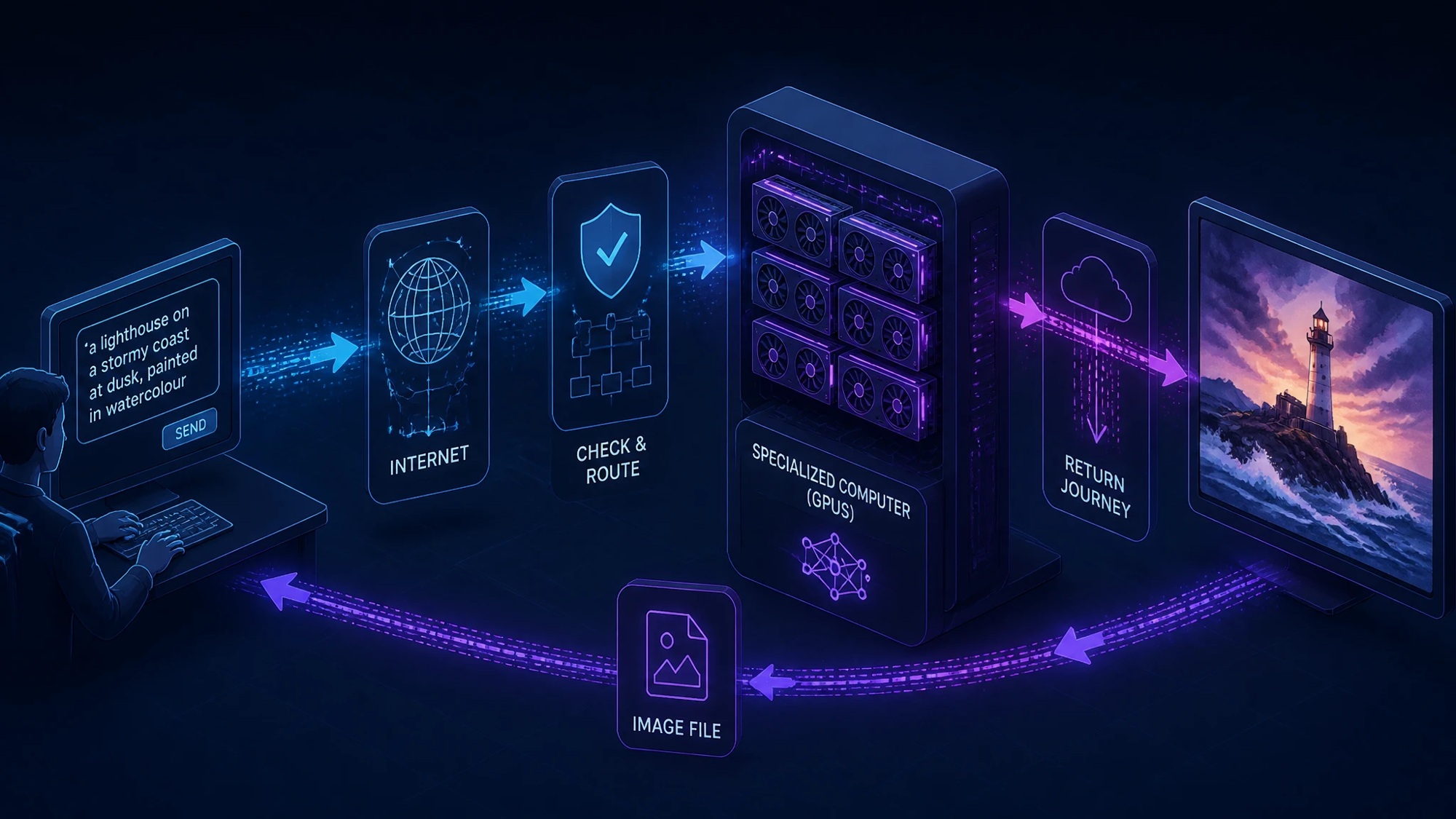
Someone types “a lighthouse on a stormy coast at dusk, painted in watercolour” and presses a button. A few seconds later, a finished picture appears on the screen, often before the kettle in the next room has even clicked off. It feels almost effortless. Behind that short wait, though, sits a surprising amount of machinery. The prompt has to travel across the internet, get checked and routed, reach a specialized computer packed with graphics processors, and then make the return trip as a fairly large image file.
Most people never think about any of this, and they don’t need to. For the engineers who build and run these services, however, every one of those steps is a design decision with real costs attached. A tool that takes three seconds feels magical. The same tool taking thirty seconds feels broken. The difference usually comes down less to the AI model itself and more to the network and infrastructure wrapped around it.
The Request Path: From Browser to Inference Cluster
When a user enters a prompt into an online AI image generator, the request rarely hits a single server. It passes through edge nodes and API gateways before landing on a GPU cluster that may sit in a different region entirely. Each stop along the way has its own small job to do, and together they decide how quickly and reliably the request moves.
The first stop is usually a content delivery network, or CDN, with edge locations spread across many cities. A user in Lahore and another in Leeds will each connect to an edge node close to them, which handles the secure connection and serves the web page itself. That edge node doesn’t generate any images. Its role is to answer quickly, shrug off traffic spikes and pass genuine requests further inside.
Next come load balancers, which spread incoming requests across a pool of backend servers so that no single machine ends up overwhelmed. Behind them sits the API gateway, a kind of front desk for the whole service. It checks who is asking, whether their account is valid, whether they’ve used up their daily credits and whether they’re sending requests suspiciously fast. A user who has hammered the button forty times in a minute is likely to be politely slowed down here.
Only then does the request reach the inference cluster, often by way of a job queue. The queue matters more than it seems. Image generation takes seconds rather than milliseconds, so requests are lined up and handed to GPUs as they become free, much like customers waiting for the next open till at a busy supermarket.
Inside the Inference Cluster
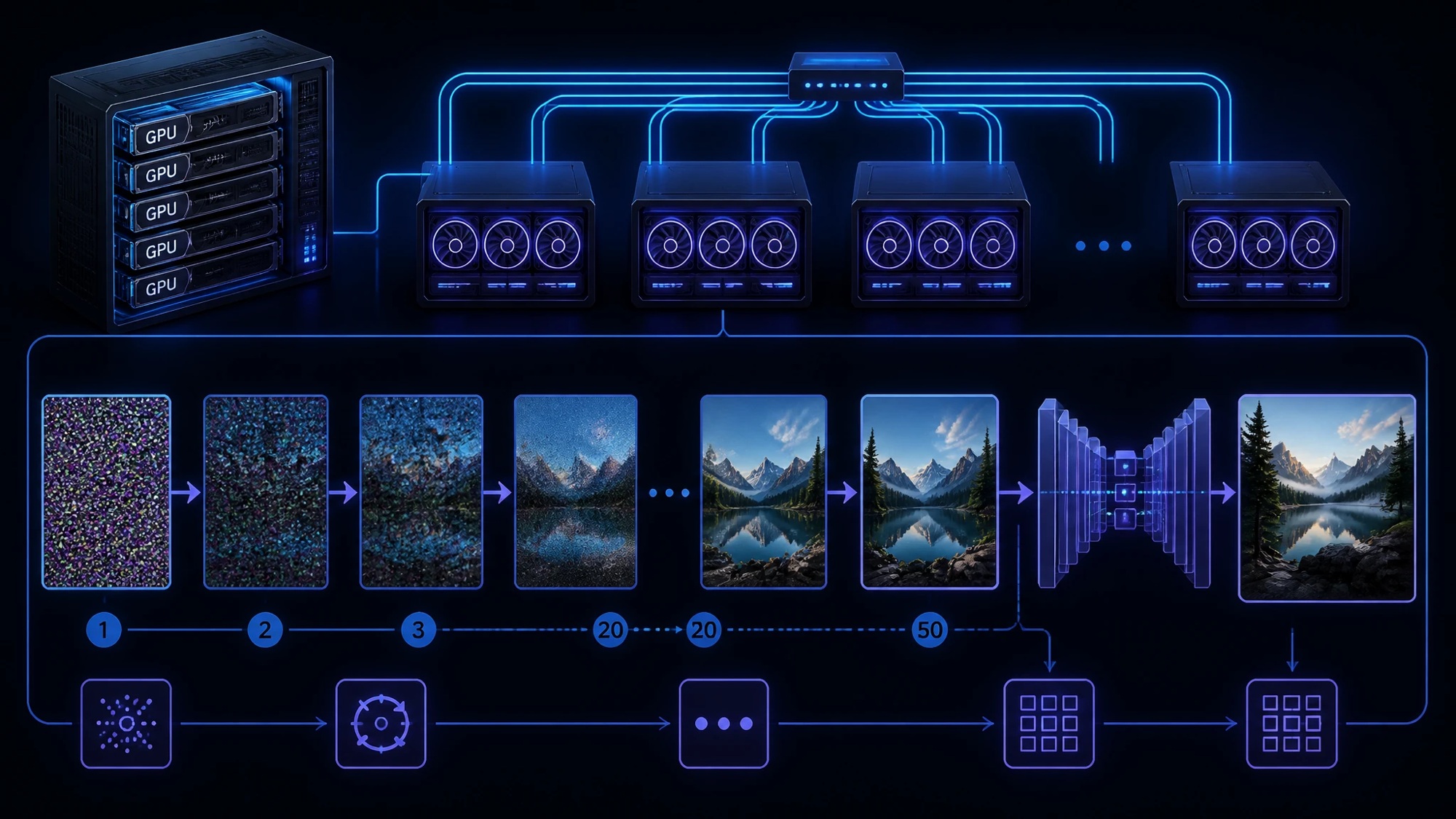
An inference cluster is built from GPU nodes, which are servers that typically hold several high-end graphics processors linked by very fast internal connections. Most popular image tools rely on diffusion models. These models start with random noise and refine it step by step, often over twenty to fifty passes, until a recognizable picture emerges. A final decoding stage then turns the model’s internal representation into actual pixels.
Serving these models efficiently is a craft of its own. Requests are often batched together so a GPU can work on several prompts at once, a little like a baker filling the whole oven rather than baking one loaf at a time. Larger models may be split across multiple GPUs, which means those GPUs have to exchange data constantly while a single image is being made.
That’s why east-west traffic dominates inside these facilities. North-south traffic, the data travelling between users and the data centre, is surprisingly modest: a short line of text going in and one image coming out. East-west traffic, the data moving between servers inside the data centre, is far heavier. Model weights get pulled from storage onto GPU nodes, sharded models pass intermediate results between processors, and monitoring systems stream a steady flow of telemetry. A prompt that’s only a few hundred bytes long can set off gigabytes of internal movement.
Fabric Requirements for GPU Networking
GPUs are expensive, and a GPU that sits idle while waiting for data is money quietly draining away. The network that connects them, often called the fabric, is designed to keep that waiting to an absolute minimum. A key technology here is RDMA, or remote direct memory access, which lets one machine read from or write to another machine’s memory without bothering either CPU. It’s the networking equivalent of passing a parcel straight across the counter rather than sending it through the post room.
There are two main ways to run RDMA at scale.
InfiniBand was built for high-performance computing and is lossless by design, using a credit system that stops a sender from transmitting until the receiver has room. RoCE, short for RDMA over Converged Ethernet, brings the same idea to standard Ethernet, which many organisations already know how to run and buy. InfiniBand tends to offer very consistent performance. RoCE tends to win on familiarity and flexibility. Both have strong supporters, and large AI operators use each.
Ethernet, however, wasn’t originally designed to avoid dropping packets, and RDMA traffic copes badly with loss. To make Ethernet behave, operators turn to lossless configurations built on Priority Flow Control (PFC) and Explicit Congestion Notification (ECN). PFC lets a switch tell its neighbour to pause a particular class of traffic before buffers overflow. ECN marks packets when congestion starts building, so senders ease off early rather than crashing into a wall. Tuned well, the two work together quietly. Tuned badly, they can cause pauses that ripple across the whole network.
The physical layout matters just as much. Most AI fabrics use a non-blocking leaf-spine design, where every rack switch (the leaf) connects to every core switch (the spine). In a non-blocking setup, there’s enough capacity for any server to talk to any other at full speed simultaneously, with no bottleneck in the middle. It costs more in cabling and switches. For GPUs that hate waiting, it’s usually worth it.
The Latency Budget: Where the Milliseconds Go
Engineers often talk about a latency budget, which is simply a breakdown of where the total waiting time goes. The early stages are quick. Connecting to a nearby edge node, completing the secure handshake and passing through the gateway typically take tens of milliseconds, about the time it takes to blink.
Queueing is far less predictable. On a quiet Tuesday morning, a request might reach a GPU almost instantly. On a Sunday evening, when half the internet seems to be making birthday cards and fantasy dragons, the same request might wait several seconds in line. Services counter this by adding capacity at busy times or offering faster queues to paying users.
Model load time can be the biggest surprise of all. Image models often weigh several gigabytes, and if the requested model isn’t already sitting in GPU memory, it has to be loaded first. That “cold start” can take anywhere from a few seconds to much longer. Keeping popular models warm and ready avoids most of it, though it means paying for GPUs that aren’t always busy.
The generation itself, with all those denoising steps, usually takes the largest predictable share, often a few seconds. Then the finished image has to be encoded and delivered back to the user. A high-resolution picture can run to several megabytes, which feels instant on a fast office connection and noticeably slower on a patchy mobile signal halfway through a train journey.
Storage and Egress
Model weights are the backbone of the whole operation. They’re usually kept in central storage and copied onto fast local drives on each GPU node, so that reloading a model doesn’t mean dragging gigabytes across the network every time. A well-designed cache is a bit like keeping the most-used pans on the hob rather than in the back of the cupboard.
Generated images need a home as well. Most services store them in object storage, which is cheap, durable and able to hold billions of files. From there, CDNs can cache and deliver them, so a user scrolling back through yesterday’s creations isn’t pulling every image fresh from the origin.
Then there’s egress, the cost of sending data out of a cloud provider’s network. Cloud platforms often charge by the gigabyte for outgoing traffic, and images aren’t small. A service handing out millions of multi-megabyte pictures each day can find egress turning into one of its largest bills. Compression, sensible default resolutions and careful CDN use all help keep it under control. Few users ever see that cost. Every operator certainly does.
The Enterprise Angle
Things look different when an entire workforce starts using these tools. A marketing team generating dozens of high-resolution variations for a campaign can produce a noticeable bump in bandwidth, especially at a branch office sharing a modest internet link. Network teams sometimes discover the trend only when someone complains that video calls have started stuttering after lunch.
- Data loss prevention, or DLP, becomes a real concern too. Prompts can contain more than people realise, such as an unreleased product name, a client’s brand guidelines or a description of a confidential design. Uploaded reference images can carry even more. DLP tools can inspect outgoing traffic and flag or block sensitive material before it leaves the building.
- SaaS visibility is the other half of the picture. Employees rarely ask permission before trying a new AI tool they’ve seen recommended online, and “shadow AI” spreads quickly. Secure web gateways and cloud access security brokers help IT teams see which services are actually in use, how often and by whom. It’s hard to manage what nobody can see.
All of this comes together in an acceptable-use policy. A good one sets out which tools are approved, what kind of data may never go into a prompt and who owns the images that come out. It works best when it’s written in plain language and explained in a short team meeting, rather than buried in a forty-page document nobody opens.
Conclusion
Pressing “generate” looks like a single action, but it sets off a long chain of events: edge nodes, load balancers, API gateways, queues, GPU clusters, lossless fabrics, caches, object storage and CDNs, all working within a few seconds. The diffusion model gets most of the attention. The network carrying everything to and from it does much of the heavy lifting.
That’s why generative AI is as much a networking problem as a machine learning one. A brilliant model on a congested, poorly designed network still feels slow, while a well-built fabric lets that same model feel almost instant. For the people using these tools, the infrastructure stays invisible. For the people building them, it’s where much of the real work lives.
ABOUT THE AUTHOR

IPwithease is aimed at sharing knowledge across varied domains like Network, Security, Virtualization, Software, Wireless, etc.