Table of Contents
Selecting an LMS that connects with Salesforce requires more than checking an integration box. Training data must reach the right records, permissions must protect sensitive information, and administrators need clear control over synchronization. Sales, customer, partner, and employee programs also create different reporting demands. A sound evaluation therefore examines data flow, automation, analytics, security, and learner access together. The following checks help buyers compare products against daily operational needs before signing a contract.
Training leaders should begin by defining which Salesforce records need learning data and who will use it. The Salesforce LMS directory helps buyers compare products listed with Salesforce CRM integration, then review available details before arranging demonstrations. A directory listing confirms relevance, but it doesn’t prove each product matches an organization’s objects, permissions, reporting needs, or support model.
Points of Consideration: LMS That Works Well With Salesforce Today
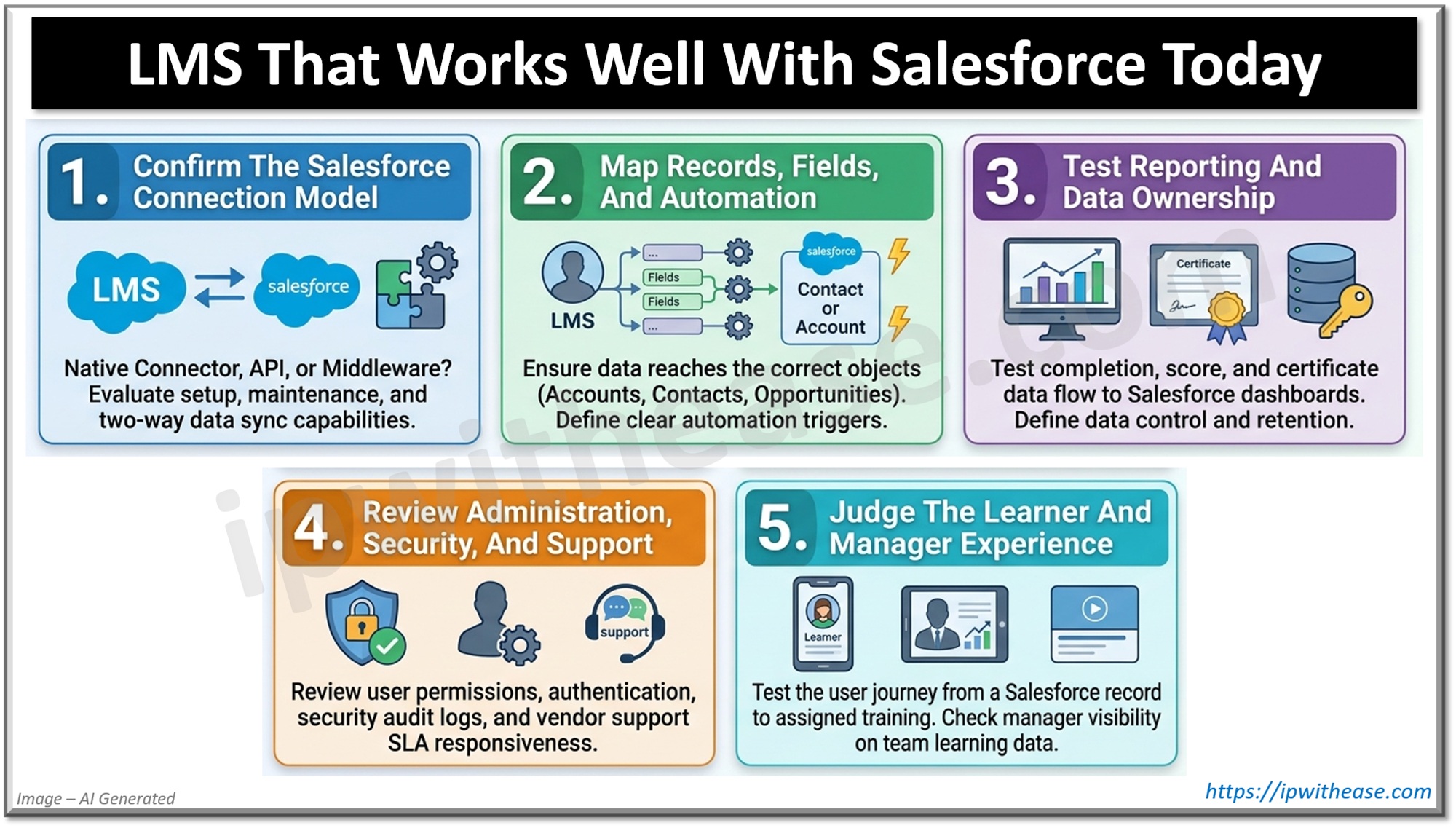
1. Confirm The Salesforce Connection Model
An LMS should explain how its Salesforce connection works, rather than simply naming an integration. Buyers should ask whether the connection uses a native connector, application programming interface, middleware, or a combination.
The connection model affects setup, maintenance, and data control. A native connector can simplify configuration, while an application programming interface may support more flexible workflows. The vendor should document supported Salesforce editions, required permissions, authentication methods, and any extra services.
Data direction also matters. Some connections send course assignments and completion records into Salesforce. Others pull user, account, contact, or opportunity data into the LMS. Buyers should identify whether synchronization is one-way or two-way, then confirm the schedule and error-handling process.
2. Map Records, Fields, And Automation
A practical evaluation starts with a field map. The map should show which Salesforce fields create users, assign learning, update status, or trigger follow-up actions.
The LMS should support the records that match the training program. For example, a customer education team may need account-level enrollment, while a sales team may need contact-level assignments. Partner training can require separate access rules and reporting groups.
Automation should have clear conditions and controls. Ask whether administrators can trigger assignments after a role change, account update, or opportunity event. The system should also prevent duplicate users, explain failed syncs, and let authorized staff replay or correct an error.
3. Test Reporting And Data Ownership
Salesforce integration has value only when learning records remain accurate and useful. A demonstration should show completion status, scores, certificates, due dates, and learning activity where managers already work.
Buyers should check whether reports support filters by account, territory, role, team, or program. They should also ask whether Salesforce dashboards can use LMS data without manual exports. A useful test includes an overdue learner, a completed course, and a failed assessment.
Data ownership needs equal attention. The LMS should state which system controls each field and what happens when records conflict. It should also explain retention, deletion, audit history, and export options before implementation begins.
4. Review Administration, Security, And Support
Salesforce permissions do not automatically govern every action inside an LMS. The evaluation should compare roles, administrator access, learner visibility, and separation between internal and external audiences.
Security questions should cover authentication, encryption, audit logs, and user provisioning. The vendor should explain how inactive Salesforce users lose LMS access and how administrators review permission changes. These details reduce access errors after staff or partner records change.
Support requirements deserve a written answer. Buyers should request implementation steps, technical documentation, response targets, and ownership for troubleshooting. A connection that requires frequent manual repair can increase administrative work, even when the initial setup appears simple.
5. Judge The Learner And Manager Experience
Learners should reach assigned training without searching across disconnected systems. A good workflow takes users from a Salesforce record, notification, or portal link to the correct course with minimal friction.
Managers also need useful visibility. They should see assigned learning, completion status, overdue work, and relevant results without requesting separate reports. External audiences need special review because account boundaries, branding, and access rules can differ from internal training.
Test the complete journey before purchase. Create a user, assign a course, complete an assessment, update a Salesforce field, and inspect every resulting record. This exercise exposes delays, missing values, confusing screens, and permission problems earlier than a sales demonstration.
Conclusion
The best LMS choice depends on a documented Salesforce workflow, not a marketplace label. Buyers should create a field map, test representative records, inspect permissions, and validate reports with the people who will manage training. A short technical pilot can reveal synchronization delays and access gaps before deployment. Afterward, the evaluation team should score each product against those results, then select the LMS that fits its defined process without unnecessary manual work.
ABOUT THE AUTHOR

IPwithease is aimed at sharing knowledge across varied domains like Network, Security, Virtualization, Software, Wireless, etc.