Table of Contents
For decades, personal computing has depended on screens. People moved from desktop computers to laptops and then to smartphones, but the basic interaction remained similar. Users still needed to stop what they were doing, look at a display, and manually search for information.
AI glasses introduce a different model. Instead of asking users to focus on another screen, they can deliver information through voice, audio, cameras, and contextual assistance. The technology remains close to the user without demanding constant visual attention.
This does not mean glasses are about to replace smartphones. Their more immediate value lies in handling brief tasks that are inconvenient on a phone. Taking a quick photograph, translating a sign, asking about an object, sending a message, or setting a reminder can happen while the user continues walking, working, or interacting with other people.
As artificial intelligence improves, glasses are becoming more than connected accessories. They are emerging as a new interface between users, digital services, and the physical world.
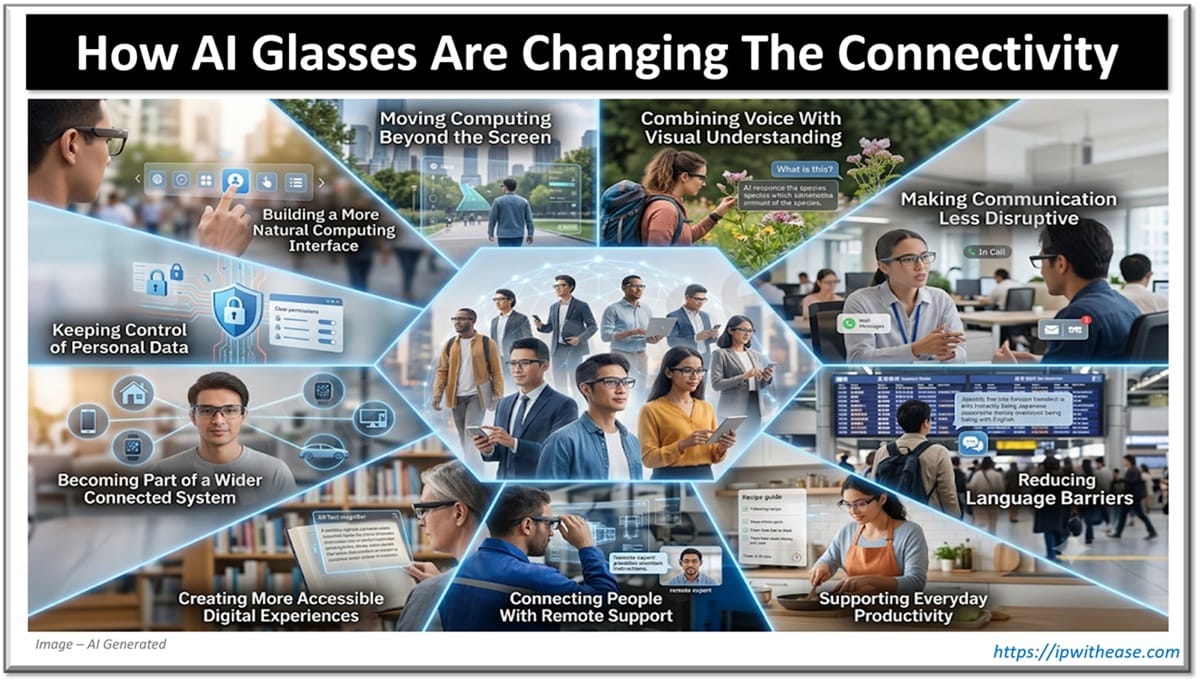
How AI Glasses Changing the Connectivity
Moving Computing Beyond the Screen
Smartphones made computing portable, but they also made screens a constant part of daily life. Checking a notification, looking up directions, or recording a short note requires users to shift their attention away from their surroundings.
AI glasses reduce some of that friction by supporting voice based interaction. A user can ask a question, hear a response, or control a feature without opening an application.
The difference may seem small, but it changes how technology fits into everyday situations. A person preparing food can check a measurement without touching a phone. Someone walking through an unfamiliar city can ask for information while continuing to observe the environment. A technician can record a note without putting down a tool.
The most useful wearable interactions are usually short. Glasses do not need to recreate every function of a laptop or phone. They need to make the right information available at moments when another device would interrupt the task.
Combining Voice With Visual Understanding
Voice assistants are not new, but AI glasses give them access to more context.
A traditional voice assistant hears the user’s question but may not understand what prompted it. Glasses equipped with cameras can also process information from the user’s surroundings. This allows someone to ask about a product, object, landmark, sign, or piece of text without describing it in detail.
A person could look at a building and ask about its history. A traveller could request help reading a menu. A homeowner could ask what type of plant is growing in the garden. The AI receives both the spoken question and visual context, making the interaction more direct.
A practical example is Meta AI glasses, which combine cameras, microphones, open ear audio, voice controls, and AI assistance inside familiar eyewear. Current models support hands free media capture, calls, messaging, translation, and questions related to what the user is viewing.
Visual AI still has limitations. Poor lighting, unclear images, unusual viewing angles, or incomplete context can affect the answer. Users should verify information when accuracy matters, especially when the question relates to health, safety, finance, or technical work.
Even with these limits, visual understanding gives glasses an important advantage. The device does not need the user to translate every physical situation into text before asking for help.
Making Communication Less Disruptive
Communication tools have become more capable, but they can also interrupt conversations and workflows.
A person may need to take out a phone, unlock it, locate the correct application, and type a response. AI glasses can shorten this process by supporting voice controlled calls and messages.
This can be useful when walking, carrying something, cooking, or performing a task that requires both hands. The user can respond without completely shifting attention to another device.
Open ear speakers also allow audio to remain personal while leaving the ears uncovered. Users can listen to messages, calls, navigation, or music while remaining more aware of their surroundings than they might be with traditional headphones.
The value is not simply speed. Wearable communication can feel less disruptive because the interaction occurs within the activity rather than replacing it.
However, voice communication is not appropriate in every environment. A spoken message may reveal private information to nearby people. Users still need to decide when voice control is convenient and when a screen offers greater privacy.
Reducing Language Barriers
Translation is becoming one of the clearest use cases for wearable AI.
Traditional translation applications require users to hold a phone, select languages, position the microphone, and look at a screen. Glasses can make the interaction more natural by capturing speech and playing the translation through their speakers.
This may help travellers understand short conversations, ask for directions, or communicate during everyday activities. It can also support multilingual workplaces where employees regularly interact with colleagues or customers who speak different languages.
Visual translation adds another layer. A camera can read signs, labels, instructions, and menus, while AI presents the meaning through audio or a connected display.
Current AI glasses already provide real time translation functions, and on device AI is increasingly being used to process features such as translation with less dependence on continuous cloud communication.
Translation tools should still be treated as assistance rather than perfect interpretation. Meaning can depend on tone, cultural context, technical vocabulary, and the relationship between the speakers. Important medical, legal, and business conversations may still require a professional translator.
Supporting Everyday Productivity
AI glasses can improve productivity without trying to become complete office computers.
Their strongest role is often capturing information at the moment it appears. A user can dictate a reminder, record an idea, photograph a reference, or ask a quick question before the detail is forgotten.
This is useful because many valuable observations happen away from a desk. Ideas appear during a walk. Maintenance problems become visible during an inspection. A useful product may be noticed while shopping. A person may remember an important task while travelling.
Voice based reminders and notes remove several steps from the process. Instead of relying on memory until a phone becomes available, users can capture the information immediately.
Wearables may also help reduce context switching. Opening a phone to complete one small task can expose the user to messages, social media, emails, and unrelated notifications. A focused voice interaction can complete the original task without inviting the same level of distraction.
The technology becomes most valuable when it supports the user quietly. A wearable that produces too many suggestions or notifications could create more interruptions than it removes.
Connecting People With Remote Support
AI glasses can provide more than automated answers. They can also connect the wearer with another person who can see the situation from the same point of view.
This has practical uses in technical support, training, healthcare, accessibility, and field service. A technician could show a machine problem to a remote specialist. A new employee could receive guidance while completing an unfamiliar process. A family member could help someone understand the controls on an appliance.
First person video is useful because the wearer does not need to hold and reposition a phone. The remote helper sees what the user sees while the user keeps both hands available.
This can reduce misunderstandings. Describing an unfamiliar component over the phone is difficult, especially when the worker does not know its correct name. A shared visual view gives the specialist more information and allows them to request a closer look.
Remote support will need reliable connectivity, clear permission controls, and secure communication. In professional settings, businesses must also decide what may be shown and whether sessions should be stored.
Creating More Accessible Digital Experiences
Wearable AI may become particularly valuable for people who face barriers when using conventional screens.
A camera based assistant can read text aloud, describe nearby objects, identify products, or provide information about the surrounding environment. A user can request help without needing to frame and hold a phone camera.
For people with limited vision, this can make printed information and unfamiliar spaces easier to understand. For people with hearing difficulties, transcription and translation tools may improve access to spoken communication.
Hands free controls may also help users who have difficulty operating a touchscreen or carrying a phone. The ability to access information through speech can make common digital tasks more independent.
Wearable accessibility tools are most effective when they are designed with the people who will use them. Accuracy, comfort, control, and reliability matter more than adding the largest possible number of features.
Recent demonstrations have shown how camera equipped AI glasses can support blind and low vision users with tasks such as recognizing objects, understanding surroundings, and accessing remote assistance.
Becoming Part of a Wider Connected System
AI glasses do not operate alone. They usually connect with phones, online accounts, communication platforms, cloud services, and other smart devices.
This makes them another interface within a wider connected environment.
A user might receive a calendar reminder through the glasses, control audio from a phone, send a message through a communication service, or ask an AI assistant for information from an online source. Future systems may connect more closely with smart homes, vehicles, workplace platforms, and location based services.
The usefulness of this ecosystem will depend on integration. Users will not want to manage separate accounts and applications for every feature. They will expect the glasses to work with the services they already use.
Developers also need to consider continuity between devices. A task started through glasses may need to continue on a phone or computer when it becomes more complex. The wearable can handle the first interaction, while a larger screen provides space for detailed work.
This cooperative model is more realistic than expecting one device to replace every other form of computing.
Keeping Control of Personal Data
The cameras and microphones that make AI glasses useful also require careful data management.
Users should understand when the camera is active, when voice information is being processed, and whether data is stored locally or sent to an online service. They should review permissions rather than enabling every feature automatically.
Clear capture indicators are important because wearable cameras affect people nearby as well as the owner. Users should ask permission before recording in situations where others may expect privacy.
Strong account security also matters. Because glasses often connect to phones and cloud accounts, a compromised password could expose stored media, messages, or device settings.
Manufacturers can support trust through visible recording indicators, clear controls, regular security updates, and understandable explanations of how AI requests are processed. Users can support it by respecting privacy and avoiding sensitive recording.
Security does not need to make wearable technology feel negative. It is part of making the device dependable enough for regular use.
Building a More Natural Computing Interface
AI glasses are still developing. Battery life, camera quality, processing power, comfort, and software support will continue to influence adoption.
The category does not need to replace smartphones to become successful. It can serve a different role by handling moments when screens are inconvenient or distracting.
Voice interaction makes it possible to ask for help without opening an application. Cameras allow AI to understand more about the user’s surroundings. Open ear audio delivers information while helping the wearer remain connected to the environment.
Together, these features create a more natural form of computing. The user does not always need to translate an experience into a search query, photograph, or written message before technology can assist.
The long term opportunity is not about placing more digital content in front of people. It is about making useful information available with fewer steps.
As AI glasses improve, they are likely to become part of communication, travel, accessibility, productivity, and connected services. Their success will depend on whether they fit naturally into daily life while giving users meaningful control over when and how the technology participates.
ABOUT THE AUTHOR

IPwithease is aimed at sharing knowledge across varied domains like Network, Security, Virtualization, Software, Wireless, etc.