Table of Contents
A new website is often spread across several services from the start. The domain sits with one company, the files with another, and email is managed somewhere else. While the project is small, this setup may not cause much trouble.
The inconvenience becomes clearer when something needs to change. A team may have to open one account to update a domain record, another to upload files, and a third to check whether the certificate is active. The task is usually straightforward. Finding the right place to complete each part is what slows it down.
Website hosting brings these services into one environment, so routine work requires fewer handovers between separate accounts.
Manage a Website
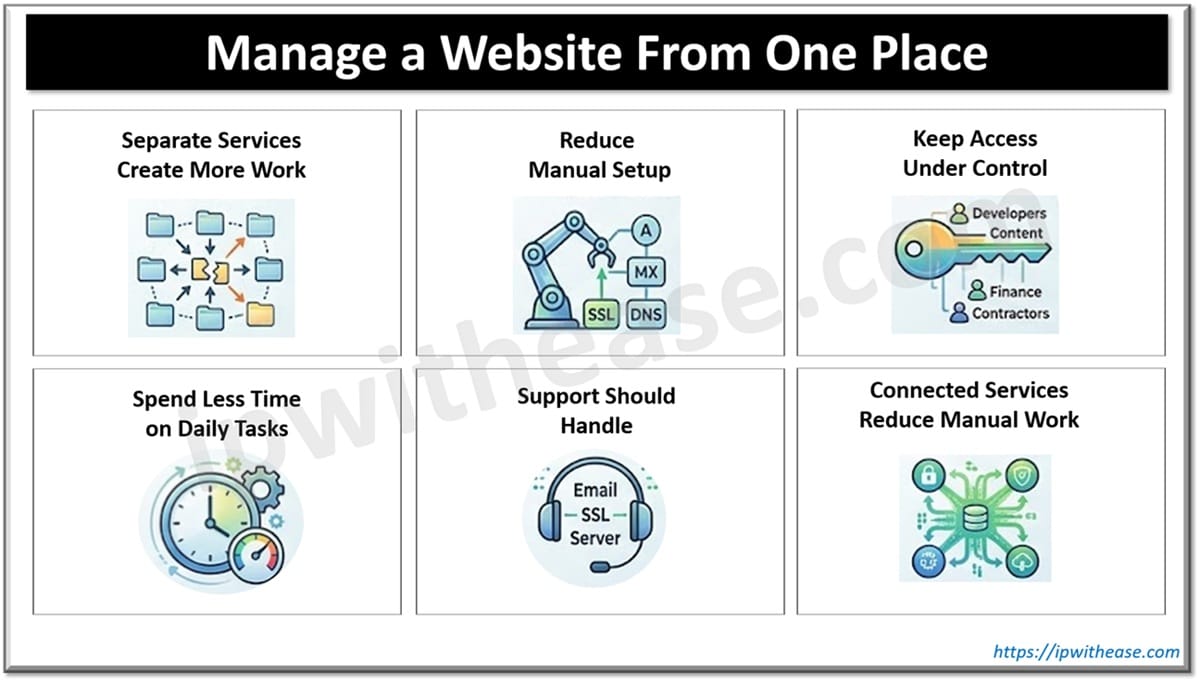
Why Separate Services Create More Work
Separate providers create more points that someone has to monitor. The domain, hosting, and email may follow their own billing cycles, store different contact details, and send notices to different people.
Poor oversight often becomes visible when:
- renewal dates are kept in personal calendars
- payment notices reach former employees
- nobody knows who controls a service
- unused subscriptions continue to renew
- account details do not match across providers
A single, unified record is usually enough to bring this information under control. It can be updated as subscriptions are added, payment methods change, or access passes to another person.
How to Reduce Manual Setup
Manual configuration becomes more complicated when core services are scattered. A connection that should be routine may require changes to A, MX, or CNAME records, followed by ownership checks and certificate activation.
Most of these steps are simple on their own. The risk comes from moving details between different dashboards. An incorrect address can point the domain to the wrong server, interrupt email delivery, or prevent SSL from becoming active. Further changes may also require another DNS update and a new propagation period before every network recognizes the result.
A connected platform can complete more of this setup automatically. When the domain and hosting already belong to the same environment, server details, SSL, and related records can be applied without copying them between accounts. Manual changes are then reserved for unusual configurations rather than every new website.
How to Keep Access Under Control
Website management often begins with one account. As more people become involved in a website, one shared login becomes difficult to control. It leaves no reliable record of who changed a setting and gives every user access to areas they may not need.
Access should match the work each person actually handles:
- developers may need hosting and server controls
- content teams may only need the website dashboard
- finance staff may require billing access
- external contractors should receive temporary permissions
- two-factor authentication should protect accounts with wider control
Separate accounts make those boundaries easier to maintain. They also allow individual permissions to be changed or removed without replacing a shared password across the whole team. High-level permissions can stay restricted to those who manage the primary account settings.
How to Spend Less Time on Daily Tasks
Routine website management is made up of small actions that repeat throughout the week. A mailbox needs to be created, a backup checked, or a file opened before a change is made. None of these tasks is particularly difficult, but each one takes longer when it begins with finding the correct tool.
A connected platform keeps the main working areas within the same environment. Applications, email, files, databases, and backups can be reached without opening separate software or locating another account for each request.
The practical difference becomes visible over time. Saving a few steps on one task may seem minor, but the same steps are repeated across updates, checks, and everyday requests. A simpler route through that work leaves less routine administration for the team.
What Support Should Handle
Most website problems are not complete outages. More often, one service stops behaving as expected while everything else continues to work. That makes the first challenge identifying who is actually responsible for the issue.
Problems often appear when:
- email messages stop arriving
- an SSL certificate fails to renew
- the website points to the wrong server
- DNS changes do not take effect as expected
- a connected service cannot verify the domain
When services are managed by different providers, each support team usually sees only its own part of the setup. Hosting can confirm that the server is running, while the domain provider or email service checks different parts of the configuration. The team still has to determine where the problem actually started.
A connected platform gives support more visibility across the services it manages. Fewer providers are involved, fewer conversations are needed, and routine issues can often be resolved without moving between multiple support teams.
How Connected Services Reduce Manual Work
When domain registration, hosting, email, and SSL are managed within one structure, fewer technical settings need to be handled across separate accounts. The main services can work together without requiring the owner to reconnect each part manually.
A connected setup may include:
- automatic links between the domain, hosting, email, and SSL
- fast storage for website files
- server-level malware protection
- two-factor authentication for email
- the ability to change hosting plans as the project develops
Billing, security, and configuration are also easier to follow when they remain within the same account structure. This reduces the number of separate systems involved in running the website and gives each management task a clearer place.
As the project grows, the same setup can continue to support it without forcing the team to rebuild the workflow around additional providers.
A Simpler Way to Stay in Control
Website management becomes difficult when ordinary tasks depend on too many separate services. Each account may work correctly on its own, but the overall arrangement still requires someone to coordinate details, monitor changes, and solve problems across different providers.
A more connected structure reduces that pressure. It keeps routine work easier to follow and makes responsibility clearer when something needs attention.
As the project grows and involves more people, the administrative process should not become more fragmented with every step. Keeping the main services connected helps the team maintain control without allowing technical administration to take over the working day.
ABOUT THE AUTHOR

IPwithease is aimed at sharing knowledge across varied domains like Network, Security, Virtualization, Software, Wireless, etc.