Table of Contents
Most work conversations start with an email sent quietly across screens. A note arrives, clear and plain, keeping things moving without fuss. However, platform choice is a major task to send email smoothly. Different organizations depend on various platforms to send emails based on their needs, safety requirements, and preferences.
Businesses appreciate a well-structured migration plan through which they basically migrate from one platform to another due to the change in requirements. You need to have a clear roadmap when you decide to migrate gmail to Office 365, to get a clear idea about what and how to do next. Let’s understand the key steps that matter most when shifting gears quietly.
Steps to Migrate Gmail to Office 365
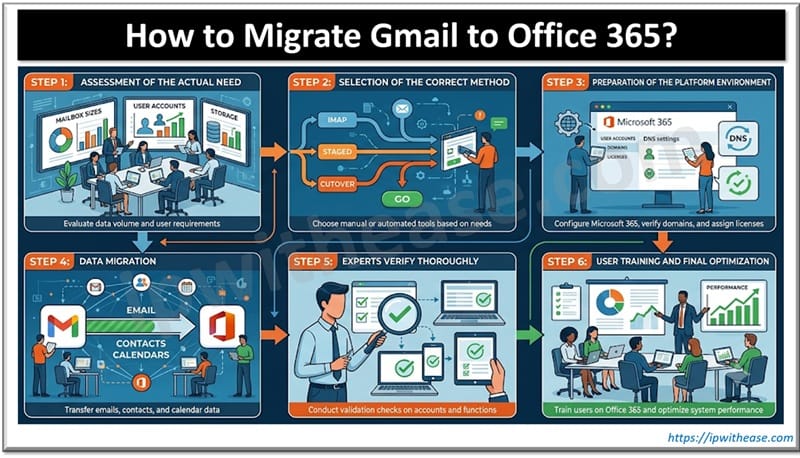
Step 1: Assessment of the Actual Need
Firstly, experts thoroughly evaluate the current email data, information of user accounts, and storage requirements to understand the need. For this, they check mailbox sizes, identify shared folders, and pre-loaded configurations. Such an accurate analyst helps businesses understand the migration approach, whether through manual efforts, automated tools, or hybrid methods. Apart from understanding the need, this step helps address the challenges, such as network limitations, data volume, or compatibility issues.
Step 2: Selection of the Correct Method
Diverse migration methods, such as IMAP, staged migration, or cutover approaches, are generally used for individual business needs. Distinct perks are associated with each method based on the size of the organization. Staged methods help move data gradually, whereas IMAP methods are suitable for basic email transfer. Advanced tools ensure better control, reliability, security, and fast execution.
Step 3: Preparation of The Platform Environment
A proper setup is essential to use Office 365 before transferring data. Here, professionals create user accounts, verify domains, and analyze license assignments. Still, DNS settings must match what Office 365 needs so messages move without hiccups. Attention turns to rules for compliance, how data stays protected, along with who gets access.
Step 4: Data Migration
In this stage, tech experts actually transfer contacts, emails, and calendars. In this way, data moves from Gmail to Office 365 mailboxes through the selected method. Professionals perform consistency checks and monitor the tools properly to track progress. These careful checks help ensure you haven’t deleted or lost any important data during the process.
Step 5: Experts Verify Thoroughly
Once the transfer finishes, a careful check follows. They perform random checks on different accounts to confirm data accessibility. Such evaluation also includes the validation of the email flow, functionality review, and login checks. Here, you can find hidden discrepancies that can be resolved right at the moment.
Step 6: User Training and Final Optimization
The last stage includes training the users to utilize the new platform properly after you migrate Gmail to Office 365. At this stage, businesses should focus on the system performance and user adoption, with equal importance. Employees should get training sessions to use the features of Office 365, so that they can access their mailboxes easily. This step helps in the true implementation of the platform among teams and management across departments.
First things first, take a good look at what you currently have in Gmail and figure out exactly what you need in Office 365. Once that’s clear, the whole migration becomes much less stressful. Every single step is important, from setting up the accounts correctly to properly training your team. So, get help from people who’ve done this before. That makes the entire switch feel smooth and genuinely better than your old setup.
ABOUT THE AUTHOR

IPwithease is aimed at sharing knowledge across varied domains like Network, Security, Virtualization, Software, Wireless, etc.