
Portable: no install and no admin rights needed
Compatibility: Windows 10 and 11
Version 1.0.0 · released September 2026
“It’s always DNS” – now you can prove where
A user can’t reach an app. One PC resolves the name, another doesn’t. The website works from home but not from the office. You flush caches, run nslookup against three servers, and still don’t know which layer is wrong.
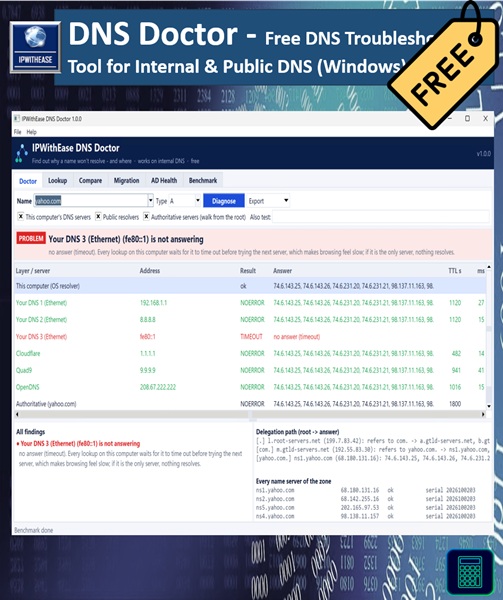
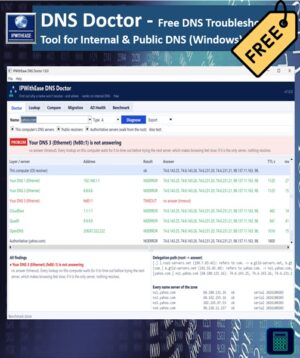
DNS Doctor checks every layer in one go and tells you where the answers start to differ:
- The hosts file on this PC
- This computer’s own resolver and cache
- Your DNS servers
- Public resolvers (Google, Cloudflare, Quad9)
- The domain’s authoritative name servers, reached by walking down from the root
Then it gives you a verdict, such as “Your DNS server is still serving a cached old answer. It expires at 14:35” or “ns2 is out of sync: its zone serial is older than ns1’s.”
What it recognises
- On your PC: a hosts-file override, or a local cache or VPN rule that disagrees with DNS
- On your DNS servers: servers that don’t answer, refuse queries or are slow; stale cached answers and stale “does not exist” answers, each with the exact time they clear; split-horizon zones that are missing a record or override the public answer; ISPs that rewrite “does not exist” into ad pages
- On the domain itself: DNSSEC validation failures, lame delegations, out-of-sync name servers, dangling CNAMEs, dead name servers, and names that really don’t exist
- On the network: DNS traffic being intercepted by a firewall, ISP or security product
Six tools in one window
- Doctor: the full diagnosis of one name across every layer
- Lookup: any record type (A, AAAA, CNAME, MX, NS, TXT, SOA, SRV, PTR, CAA, DS, DNSKEY, HTTPS) from any server, including DNS-over-TLS and DNS-over-HTTPS. Choose ALL to list the common types at once.
- Compare: many names against many servers, side by side. Answers that differ from the majority are highlighted, which is perfect after adding or changing records.
- Migration: snapshot before a DNS change, then check afterwards. For every server it shows whether it has the new answer yet, and exactly when its cached old answer expires: “Fully updated by 14:35”.
- AD Health: domain controller SRV records (LDAP, Kerberos, PDC, Global Catalog) on every DNS server, whether each DC answers on its key ports, stale DC records, and public DNS servers that domain members shouldn’t be using
- Benchmark: which resolver is fastest from your location, for cached and uncached names, with reliability, DNSSEC validation and NXDOMAIN rewriting checks, plus DNS-over-HTTPS and DNS-over-TLS
Works where online checkers can’t
Web-based DNS tools only see public DNS. DNS Doctor runs inside your network, so it can test Active Directory zones, private zones and split-horizon setups, and compare them with what the internet sees. The names you test are never sent to a third-party website.
Reports for tickets and change records
Every result exports to an HTML report you can attach to a ticket or a change record, plus CSV and JSON. The same EXE also runs from the command line for scripts and scheduled checks:
IPWithEase-DNS-Doctor.exe --cli doctor www.example.com -o report.html
What you get
- IPWithEase DNS Doctor installer (adds a Start menu shortcut and uninstaller)
- Portable .exe that runs from any folder or USB stick, no install needed
After checkout the download links appear on the order page and in your email. You can always download the latest version again from My Account → Downloads.
System requirements
Windows 10 or 11 (64-bit). No admin rights or extra software required. Internal DNS checks work without internet access. Public and authoritative checks need to reach those servers.
Good to know
- Some corporate firewalls block direct DNS to outside servers. DNS Doctor detects this and tells you, rather than reporting a false problem.
- Windows may show “Windows protected your PC” for a new download. Click More info → Run anyway. You can check the file against the SHA-256 checksum on the versions page.
- Only test DNS servers and domain controllers you own or are authorised to manage.
More free tools from IPWithEase
IP Scanner · IP Subnet Calculator · Ping & Trace · MAC Lookup






Reviews
There are no reviews yet.