
Portability: Single portable .exe: no install and no admin rights needed
100% offline: no account, no telemetry
Compatibility: Windows 10 and 11
Version 1.0 · released September 2026
Subnetting without the scratch paper
Whether you’re carving up a /16 for a new site, checking which subnet an address belongs to, or studying for a certification, subnetting is something every network engineer does again and again. IPWithEase IP Subnet Calculator puts the answers on one screen, and goes a step further by producing the configuration as well.
Four tools in one window
IPv4 Calculator. Enter any address with a prefix (192.168.1.0/24, or 10.20.30.77/27 to find the subnet a host belongs to) and see:
- Network address and CIDR notation
- Subnet mask and wildcard mask (handy for ACLs and OSPF)
- First and last usable address
- Broadcast address
- Total addresses and usable hosts
/31 point-to-point links and /32 host routes are handled correctly.
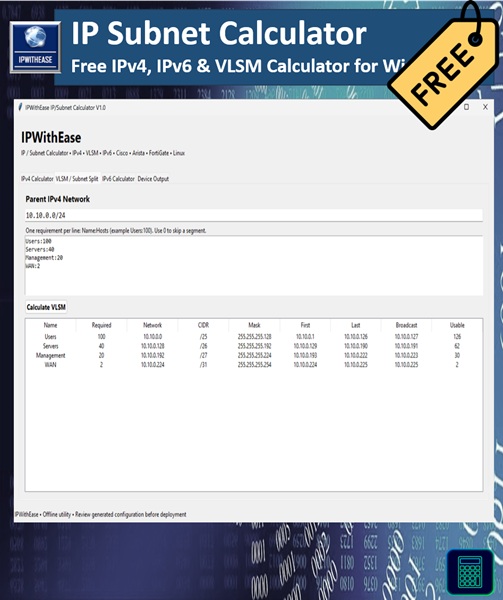
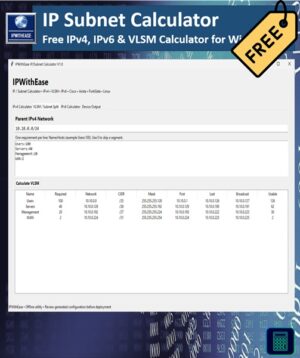
VLSM / Subnet Split. Give it a parent network and a list of requirements like Users:100, Servers:40, Management:20, WAN:2. It allocates the smallest subnet that fits each one, largest first, so there’s no wasted space or overlap. For every segment you get the network, prefix, mask, first and last usable, broadcast and usable host count. Set a segment to 0 to keep it in your plan without allocating space yet.
IPv6 Calculator. Enter an IPv6 prefix (2001:db8:100::/48) to see the network address, the fully expanded form, the first and last address, and the total address count.
Device Output. Pick a network, an interface and an interface IP, and get a configuration template for:
- Cisco IOS / IOS-XE
- Arista EOS
- FortiGate
- Linux (
ipcommands)
The Cisco and Arista templates include an OSPF network statement with the correct wildcard or prefix. Select the output and copy it straight into your change plan or terminal.
Built for engineers
It was made by a network architect for everyday work: planning a branch office, preparing a change, double-checking a colleague’s addressing, or teaching subnetting to a junior engineer. No ads, no pop-ups, no browser tabs. It opens in a second and works with no network connection at all.
Private by design
Your addressing plans never leave your computer. There’s no sign-up, no cloud service and no telemetry.
What you get
- IPWithEase IP Subnet Calculator, a single portable .exe that runs from any folder or USB stick with nothing to install
After checkout the download link appears on the order page and in your email. You can always download the latest version again from My Account → Downloads.
System requirements
Windows 10 or 11 (64-bit). No admin rights or extra software required.
Good to know
- Generated configuration is a starting template. Always review it before applying it to a live device.
- Windows may show “Windows protected your PC” for a new download. Click More info → Run anyway. You can check the file against the SHA-256 checksum on the versions page.
More free tools from IPWithEase
IP Scanner · Ping & Trace · DNS Doctor · MAC Lookup






Reviews
There are no reviews yet.