Table of Contents
If you’ve ever tried to get a straight answer on “How much does NetSuite cost?”, you already know the frustrating truth: there isn’t one number.
NetSuite pricing is more like planning a home renovation than buying a boxed product. The materials, the scope, the number of people involved, and how much you customize will determine whether you’re looking at a sensible refresh, or a full-scale rebuild.
This guide breaks down the real components of NetSuite costs, the ranges you should expect, and the common “gotchas” that quietly inflate budgets. Think of it as a quick guide to NetSuite costs you can use before you ever sit down for a pricing call. The goal isn’t to scare you. It’s to help you walk into pricing conversations with clarity, ask the right questions, and build a budget your finance team won’t hate six months later.
The Two Buckets You Must Separate: Subscription vs. Year-One Total Cost
Most teams lump everything into “NetSuite costs,” but there are really two different categories:
- Recurring subscription costs (what you pay every year)
- One-time and project costs (what you pay to get live and make it work for your business)
NetSuite is a subscription platform, so you’ll have ongoing license fees. But in practice, Year 1 is almost always the most expensive year, because it includes implementation, data work, training, and (often) integrations.
A clean way to think about it is:
- Year 1 = subscription + implementation + onboarding + integrations + any customization
- Year 2+ = subscription + support + optimization + incremental improvements
If you only budget for the subscription, you’re not budgeting—you’re hoping.
Typical NetSuite Cost Ranges (Reality Check)
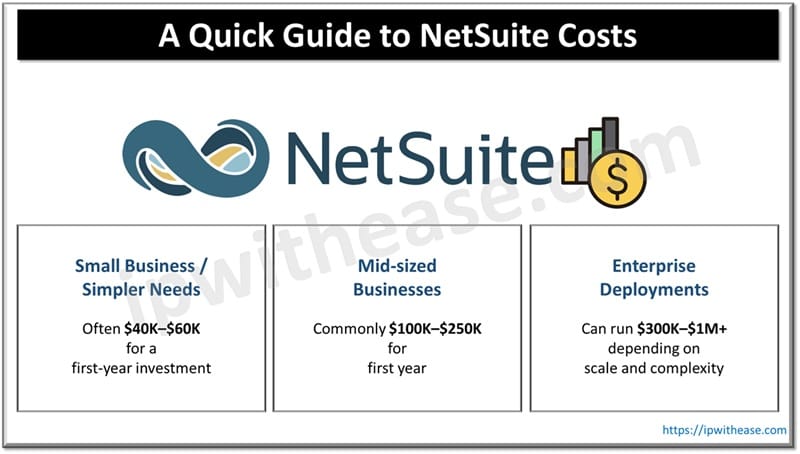
Pricing varies widely, but most businesses fall into these rough bands. If you want a deeper breakdown alongside these ranges, you can skim a quick guide to NetSuite costs and come back here with sharper questions for vendors and partners.
Pricing varies widely, but most businesses fall into these rough bands:
- Small business / simpler needs: often $40K–$60K for a first-year investment
- Mid-sized businesses: commonly $100K–$250K first year
- Enterprise deployments: can run $300K–$1M+ depending on scale and complexity
Across multiple pricing guides, a broader umbrella range you’ll frequently see is $25,000 to $250,000+ per year, depending on what you buy and how complex your rollout is.
The key point isn’t the exact number, it’s what drives the number.
The 6 Factors That Drive NetSuite Pricing the Most
1) Your Base Platform License
Think of this as the “entry ticket.” You’re paying for the core platform—then adding what you need on top.
Some guides cite a base license in the range of roughly $999 to $2,000 per month, but the real quote depends on what edition and bundle fits your scenario.
2) Number of Users (and What Type of Users They Are)
User count is one of the fastest ways costs scale.
A common range you’ll see is $99–$150 per user per month, but what matters just as much is how your users are licensed.
Here’s a budgeting mistake that shows up constantly:
- Teams license everyone as a “full” user when many people only need dashboards, approvals, or limited access.
A smarter approach is mapping roles first:
- Who creates transactions?
- Who approves?
- Who only needs reports?
This alone can save meaningful money over 3–5 years.
3) Modules and Add-Ons
NetSuite is modular. That’s a benefit—until you buy everything at once “just in case.”
Modules can add anywhere from $5,000 to $30,000+ per year depending on what you add. The more advanced the functionality (manufacturing, complex revenue recognition, WMS-type capabilities, multi-entity features), the more important it becomes to scope carefully.
A practical strategy:
- Phase modules: core financials first, then layer in advanced capabilities once the foundation is stable.
4) Implementation (Often the Biggest Single Cost in Year 1)
Implementation covers configuration, workflows, testing, setup, project management, and go-live support.
A widely shared range is $25,000 to $150,000+, but the real determining factor is complexity.
A solid rule of thumb many teams use:
- Implementation can be 1.5× to 3× your annual license cost, depending on complexity.
So if your license is around $20K/year, implementation might land around $30K–$60K. If your license is $80K/year and you have multi-entity complexity and integrations, implementation can climb quickly.
5) Integrations (The “Quiet Budget Killer”)
Integrations don’t always look scary on a proposal until you realize how many systems touch finance.
Examples:
- ecommerce platform
- payment processors
- payroll and HR
- billing tools
- CRM
- tax and compliance
- 3PL/WMS
- banking feeds
Some guides cite $0 to $1,000+ for simpler integrations depending on available connectors and annual fees, but that range expands quickly if you need custom builds, middleware, or heavy data transformation.
If your team is remote or security-conscious, integration decisions also affect access controls, identity management, and monitoring—things that can add time and cost if planned late.
6) Customization and Ongoing Optimization
Customization is where “ERP implementation” becomes “ERP transformation.”
Some projects only need light workflow tweaks and reports. Others require scripting, custom objects, or tailored automation.
Commonly cited customization rates range around $150–$300 per hour depending on who does the work and the skill level required.
Then there’s the part many teams forget:
- post-go-live optimization
Some guides estimate ongoing optimization in the ballpark of $2,000–$15,000 annually, depending on how continuously you improve processes.
The Hidden Costs That Sneak Up on Unprepared Teams
Even well-managed projects can run over budget if these aren’t planned:
Data migration and cleanup
You don’t just “move data.” You normalize it, deduplicate it, map it, validate it, and decide what history is worth bringing. Migrating everything “for completeness” often adds complexity without adding value.
Training and adoption
A perfectly configured system still fails if people don’t use it correctly. Training isn’t optional, it’s risk reduction.
Change management
If NetSuite changes how approvals work, how purchasing happens, how inventory is tracked, or how revenue is recognized, you’re changing habits, not software. That takes time.
Scope creep
A project starts with “we just need core ERP,” and ends with “also can we automate these 14 edge cases.” Without guardrails, budgets stretch.
Some sources estimate these hidden elements can add 20% to 50% to the total investment if not planned.
A Simple Cost Estimation Framework You Can Use Today
If you need a quick, defensible estimate for internal budgeting, use this structure (it’s the same logic you’d see in a quick guide to NetSuite costs, just expanded with practical context):
- Base license
- User licenses
- Modules
- Implementation
- Integrations + customization buffer
- Training + post-go-live support
Then sanity-check with a scenario example:
- 20 users + several modules + mid-level implementation often lands around $80,000 to $150,000 in Year 1 depending on integration needs and complexity.
This range isn’t meant to be perfect—it’s meant to keep you out of fantasy-land.
How to Keep NetSuite Costs Under Control Without Cutting Corners
Here’s the cost-control playbook that actually works:
Phase your rollout
Start with what must be correct: financials, core operations, reporting. Expand once the team is confident.
Right-size licensing
Avoid paying full price for people who only need limited access. Role mapping pays off.
Be ruthless about “must-have” vs “nice-to-have”
If a feature isn’t solving a real business problem; it’s not a requirement, it’s a preference.
Treat integrations like a separate project
List every system that touches finance or operations. Decide what must integrate in Phase 1 vs Phase 2.
Budget for success after go-live
Go-live isn’t the finish line. It’s the moment you start using the system in real life.
Final Thought: Budget for Outcomes, Not Just Software
NetSuite isn’t “expensive” or “cheap” on its own. It’s a platform that can either:
- streamline operations, improve visibility, and support growth, or
- become a bloated project that costs more than expected and delivers less than promised
The difference comes down to scope discipline, role-based licensing, thoughtful phasing, and realistic planning for integrations, data, and adoption.
If you build your budget around those realities, you won’t just predict NetSuite costs, you’ll manage them. And the next time someone asks you for a quick guide to NetSuite costs, you’ll have a clear, defensible way to explain what really drives the number.
ABOUT THE AUTHOR

IPwithease is aimed at sharing knowledge across varied domains like Network, Security, Virtualization, Software, Wireless, etc.