Table of Contents
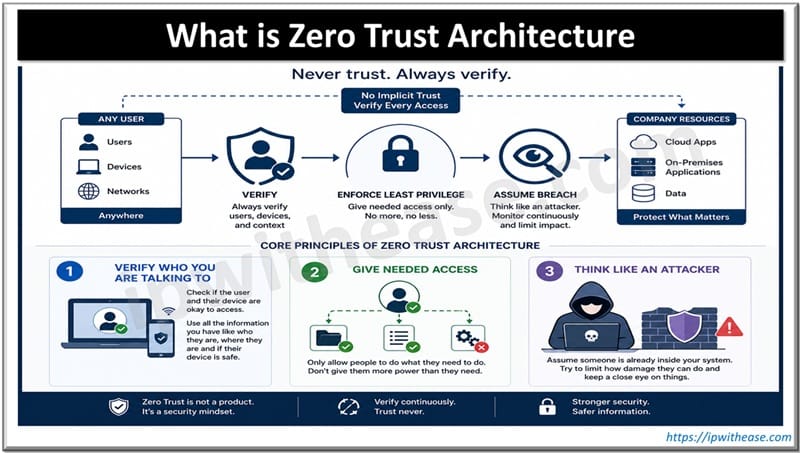
Zero Trust Architecture or ZTA is a security model that operates on the principle of “never trust, always verify” — no user, device, or system is trusted by default, even inside the network. Every access request is continuously authenticated, authorized, and validated before granting the minimum necessary permissions.
Unlike the way of traditional network security, where we thought everything inside our company’s network was safe, Zero Trust Architecture thinks that nothing is safe unless we check it. We have to verify everything to make sure it is okay.
Core Principles of Zero Trust Architecture
- Verify who you are talking to. Check if the user and their device are okay to access. Use all the information you have like who they are, where they are and if their device is safe.
- Give needed access. Only allow people to do what they need to do. Don’t give them more power than they need.
- Think like an attacker. Assume someone is already inside your system. Try to limit how damage they can do and keep a close eye on things.
Important considerations for security include
- Micro-segmentation which is like isolating workloads so they do not affect each other. Micro-segmentation is a way to keep workloads safe.
- We also need Multi-factor authentication which is necessary for security.
- Continuous monitoring and analytics help us to stay safe.
- We also need to check the Endpoint security and make sure the device health checks are done.
- We have to ensure Encrypted traffic like TLS or mTLS.
Implementing Zero Trust Architecture: A Step-by-Step Guide
Step 1: Define What Needs Protection
Don’t try to protect everything. It is too much to handle. Start by finding out what is most important. The data, assets, applications and services.
For example you may want to protect:
- Customer database
- Payment gateway
- Internal HR app
Focus on these areas first.
Step 2: Map Transaction Flows
We need to understand how traffic moves to and from our protected surface.
This is where we figure out what is going on. What devices and networks are getting to which resources.
We use things like NetFlow and service maps. We also do manual interviews to get this information.
Step 3: Build a Zero Trust Network or Micro-segmentation
We need to create isolated areas around each application or workload. To do this we can use software-defined perimeters or next-gen firewalls.
The idea is to block all traffic by default and only let through the traffic that we have specifically allowed this is our Zero Trust Network. We will make a list of allowed traffic and only let that traffic go through this list is like a whitelist, for our Zero Trust Network.
Step 4: Implement IAM
This Identity and Access Management is really important. Every time someone tries to access something we need to make sure they are who they say they are and that they have permission to do what they want to do.
We need to make sure everyone uses a form of verification like a code sent to their phone every time they log in. This second form of verification should be used everywhere.
It would be great if we could have a system where people only have to log in and then they can access everything they need to. This system should be based on what role someone has or what attributes they have like what department they work in.
So we should use sign-on with role-based access controls or attribute-based access controls for Identity and Access Management. We should also connect our Identity and Access Management system to systems that manage identities like Okta or Azure AD. These identity providers can help us manage who has access to what.
Step 5: Continuous Device Health Checks
We need to keep checking if devices are healthy all the time. Device health checks are done over and over again to make sure everything is okay.
We must make sure devices have security measures like antivirus software and endpoint detection and response and that they are compliant with our rules like having the latest operating system patches and disk encryption before we let them connect to our system. We can use tools, like CrowdStrike, Microsoft Intune or Cisco AnyConnect posture assessment to do this.
Step 6: Enable Least Privilege Access
We need to restrict access to the Least Privilege Access. The Least Privilege Access should have policies like Just-in-time and just-access.
These policies for the Least Privilege Access will automatically revoke access when it is not needed for example after a job role changes, for the Least Privilege Access.
Step 7: Keep an Eye on Everything and Record It
Think like a hacker. Spot things happening right now. Collect logs from
- Your network
- User identity
- Device endpoints
- Cloud storage
- Use tools like
SIEM (Security Information and Event Management)
- For example Splunk
- For example Sentinel
UEBA (User and Entity Behavior Analytics)
Set up notifications for access patterns
- for example access at odd hours
- for example access, from many locations
Step 8: Ensuring Traffic Encryption
We do not want any trust that is not encrypted. We need to use something called TLS or mTLS when services talk to each other. This way all the data is encrypted when it is moving around and when it is sitting still. We should also make sure we can get to things without using a VPN by using something called Zero Trust Network Access solutions.
These solutions are like Zscaler or Cloudflare or AppGate.So we use Zero Trust Network Access solutions, like Zscaler or Cloudflare or AppGate to keep all the traffic encrypted.
Step 9: Automate Policy Enforcement
We need to move from static rules and make decisions based on policies that can change. We should use tools like Terraform and Ansible to make sure our policies for segmentation and access are enforced in this way every time.
We also need to integrate these policies with information about who’s using the system and what device they are using to get a better understanding of what is going on with our Policy Enforcement and automate Policy Enforcement.
Step 10: Continuous Improvement
The Zero Trust Architecture is a journey that we’re on; it is not something that we do one time and then forget about.
We need to do audits all the time and test how well our systems can withstand attacks. We should look at what happened when something went wrong and use that to make our rules better.
The Zero Trust Architecture should be used to protect more areas, not just one area at a time but one area, after another.
Common Mistakes to Watch Out For
- Trying to do too much at once. Start with something like one app or data set.
- Forgetting about systems that can’t work with modern security methods.
- Trusting ways of securing networks like using IP addresses.
- Not thinking about people. Train users on using factors, for authentication and why access is changing.
Quick Reference: ZTA vs Traditional Security
| Feature | Traditional | Zero Trust |
|---|---|---|
| Default Trust | Inside Network = Trusted | No trust by default |
| Access Control | Broad Network Access | Pre-session, Least Privilege |
| Verification | At perimeter only | Continuously |
| Lateral Movement | Easy Inside Network | Blocked by micro-segmentation |
| Visibility | Low Inside | High, end-to-end |
Related FAQs
Q.1 How does Zero Trust differ from traditional perimeter security?
Traditional trusts internal networks; Zero Trust treats every access request as untrusted and verifies each request irrespective of network location.
Q.2 What components make up a Zero Trust Architecture?
Identity and access management (IAM), multi-factor authentication (MFA), device posture checks, policy engine, microsegmentation, encryption, continuous monitoring/analytics, secure access gateways (ZTNA/SASE).
Q.3 Is Zero Trust the same as Zero Trust Networking or ZTNA?
No. ZTNA is a component focused on secure remote access. Zero Trust is a broader architecture encompassing identity, devices, data, and network controls
Q.4 Do I need to replace existing security tools?
Not necessarily. Many existing tools can be integrated; focus on orchestration, policy centralization, and filling capability gaps (e.g., device posture, continuous analytics).
Q.5 How does Zero Trust handle legacy apps and OT/ICS systems?
Often requires compensating controls: network segmentation, access gateways, application proxies, protocol controls, and careful patching/monitoring. Prioritize risk and compatibility testing.
Q.6 Is Zero Trust only for enterprises with cloud environments?
No. It applies to on-prem, cloud, hybrid, and remote work scenarios; benefits are often strongest in modern, distributed environments.
ABOUT THE AUTHOR

You can learn more about her on her linkedin profile – Rashmi Bhardwaj