
Table of Contents
When you connect to a VPN, your internet traffic takes a different route. Instead of going directly to its destination, it first travels through a VPN server using an encrypted connection.
This process is known as VPN tunneling.
You may have heard the term when setting up remote access to a company network or looking into online privacy. But what actually happens inside a VPN tunnel? How does your data travel across the public internet without being readable by others along the way?
To understand the process, we’ll look at how VPN tunneling works, the role of encryption and encapsulation, and the protocols that make secure connections possible.
What Is VPN Tunneling?
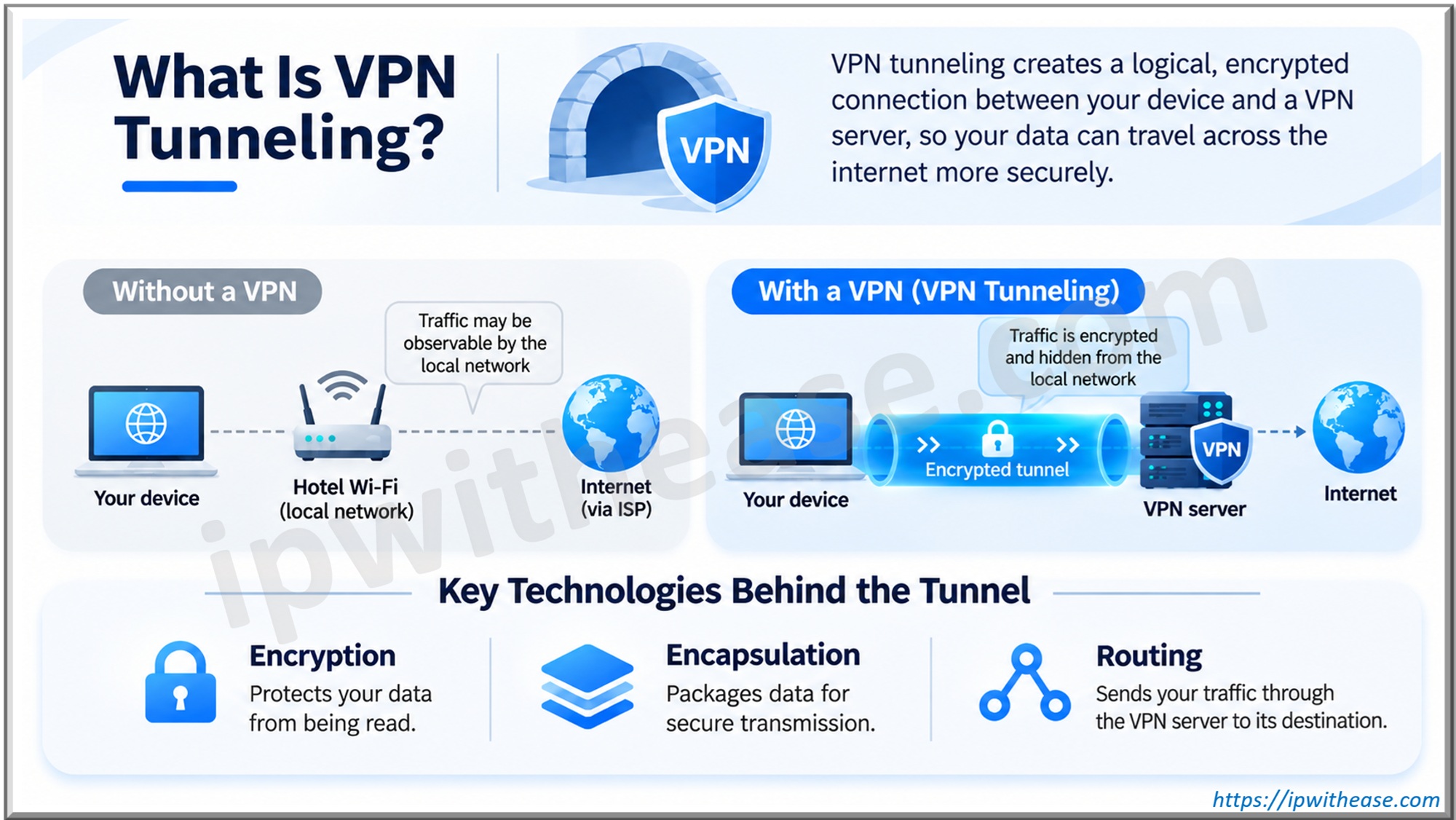
VPN tunneling is a networking method that creates a logical connection between two endpoints, usually your device and a VPN server.
The tunnel allows data to travel across a public network as though it were passing through a dedicated connection. In a secure VPN, the traffic is encrypted before it leaves your device and decrypted when it reaches the other end.
Think about connecting your laptop to a hotel’s Wi-Fi network.
Without a VPN, your internet traffic follows the hotel’s network configuration and travels through its internet service provider. HTTPS still protects the contents of secure website connections, but the local network may be able to observe some connection details.
With an active VPN tunnel, your device sends protected traffic to the VPN server first. The hotel network can see that you’re communicating with a VPN server, but it generally cannot read the encrypted data inside the tunnel.
The tunnel is virtual. It doesn’t require a separate physical cable or private internet connection.
Instead, software and networking protocols handle the encryption, packet encapsulation, and routing needed to carry your data securely.
How Does VPN Tunneling Work?
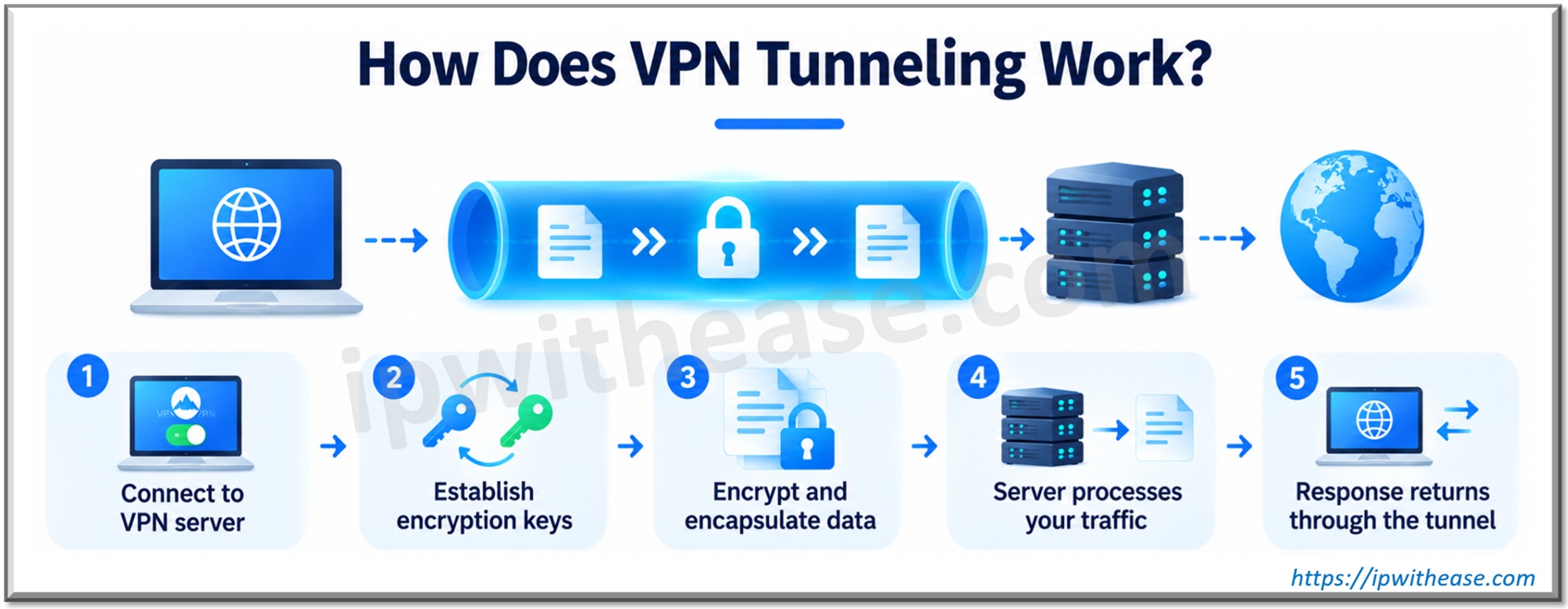
A VPN tunnel involves several processes working together. Although the technical details vary by protocol, the basic connection follows a similar sequence.
Step 1: Your Device Connects to a VPN Server
When you open a VPN application and start a connection, the VPN client contacts a VPN server.
The two endpoints establish communication and begin the process of setting up a secure session.
The VPN client may also create a virtual network interface and update your device’s routing rules. These changes determine which traffic should travel through the tunnel.
For example, a full-tunnel configuration sends most internet traffic through the VPN. A split-tunnel configuration allows selected traffic to use the regular network connection.
Step 2: The VPN Establishes Encryption Keys
Before protected data can pass through the tunnel, the endpoints need a secure way to encrypt and decrypt it.
VPN protocols use authentication and key-establishment mechanisms to prepare the connection.
The exact method depends on the protocol. Some use certificate-based authentication, while others rely on public keys or other configured credentials.
Once the secure session is established, the endpoints can exchange encrypted data without sending the session’s secret keys openly across the network.
Step 3: Data Is Encrypted and Encapsulated
Suppose you open a website while connected to the VPN.
Your device prepares the data packets needed for the connection. The VPN software encrypts the protected packet contents and packages them for transmission through the tunnel.
This packaging process is called encapsulation.
The resulting outer packet contains the routing information needed to reach the VPN server, while the protected inner data remains encrypted.
Routers along the path can forward the outer packet without needing access to the original packet’s contents.
Step 4: The VPN Server Processes Your Traffic
When the encrypted packets reach the VPN server, it checks and decrypts them according to the VPN protocol.
The server then processes the original traffic and forwards it toward its intended destination.
For a typical consumer VPN connection, websites see the VPN server’s public IP address rather than the user’s original public IP address.
The VPN tunnel itself ends at the server. Traffic beyond that point relies on other protections, such as HTTPS, to remain encrypted between the server and the destination website.
Step 5: The Response Returns Through the Tunnel
The website sends its response back toward the VPN server.
The server prepares the returning data for transmission through the VPN tunnel, encrypts it, and sends it to your device.
Your VPN client then decrypts the received data and passes it to the appropriate application.
This exchange continues while the VPN connection remains active.
Most of these operations happen automatically, so you can browse websites, download files, or use applications without managing individual packets.
Common VPN Tunneling Protocols
Not every VPN tunnel works the same way.
Different VPN protocols use different methods to establish secure connections, encapsulate packets, and handle data transmission. These differences can influence connection speed, reliability, and compatibility with different networks.
For everyday users, much of this configuration happens automatically. A VPN client handles the connection process, and a VPN service with a free option can offer a practical way to start using encrypted tunneling without setting up the network connection manually.
Three commonly used protocol options help illustrate how VPN tunneling works.
WireGuard
WireGuard is a modern VPN protocol designed around a relatively small codebase and a streamlined connection process.
It uses UDP to transport encrypted packets and relies on a defined set of cryptographic algorithms, including ChaCha20 for encryption.
One notable feature is its approach to authentication. Each VPN peer has a public and private key, and configuration rules associate public keys with permitted IP addresses.
WireGuard is often chosen for its efficient design and strong performance.
However, real-world speeds still depend on network conditions, server capacity, and the device being used.
OpenVPN
OpenVPN is an established protocol widely used in both personal and business VPN environments.
It uses TLS-based mechanisms to establish secure connections and can transport data over either UDP or TCP.
The choice between these transport methods affects how traffic behaves.
UDP generally introduces less transport overhead, making it a common option when performance matters. TCP provides reliable, ordered delivery, although running tunneled TCP traffic over another TCP connection can introduce additional delays under certain network conditions.
OpenVPN is also highly configurable, which makes it suitable for networks with different security and compatibility requirements.
IKEv2/IPsec
IKEv2 and IPsec are commonly used together to establish secure VPN connections.
IKEv2 handles security association negotiation and key establishment, while IPsec provides mechanisms for protecting network traffic.
In a typical IPsec tunnel, Encapsulating Security Payload (ESP) protects the transmitted packets.
IKEv2/IPsec is particularly useful in environments where devices frequently change networks. With appropriate mobility support, a connection can survive transitions between Wi-Fi and mobile data more smoothly.
This makes it a practical option for certain mobile and enterprise VPN deployments.
VPN Encryption vs. Encapsulation: What’s the Difference?
Encryption and encapsulation are closely related in secure VPN tunneling, but they serve different purposes.
Encryption protects the contents of your data.
It transforms readable information into ciphertext that cannot be meaningfully interpreted without the appropriate cryptographic keys.
For example, someone observing an encrypted VPN connection may see packets traveling to a VPN server, but they generally cannot inspect the original application traffic contained inside those packets.
Encapsulation makes the traffic suitable for transmission through the tunnel.
It wraps the original packet or protected data inside an outer packet with the addressing information required to reach the tunnel endpoint.
These functions work together.
Encryption protects the information, while encapsulation allows the protected information to travel across the network.
It’s also important to understand that tunneling alone doesn’t guarantee encryption. Some networking tunnels, such as basic GRE tunnels, provide encapsulation without encrypting the transported data.
A secure VPN combines tunneling with appropriate cryptographic protection.
Full Tunneling vs. Split Tunneling
VPNs can route traffic in different ways depending on the connection configuration.
The two common approaches are full tunneling and split tunneling.
| Feature | Full Tunneling | Split Tunneling |
| Traffic routing | Most or all traffic uses the VPN tunnel | Selected traffic uses the VPN tunnel |
| Public IP address | VPN server IP for tunneled traffic | Depends on the application’s route |
| Local network access | May require additional configuration | Can allow direct access to local devices |
| Typical use | General VPN protection and managed enterprise access | Selective VPN routing and remote work |
Full tunneling is straightforward because most internet traffic follows the same protected route. Split tunneling offers more control.
For example, a remote employee might send traffic destined for company applications through a corporate VPN while allowing ordinary internet browsing to use the local connection.
This can reduce unnecessary traffic through company infrastructure.
However, applications excluded from the tunnel won’t receive the VPN’s network-level protection. Routing and DNS settings therefore need careful attention, particularly on enterprise networks.
Does VPN Tunneling Affect Internet Speed?
VPN tunneling can affect connection performance because it adds processing and changes how packets travel between endpoints.
Three factors are particularly important.
Encryption and Processing Overhead
Encryption and decryption require computational resources.
On modern devices, this overhead may be relatively small, but it can become noticeable on older hardware or under heavy network loads.
Encapsulation also adds packet headers, increasing the amount of data transmitted.
Distance to the VPN Server
A nearby VPN server usually provides a shorter network path than one located on another continent.
Longer routes can increase latency, especially for activities that require frequent communication between your device and the destination server.
VPN Protocol and Network Conditions
Protocols handle packet transmission differently.
A lightweight UDP-based protocol may perform well on one connection, while a TCP-based configuration might behave differently on a network experiencing packet loss or restrictions.
Server congestion, available bandwidth, and the quality of your underlying internet connection also affect the results.
No single protocol is guaranteed to be the fastest in every situation.
What VPN Tunneling Can and Cannot Protect
A properly configured encrypted VPN tunnel provides meaningful protection for data traveling between your device and the VPN server.
It helps prevent people monitoring the local network from reading the protected traffic and changes the public IP address visible to websites reached through the tunnel.
This is useful when connecting through shared Wi-Fi networks, accessing remote company resources, or adding privacy to everyday internet connections.
However, the protection has boundaries.
A VPN doesn’t prevent websites from identifying you when you sign into an account. Browser cookies and other tracking methods can also continue working.
Similarly, a VPN cannot stop you from opening a phishing link or downloading malicious software.
Connection configuration matters as well.
If DNS requests or other traffic travel outside the VPN tunnel, they may reveal information about your network activity. Some VPN clients include DNS leak protection and a Kill Switch to help reduce these risks.
For sensitive websites and applications, HTTPS remains important because it protects data beyond the VPN server.
VPN tunneling should therefore be considered one part of a broader network security approach rather than a complete replacement for other protections.
Final Thoughts
VPN tunneling makes it possible to carry protected network traffic across the public internet without requiring a dedicated physical connection.
The process brings together several networking functions: secure session establishment, encryption, encapsulation, routing, and packet processing at the tunnel endpoints.
Protocols such as WireGuard, OpenVPN, and IKEv2/IPsec implement these functions in different ways, offering different approaches to performance, compatibility, and connection management.
Understanding how these components work makes it easier to evaluate VPN configurations, identify connection problems, and choose the right tunneling approach for a particular network.
Whether you’re managing remote access for an organization or simply connecting a personal device to public Wi-Fi, the underlying principle remains the same: protect traffic between two endpoints while allowing it to move across an existing network.
ABOUT THE AUTHOR

IPwithease is aimed at sharing knowledge across varied domains like Network, Security, Virtualization, Software, Wireless, etc.