Table of Contents
Every home or office seems to have one. The back bedroom where video calls freeze, the balcony where Netflix keeps buffering, the conference room at the far end of the floor where the signal drops to one bar. The router sitting in the living room or the comms rack simply can’t push a good signal through every wall, floor and steel door in the building.
There are two popular ways to fix this: a WiFi extender (also called a repeater or booster) and a mesh WiFi system. Both promise to stretch your wireless coverage, and on the shelf they can look surprisingly similar. Under the hood, though, they work very differently, and picking the wrong one can leave you with more coverage but worse performance.
In this article we will look at how each technology works, compare them side by side, and help you decide which one suits your space.
What is a WiFi Extender?
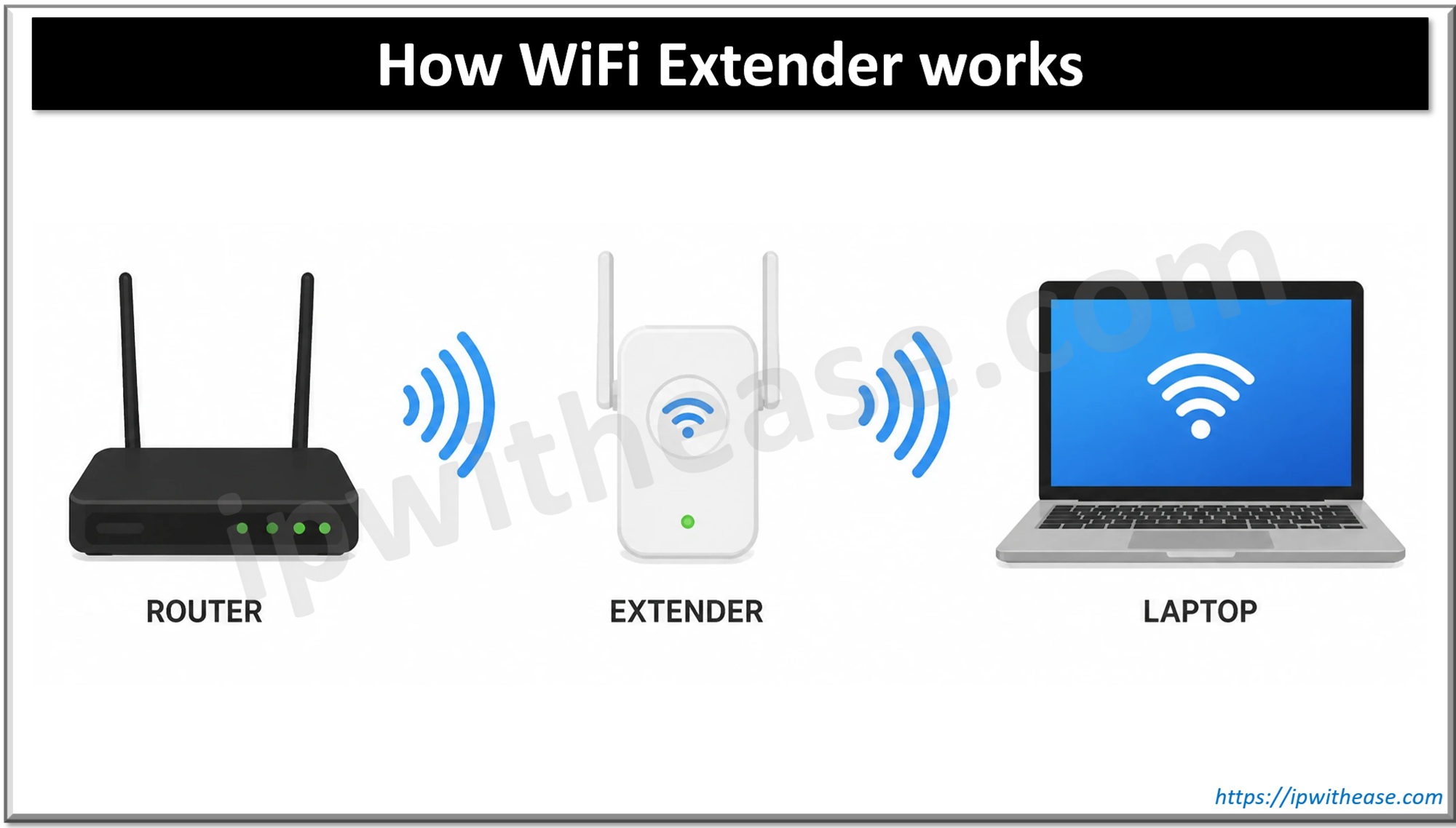
A WiFi extender is a small device, usually plugged straight into a wall socket, that sits between your router and the area with weak coverage. It listens to the router’s wireless signal, then rebroadcasts it to devices further away.
That sounds simple, and it is. That simplicity is both its biggest strength and its biggest weakness.
How it works
A typical single-radio extender has to do two jobs with the same radio: talk to the router and talk to your devices. Since a radio can only transmit or receive on one channel at a time, it keeps switching between the two conversations. The practical result is that the throughput available to clients behind the extender can drop to roughly half of what the extender itself receives from the router. Dual-band and tri-band extenders reduce this penalty by dedicating one band to the router link, but they don’t remove it entirely.
Most extenders also create a separate network name (SSID), often something like HomeWiFi_EXT. Your phone or laptop then treats it as a different network. As you walk around, the device often clings to whichever network it joined first, even when the other one would give a far better signal.
Where extenders make sense
- A single dead spot, such as one bedroom or a garden office
- Small flats or apartments where the router covers most of the space
- Tight budgets, since a basic extender costs a fraction of a mesh kit
- Temporary fixes, rented accommodation, or setups where you can’t replace the ISP router
One related option is worth knowing: powerline adapters with WiFi, which carry data over your electrical wiring and then create a wireless hotspot at the other end. They avoid the wireless halving problem, but performance depends heavily on the quality of your house wiring.
What is a Mesh WiFi System?
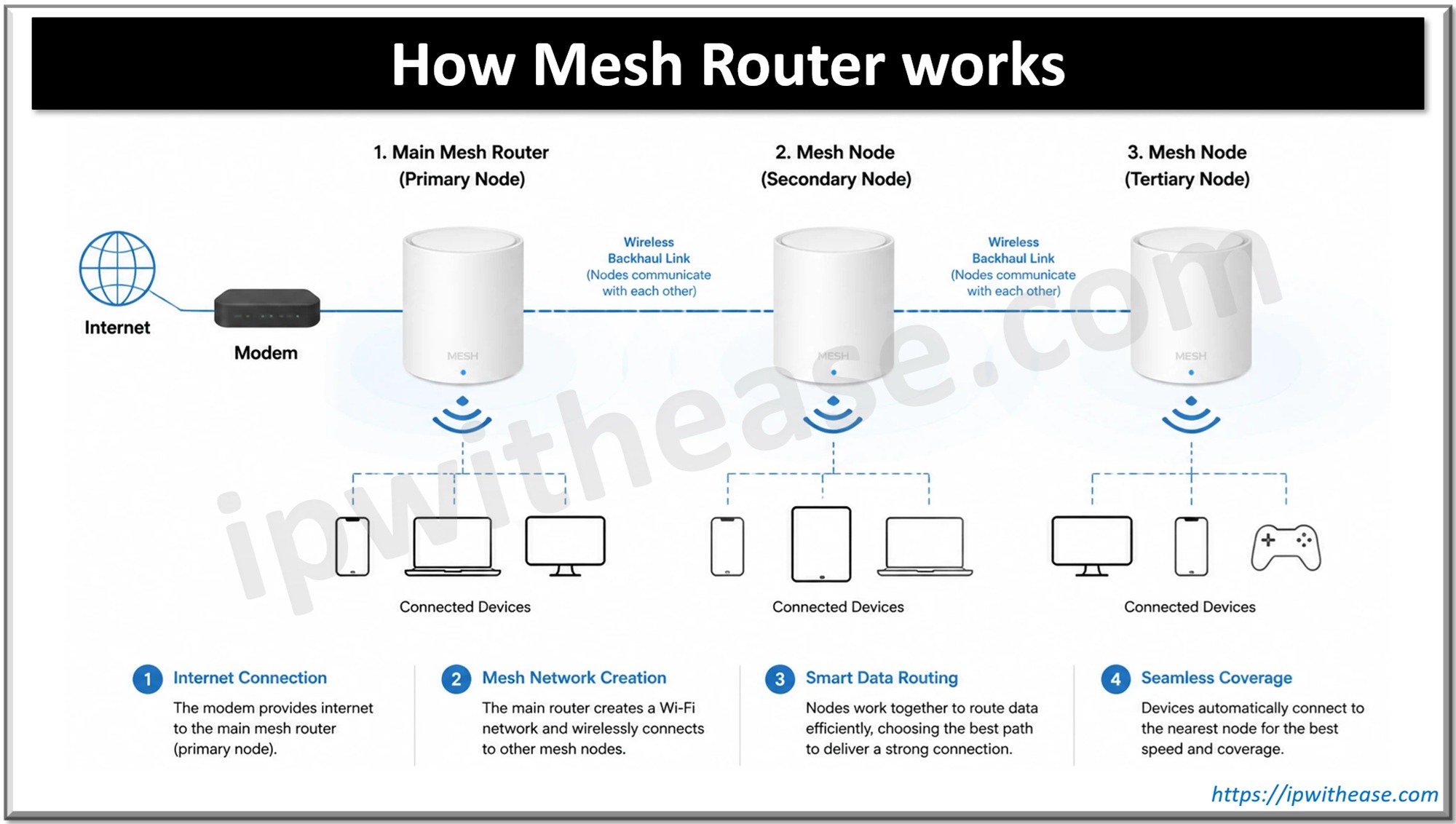
A mesh WiFi system replaces your single router with a set of nodes (sometimes called satellites or points) that work together as one network. One node connects to your modem or ISP router, and the others are placed around the house or office. Together they form a single wireless fabric with one SSID and one password.
The key word is together. An extender is a dumb relay for one router; mesh nodes are aware of each other and coordinate how traffic moves.
How it works
- Backhaul: This is the link that carries traffic between nodes. Good mesh systems use a dedicated wireless band for backhaul (common in tri-band kits) so that node-to-node traffic doesn’t eat into the bandwidth your devices use. Many also support wired (Ethernet) backhaul, which is the gold standard if you can run a cable.
- Self-routing: If one node goes offline or gets congested, traffic can find another path. Larger systems pick the best route automatically.
- Seamless roaming: Mesh systems typically support standards such as 802.11k, 802.11v and 802.11r. These help a client learn about nearby nodes, get nudged towards a better one, and reconnect quickly. Walk from the kitchen to the terrace on a video call and the handover happens without you noticing.
- Central management: Everything is configured from one app or web portal: firmware updates, guest networks, parental controls, device lists and security settings.
A quick note on standards
Most consumer mesh kits are vendor-specific, so nodes from one brand generally won’t mesh with another. The Wi-Fi Alliance’s EasyMesh certification aims to change that, and some ISPs now ship EasyMesh-capable routers that can pair with compatible satellites. If you plan to expand later, check compatibility before you buy.
Related: 2.4 GHz vs 5 GHz: Which Wi-Fi should I use
Mesh Router vs WiFi Extender: Comparison Table
| Parameter | WiFi Extender | Mesh Router |
| Architecture | Relays the signal of an existing router | Replaces the router with coordinated nodes |
| Network name (SSID) | Often a separate SSID (e.g. _EXT) | Single SSID across all nodes |
| Throughput | Can drop by about half on single-radio models | Largely maintained with dedicated or wired backhaul |
| Roaming | Manual or sticky; devices hold on to weak signals | Seamless handover using 802.11k/v/r |
| Coverage | Adds one extra zone | Scales across large or multi-floor spaces |
| Scalability | Daisy-chaining extenders degrades performance quickly | Add nodes as needed |
| Management | Separate settings page from the router | One app or portal for the whole network |
| Wired backhaul | Rare (some have an Ethernet port for clients) | Common and recommended |
| Setup | Plug in, press WPS or use a web page | App-guided, usually a few minutes |
| Cost | Low | Moderate to high |
| Best for | Small spaces, one dead spot, low budget | Large homes, multi-storey buildings, small offices |
Download the comparison table: Mesh Router vs WiFi Extender
Key Differences Explained
1. Speed and throughput
This is where the gap is widest. Every wireless hop costs something, and an extender pays the price on a shared radio. If your router delivers 300 Mbps to the extender’s location, a basic extender may hand only around half of that to your laptop, and less again if the extender itself was placed where the signal was already weak.
A mesh system with a dedicated backhaul radio, or better still an Ethernet backhaul, keeps client traffic and node-to-node traffic apart. Speeds still fall with each wireless hop, but far more gently.
2. Roaming and user experience
With an extender, your devices see two networks and have to decide when to switch. Most of them decide badly. You end up with a phone showing full bars from the extender while sitting right next to the main router, or the opposite.
Mesh treats the whole space as one network and actively steers clients to the best node. For voice calls, video conferencing and anyone who moves around the house with a laptop, this makes a real difference.
3. Management and security
An extender is one more box with its own admin page, its own firmware and its own password, and it is easy to forget about. Outdated firmware on a forgotten extender is a quiet security risk.
Mesh systems put everything in one place. Firmware updates usually roll out to all nodes automatically, and features like WPA3, guest isolation and device blocking apply network-wide.
4. Scalability
Adding a second extender to fix the dead zone the first one created is a common mistake. Each extra hop compounds the throughput loss, and the network becomes harder to troubleshoot. Mesh is built for growth: add a node, place it sensibly, and the system works out the topology.
5. Cost
Extenders win clearly on price. A mesh kit with two or three nodes typically costs several times more than a single extender, and Wi-Fi 6E or Wi-Fi 7 mesh kits sit at the top of the range. Whether that premium is worth paying depends on how big the problem is.
Related: What is Wi-Fi Offload?
Which One Should You Choose?
There is no universal winner. The right answer depends on the size of the space, how it’s built, and how the network gets used.
Go with a WiFi extender if:
- You live in a 1 or 2 BHK flat, or a similar small space, with just one weak corner
- Your router is fairly new and performs well everywhere except one room
- The devices in the dead zone need basic browsing, not 4K streaming or gaming
- You’re on a tight budget or can’t replace the ISP-provided router
Go with a mesh system if:
- Your home is large, has multiple floors, or has thick concrete or brick walls
- You have many connected devices: smart TVs, cameras, IoT sensors, work laptops
- People take video calls while moving around, or you work from home regularly
- You want one network name and one place to manage everything
- You run a small office, clinic, café or shop and need dependable coverage without a full enterprise WLAN
A middle path: If your ISP router supports EasyMesh, adding a compatible satellite can give you mesh behaviour without replacing the whole setup. And if you can run Ethernet between rooms, even a modest mesh kit with wired backhaul will outperform an expensive kit running purely on wireless.
For larger offices, campuses or warehouses, neither consumer option is ideal. That is the territory of enterprise WLAN with controller-managed access points, proper RF surveys and PoE-powered APs.
Placement Tips and Common Mistakes
Whichever option you choose, where you put it matters as much as what you bought.
- Don’t place the extender in the dead zone. This is the most common error. An extender can only repeat what it hears, so put it roughly halfway between the router and the problem area, where the signal is still decent.
- Keep mesh nodes within good range of each other. One or two rooms apart usually works. Spacing them too far apart weakens the backhaul and drags down every device on that node.
- Use wired backhaul wherever possible. If the building already has Ethernet points, use them. It frees up the wireless spectrum entirely for clients.
- Avoid obstacles and interference. Keep units off the floor and away from microwaves, fish tanks, mirrors, metal cabinets and thick concrete pillars.
- Don’t chain extenders. Extender-to-extender setups multiply the speed loss and make troubleshooting painful.
- Avoid double NAT. When adding a mesh system behind an ISP router, put the mesh in bridge or access-point mode, or set the ISP router to bridge mode. Two routers both doing NAT can break gaming, VPNs and port forwarding.
- Keep firmware updated. This applies to both, but forgotten extenders are the usual culprits.
- Test before and after. Run a speed test and note signal strength in each room before you install anything. It’s the only honest way to know whether the change helped.
Frequently Asked Questions
Q1. Is a mesh router better than a WiFi extender?
For larger or multi-floor spaces, yes. Mesh gives you a single network, better speeds through dedicated backhaul, and seamless roaming. For a small flat with one weak spot, an extender is often good enough and much cheaper.
Q2. Does a WiFi extender reduce internet speed?
It can. Single-radio extenders share the same radio for both the router link and the client link, which can cut throughput behind the extender roughly in half. Dual-band models and good placement reduce the impact.
Q3. Can I use a mesh system with my ISP router?
Yes. Connect the main mesh node to the ISP router and run the mesh in access-point (bridge) mode, or put the ISP router into bridge mode. This avoids double NAT.
Q4. Can I mix mesh nodes from different brands?
Usually not. Most mesh systems are proprietary. EasyMesh-certified devices are designed to interoperate, but check the compatibility list before buying.
Q5. How many mesh nodes do I need?
A rough rule is one node for every one or two rooms of separation, or per floor in a multi-storey house. Wall material matters more than floor area: concrete and brick absorb far more signal than drywall.
Q6. Is a WiFi repeater the same as an extender?
Broadly, yes. The terms are used interchangeably for devices that receive and rebroadcast a WiFi signal.
Conclusion
A WiFi extender and a mesh system both chase the same goal, but they get there in very different ways. The extender is a quick, cheap patch: it works well for one stubborn corner of a small space, as long as you place it sensibly and accept some speed loss. Mesh is a proper redesign of your wireless network. It gives you one SSID, smooth roaming and consistent performance across large or awkward layouts.
If the dead zone is a single room, start with an extender. If you’re fighting weak signal across floors, rooms and dozens of devices, a mesh system, ideally with wired backhaul, is the fix that lasts.
ABOUT THE AUTHOR

You can learn more about her on her linkedin profile – Rashmi Bhardwaj