Table of Contents
In the OSI 7 layer model at different layers several protocols operate which enable a bunch of services. At Application layer which is layer 7 of OSI model several protocols operate which deal directly with user interface and application services to enable web browsers and server’s communication to transfer web pages and data.
HTTP protocol operates at layer 7 or application layer of OSI model and it helps in fetching resources such as HTTP documents. It is a foundation for any data exchange on the Internet and a client server protocol. It is a very old protocol in OSI stack and developed around 1989-1991.
HTTP (Hypertext Mark-up language) is language to represent linked documents in HTTP syntax which is a human readable text format.
The requests are initiated by recipients which are web browsers in this case. A typical HTTP document consists of text, layout instructions, images, scripts, videos etc.
In today’s article we will understand about HTTP protocol in general and HTTP request methods in detail.
What is a HTTP Protocol
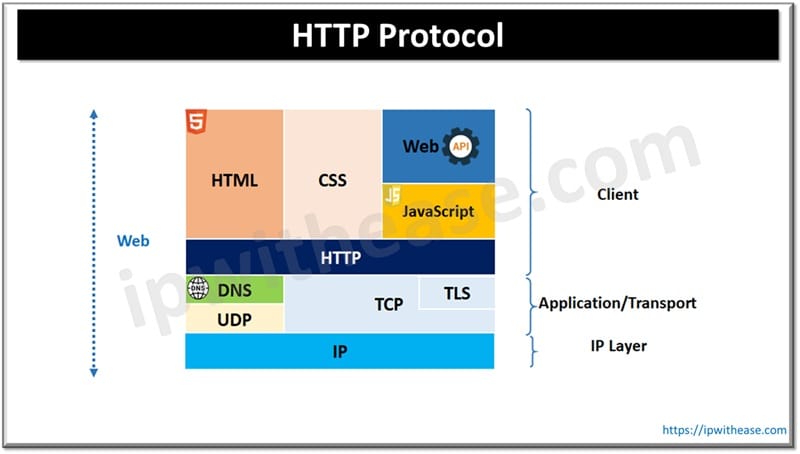
HTTP is a client-server protocol which operates at layer 7 or application layer of OSI model stack. Clients and servers communicate in HTTP by exchange of individual messages. Clients send messages or requests and servers provide the response. It is an extensible protocol which has evolved since its inception in 1991. HTTP can either use TCP or TLS encrypted TCL for guaranteed delivery of data packets and can also use UDP for less reliable but faster communication. It is not just used to fetch text documents but also images and video or to post content on servers. It can also fetch parts of documents for web page updates on demand.
HTTP Request Methods
HTTP request methods deliver a specific outcome while performing a specific function. These requests when successful return a code. Every request method uses a standard format but certain parameters could be common across these request methods or verbs.
We will look more in detail about each request method to understand its purpose and use.
HTTP GET
GET command is used to GET or fetch data from a web server. GET command execution returns the status code of (200) if data is successfully retrieved from the server.
GET <request-target>["?"<query>] HTTP/1.1<request-target> identifies the target resource request in combination with information provided in the header of the host. <Query> is an optional component preceded with a question mark and used to carry identifying information in the form of Key-value pair.
HTTP HEAD
This method requests the metadata of a resource in the form of a header. Ideal for larger loads HTTP READ is a preferred method.
HEAD <request-target>["?"<query>] HTTP/1.1<request-target> identifies resource requests in combination with information provided in the header of the host. <Query> is an optional component preceded with a question mark and used to carry identifying information in the form of Key-value pair.
HTTP POST
HTTP POST sends data to the server. The body type of the request is indicated with a content-type header. It is typically used in HTTP forms to send data to post messages on bulletin board, newsgroup, mailing list, adding a new user via signup form, providing a block of data as a result of submitting a form or annotation of existing resources.
POST <request-target>["?"<query>] HTTP/1.1It identifies the target source of the request in combination with information provided in the header of the host.
HTTP PUT
HTTP PUT is mostly used when new resource creation is required or for replacement of a representation of target resource with request content. HTTP PUT is idempotent and calling it once is no different from calling it successively.
PUT <request-target>["?"<query>] HTTP/1.1HTTP DELETE
It deletes a specified resource and only handles requests for data deletion excluding the body.
DELETE /file.html HTTP/1.1HTTP CONNECT
It requests a proxy to set up a tunnel to the destination server using HTTP and if it is successful it forwards data in both directions until the tunnel is not closed.
The request target is unique and only consists of the host and port number of the destination tunnel which is separated by colon.
CONNECT <host>:<port> HTTP/1.1HTTP OPTIONS
This method requests permitted communication options for URL or web server. This is used to test allowed HTTP methods for request to ascertain if request would succeed in making CORS preflighted request or not.
OPTIONS *|<request-target>["?"<query>] HTTP/1.1HTTP TRACE
Along the path to target used this command is used to send message loop back tests.
TRACE <request-target>["?"<query>] HTTP/1.1HTTP PATCH
For partial modification to resource this command is used. This is similar to an update.
PATCH <request-target>["?"<query>] HTTP/1.1ABOUT THE AUTHOR

You can learn more about her on her linkedin profile – Rashmi Bhardwaj