Table of Contents
The apps people love rarely feel random. They feel aware. They surface the right thing at the right moment. They feel almost thoughtful. Like a friend who knows what’s going on in their life.
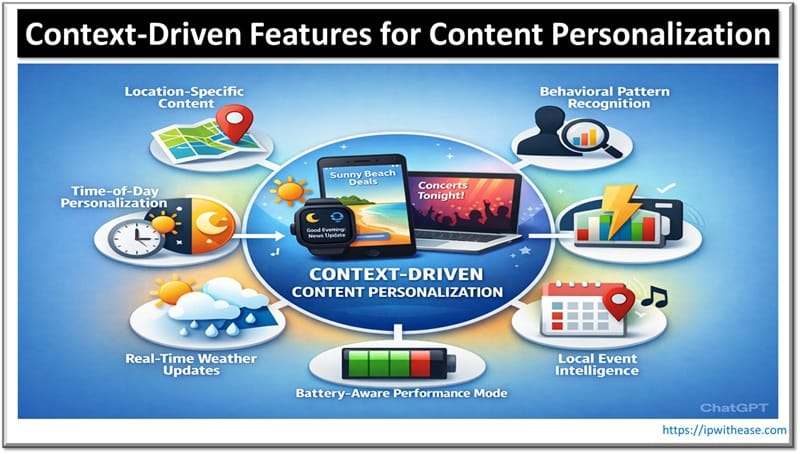
A food delivery app that highlights comfort meals during a cold snap earns taps. A shopping app that adjusts its homepage with the seasons drives sales. This is content personalization at its finest. Not sure how to incorporate it into the app you’re building? Here are six context-driven features that can make it feel truly personalized.
List of Context-Driven Features
1. Location-Specific Content
When you design apps with locations in mind, it shouldn’t stop at geolocation testing. Devs should simulate different cities to see how content adapts. Location-specific content means the app can detect where someone is. Then, it adjusts what they see. A news app can surface local headlines. A shopping app can highlight stores nearby. A travel app can suggest attractions close to the city.
This kind of content creates relevance. Users don’t have to scroll endlessly for things that matter to them. Restaurants and events appear naturally. A fitness app can recommend the community’s favorite running trails. Even details like displaying opening hours in the local time zone make the app seamless.
When users feel the app “knows” them, they trust it. They explore its features. They return more often. Essentially, location-specific content turns generic apps into personal assistants. The app doesn’t just exist. It becomes a chameleon to each user’s environment.
2. Time-of-Day Personalization
Apps can adapt to the time a user opens them. Morning users might see coffee recipes. Maybe news summaries for the day. Evening users might get relaxation tips. Perhaps some entertainment suggestions to unwind. Basically, the app changes its features based on when someone interacts with it.
This feature smartly anticipates the user’s needs at every moment. A fitness app could suggest an energizing workout in the morning. Then, gentle stretches at night. A food delivery app could highlight breakfast spots early and dinner specials later. This boosts engagement naturally. Users see content that fits their current routine. The app feels like it “gets” their day.
3. Behavioral Pattern Recognition
Your app should also learn how users behave over time. It notices what features they use most. What times of day users engage. Which content gets ignored. Mobile app analytics are the backbone here. They help track patterns. They uncover habits. Then, you use it to build the app to be more relevant to each user.
A streaming app can recommend shows similar to ones the user previously watched. A shopping app can highlight items from a brand that a user often checks out. The goal is to make the experience feel intuitive. Almost like the app can predict the user’s next move. The result? A highly personalized experience that makes the app ultra-useful to the user.
4. Real-Time Weather Updates
Another way you can personalize your app? Display real-time weather updates in the user’s city. They’ll see information that matches the day outside. A trusted weather data API for applications can provide live conditions directly on your app.
This feature adds convenience. A travel app can suggest indoor attractions during the rain. A fitness app can propose a treadmill run when it’s snowing outside. A fashion app can highlight coats on stormy days. Even a food app can promote fruit shakes when it’s hot out.
Real-time weather updates make the app feel proactive. Users rely on it to guide their decisions. Each interaction feels timely. Purposeful, too.
5. Local Event Intelligence
You could also weave local community events into your app. Users can see nearby, relevant activities. That means the app surfaces concerts and pop-ups. Maybe some workshops based on the user’s interests.
This drives discovery. A lifestyle app can suggest a gallery opening a city away. A food app can highlight a weekend food festival. The app becomes a gateway to experiences users care about. Users find events they enjoy. They’ll feel connected to their community. Then they’ll come back to the app for more. It becomes part of their lifestyle rather than a static tool.
6. Battery-Aware Performance Mode
Users shouldn’t have to feel like they need to save their phone’s battery life while browsing your app. Battery-aware performance mode adjusts app activity based on device power. It limits background processing. It pauses heavy animations when needed. It halts unnecessary data fetching.
This feature protects the user experience. Apps continue to run smoothly. Even on a really low battery. A game app can reduce graphical intensity. A shopping app can postpone image-heavy content until charging. A streaming app can lower the resolution automatically. Users are taken care of without them having to think about it.
The result? Users don’t abandon the app mid-session due to frustration. The app feels reliable. It’s more considerate than others. It builds a bond with its audience.
Conclusion
When your app adapts to users’ needs, it stops feeling generic. Battery-aware modes protect devices. Local event intelligence keeps content relevant. Behavioral pattern recognition adds thoughtfulness. Your users will feel understood. They spend more time on the app. They stick around every day.
Focus on context. Deliver content that clicks. Respect your users’ attention. Make decisions that feel personal. The result? Your app becomes something your audience can’t imagine leaving. You become a mainstay in their daily lives. All because you found ways to speak directly to them.
ABOUT THE AUTHOR

IPwithease is aimed at sharing knowledge across varied domains like Network, Security, Virtualization, Software, Wireless, etc.