Table of Contents
QuickBooks is excellent at telling a business where its money went. It is not always as good at showing what is happening on the warehouse floor.
That difference may not matter when a company sells 20 products from one stockroom. It matters a great deal once there are hundreds of SKUs, two warehouses, backorders, supplier delays, marketplace sales, or products that must be assembled before shipping.
At that stage, inventory mistakes stop being minor annoyances. They lead to rushed purchase orders, missed delivery dates, overselling, and awkward month-end conversations about why the stock value in QuickBooks does not match what is physically on the shelves.
A separate inventory platform can solve much of that problem. The operational system tracks products, orders, locations, and warehouse activity. QuickBooks remains responsible for accounting.
The ten options below take different approaches. Some are simple enough for a small online seller. Others are designed for distributors, manufacturers, or multichannel businesses with far more moving parts.
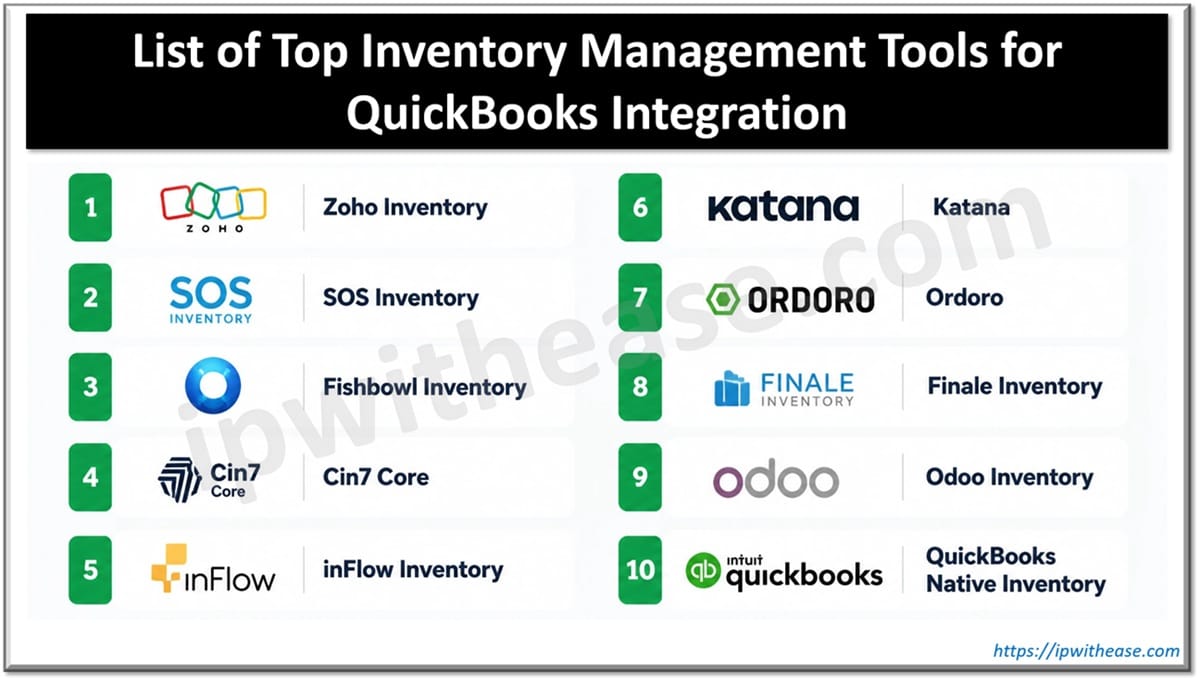
List of Top Inventory Management Tools for QuickBooks Integration
1. Zoho Inventory
Zoho Inventory makes sense for a business that has outgrown spreadsheets but is not ready for a complicated warehouse system.
It covers the everyday essentials: purchase orders, sales orders, stock transfers, shipment tracking, barcode use, and inventory across multiple locations. It also connects with a range of ecommerce platforms and shipping services.
Consider a small retailer selling through its website and two online marketplaces. Without a central tool, the same item may appear available in three places even though only one unit remains. Zoho helps bring those orders and stock updates into one workflow.
Its biggest advantage is approachability. Teams can usually understand the system without months of training. The tradeoff is that manufacturers and larger distributors may eventually need deeper production or warehouse capabilities.
2. SOS Inventory
SOS Inventory is designed for companies that want to keep QuickBooks but need more control over the work happening before a transaction reaches accounting.
It adds features such as assemblies, serial and lot tracking, purchase orders, fulfillment, sales orders, and inventory across several locations. That makes it useful for light manufacturers, wholesalers, and distributors.
The appeal is fairly straightforward: the company does not need to replace its accounting setup just because its inventory process has become more complicated.
A distributor, for example, can track incoming stock, transfers, fulfilled orders, and product assemblies in SOS Inventory. QuickBooks can then receive the relevant accounting information without becoming the place where every warehouse task is managed.
3. Fishbowl Inventory
Fishbowl has long been associated with businesses using QuickBooks Desktop or Enterprise, particularly manufacturers and distributors.
It offers more operational depth than most entry-level tools. Work orders, bills of materials, picking, packing, receiving, barcode scanning, and warehouse tracking can all be handled inside the platform.
That depth comes with a learning curve. Fishbowl is not the kind of software most businesses install on Friday and fully adopt on Monday.
Still, the extra setup can be justified when products move through several stages. A manufacturer may need to track raw materials, partially completed items, finished goods, and the components used in each production run. Basic stock software often struggles with that level of detail.
4. Cin7 Core
Cin7 Core is aimed at businesses whose inventory is being pulled in several directions at once.
A company might sell wholesale, take orders through its own website, list products on marketplaces, and supply a retail location. Each channel affects the same stock pool, which is where problems begin.
Cin7 Core combines purchasing, warehouse activity, order management, supplier records, light manufacturing, and multichannel sales. It can show what is physically available, what customers have already ordered, and what is expected from suppliers.
Among more advanced inventory tools that integrate with QuickBooks, Cin7 Core is particularly relevant when sales volume is not the only challenge. The real issue is coordinating orders, purchasing, and fulfillment across several channels.
For a very small business, it may feel excessive. For a growing wholesaler or ecommerce brand, that broader visibility can be valuable.
5. inFlow Inventory
inFlow sits in a useful middle ground. It offers more control than a spreadsheet without feeling like a full enterprise system.
Businesses can use it for product records, sales orders, purchasing, reorder points, barcode scanning, stock transfers, and location tracking. The interface is relatively easy to follow, which matters when warehouse staff and office teams both need to use the same platform.
Imagine a regional parts supplier with products stored in a showroom and a separate warehouse. Staff need to know where an item is, whether it has already been promised to a customer, and when it should be reordered. inFlow can handle those questions without forcing the company into a highly customized implementation.
It is a practical choice for smaller wholesalers, repair businesses, and product distributors.
6. Katana
Katana is built around manufacturing rather than simple stock control.
It tracks raw materials, production orders, bills of materials, finished products, and manufacturing schedules. This helps businesses understand whether they have enough materials to complete upcoming orders, not merely how many finished units are currently available.
A small furniture maker, for instance, may have plenty of finished tables in stock but not enough wood or hardware to complete the next production run. Katana provides that operational view.
The distinction matters. Businesses that buy finished goods and resell them probably do not need Katana. Companies that assemble, produce, or customize products are far more likely to benefit from it.
7. Ordoro
Ordoro is useful when inventory management and shipping are closely connected.
It centralizes orders from multiple sales channels, supports shipping labels, manages suppliers, and can accommodate dropshipping workflows. For ecommerce businesses, these functions often matter just as much as the stock count itself.
An online seller may receive dozens or hundreds of orders a day from different marketplaces. Without a central system, staff can lose time switching between dashboards, copying addresses, and correcting stock levels after orders have already been placed.
Ordoro helps bring that process together. It is less focused on manufacturing or complex warehouse logic and more focused on keeping ecommerce orders moving accurately and efficiently.
8. Finale Inventory
Finale Inventory is a stronger fit for businesses dealing with high order volumes, large catalogs, or more demanding tracking requirements.
It supports replenishment, barcode workflows, serial numbers, batch tracking, marketplace connections, and multiple warehouse processes. These features are useful when simply knowing “25 units in stock” is not enough.
Some businesses need to know which batch those 25 units came from. Others need to identify the serial number shipped to a particular customer. Finale is designed for those situations.
It can also help ecommerce companies working with third-party warehouses or several marketplaces, where delayed updates can quickly cause overselling.
9. Odoo Inventory
Odoo Inventory is part of a much larger collection of business applications.
That is both its strength and its complication.
A company can connect inventory with purchasing, sales, manufacturing, and other operational functions. It can create warehouse routes, replenishment rules, multi-step receiving processes, and barcode workflows. As the business grows, additional Odoo applications can be added.
The downside is that Odoo may require more planning and configuration than a lighter inventory platform. Businesses should also verify exactly how the QuickBooks connection will work, since a third-party connector or implementation support may be required.
Odoo is most appealing to companies that want flexibility and expect their system to expand over time.
10. QuickBooks Native Inventory
Sometimes, the best decision is not to add another tool.
QuickBooks’ own inventory features can be enough for a small company with one location, a limited catalog, and straightforward purchasing. If stock counts are accurate and staff are not maintaining separate spreadsheets, a new system may only add cost.
The need for an upgrade usually becomes obvious through daily friction.
Orders are accepted for products that are no longer available. Staff cannot agree on the correct stock count. Purchase orders are created too late. Inventory adjustments become a regular month-end task rather than an occasional correction.
When those problems start affecting customers or cash flow, it is worth comparing inventory tools that integrate with QuickBooks based on the company’s actual workflow rather than choosing the tool with the longest feature list.
What Does a Good QuickBooks Inventory Integration Actually Do?
The phrase “integrates with QuickBooks” can be misleading because integrations vary widely.
One system may transfer only invoices and sales receipts. Another may send bills, purchase orders, inventory adjustments, customer records, product data, and cost-of-goods-sold entries.
Before choosing a platform, ask three basic questions:
- Which system owns the inventory count? There should be one clear source of truth.
- What information moves into QuickBooks? The accounting team should know exactly which records will appear and when.
- How are errors handled? A failed sync should create a visible alert, not silently leave two systems with different information.
QuickBooks version also matters. A tool that connects smoothly to QuickBooks Online may not support Desktop or Enterprise in the same way.
The company’s physical workflow should guide the decision as well. Retailers may prioritize barcode scanning. Manufacturers need production planning. Importers may care about supplier orders, freight allocation, and landed cost tracking. Ecommerce sellers often need marketplace and shipping connections.
Choosing the Right Tool Without Overcomplicating the Business
There is no universal winner among inventory tools that integrate with QuickBooks.
Zoho Inventory and inFlow are approachable choices for smaller teams. SOS Inventory and Fishbowl offer more depth for distributors and manufacturers. Cin7 Core, Ordoro, and Finale are better suited to businesses managing several sales or fulfillment channels. Katana is built for production, while Odoo provides a broader and more configurable operating environment.
The safest approach is to test the software using real products and real transactions. Create a purchase order. Receive stock. Fulfill an order. Process a return. Then confirm that the correct information reaches QuickBooks.
A good integration should make inventory easier to understand and accounting easier to reconcile. When it creates more manual work than it removes, it is probably the wrong fit.
ABOUT THE AUTHOR

IPwithease is aimed at sharing knowledge across varied domains like Network, Security, Virtualization, Software, Wireless, etc.