Table of Contents
Choosing a CMS is easy when the website is still a project plan. At that stage, everything looks manageable. The team compares pricing, watches a few demos, reviews templates, and talks about integrations. The difficult questions tend to arrive later, after the site is live and people begin using it under real deadlines.
Can marketing publish a campaign page without calling a developer? Can sales see what a lead did before filling out a form? Who handles updates? What happens when a plugin stops working? And is the “cheaper” option still cheaper after maintenance and support are included?
Those questions reveal more about how HubSpot CMS compares with WordPress than a basic feature table ever will.
Both platforms can power a polished business website. The difference is where they place control, responsibility, and data.
HubSpot CMS vs WordPress
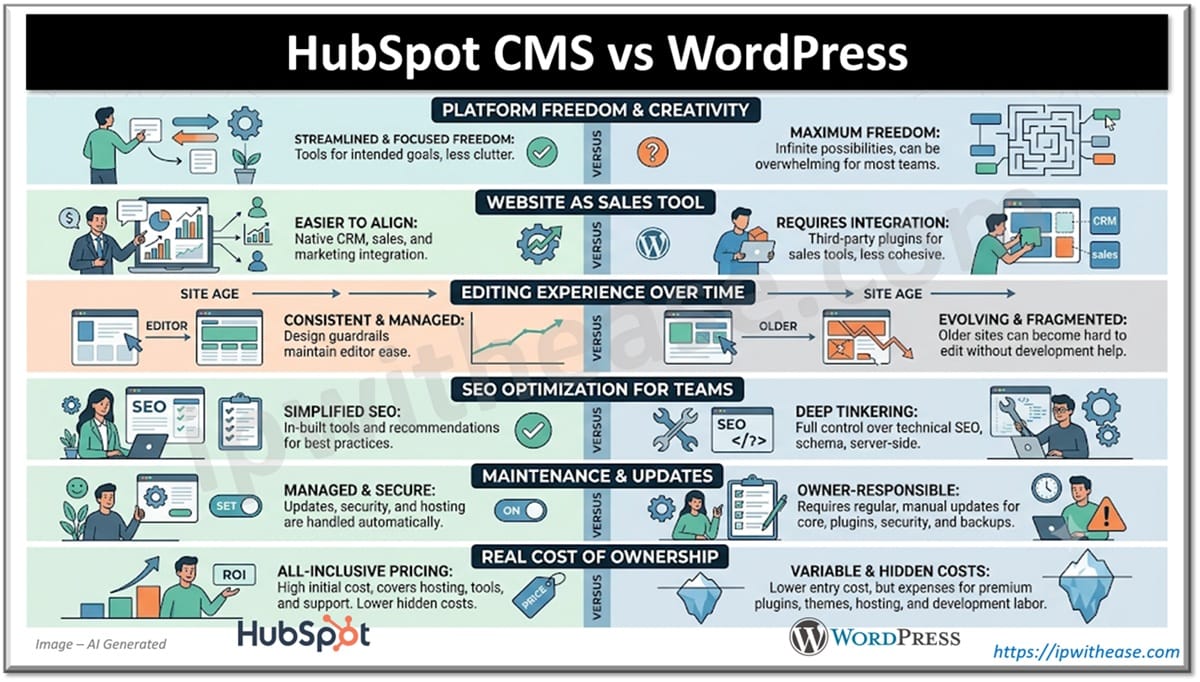
1. WordPress Gives You More Freedom Than Most Teams Actually Need
WordPress is open source, and that gives developers an enormous amount of room to work.
A business can choose its own hosting provider, build a custom theme, install plugins, change templates, connect outside systems, and modify the codebase. For unusual projects, that freedom is hard to beat.
A publisher may need several content types and custom editorial rules. A training business might want paid courses, user accounts, and gated resources. A distributor could require a searchable product library tied to another internal system.
WordPress can handle all of that.
The question is whether the average business website needs that level of freedom.
Many companies need a smaller set of things done well: service pages, articles, landing pages, forms, case studies, and a reliable way to capture leads. In those cases, WordPress flexibility can be helpful, but it can also lead to unnecessary complexity.
A site may begin with one page builder and a few plugins. Two years later, it has tools from several vendors, overlapping features, and no clear record of which plugin controls what.
The platform is not the problem. The problem is that freedom requires ownership.
Someone has to keep the setup clean.
Related: Configuration Steps for WooCommerce Plugin in WordPress
2. HubSpot Is Easier to Understand When the Website Is Treated as a Sales Tool
Some companies still think of the website as a digital brochure. Others expect it to help create pipeline.
That difference matters.
Imagine a visitor who finds an article through Google, returns a few days later, checks a service page, downloads a guide, and then submits a form. Marketing wants to know what influenced the visit. Sales wants context before following up.
HubSpot is built around that kind of journey.
Website activity, form submissions, contact records, email engagement, and campaign data can live inside the same environment. When the tracking is set up properly, teams can see more than the final conversion. They can see some of what happened before it.
WordPress can support the same process, but it often depends on several systems working together. A form plugin may send data to a CRM. Analytics tracks behavior elsewhere. Consent tools, scripts, and integrations sit between them.
That setup can work very well. It just needs more attention.
This is a useful way to think about how HubSpot CMS compares with WordPress: HubSpot starts with the website as part of a larger marketing and sales system, while WordPress starts with the website and lets the business build outward.
For companies that depend on inbound leads, this is often the deciding issue.
3. The Editing Experience Changes as the Site Gets Older
A new WordPress site is often simple to use.
A writer can publish an article, change a heading, replace an image, and move on. The trouble usually appears after the site has been expanded several times.
The homepage may use a visual builder. Service pages may use custom fields. Older articles might contain shortcodes. Landing pages could be handled by another plugin.
Nothing is necessarily broken. The site has simply accumulated different ways of doing the same job.
That is manageable for the person who has been there from the beginning. It is less friendly to a new employee who is trying to understand why one page can be edited visually while another cannot.
HubSpot tends to keep page creation more consistent.
Developers can create reusable modules and approved templates. Marketers then work inside those boundaries. This can prevent accidental layout changes and reduce the need to rebuild common sections repeatedly.
There is a downside. A developer may feel boxed in by the platform’s rules. A team that wants to change every detail may prefer WordPress. But many marketing teams do not need unlimited editing freedom. They need a reliable way to publish quickly without breaking the site. That is a different goal.
4. WordPress Gives SEO Teams More Space to Tinker
WordPress remains popular with technical SEO specialists because it allows deeper access to the site.
Common SEO plugins can manage title tags, descriptions, redirects, canonical tags, sitemaps, and schema. Developers can also change templates, internal-linking systems, crawl directives, and URL behavior.
That extra control becomes valuable on large or unusual websites.
An online store may need special rules for product filters. A multilingual site may require a careful regional structure. A publisher may want different schema for reviews, news, and guides.
WordPress generally gives teams more options in those situations.
HubSpot covers the needs of many standard business websites. It includes tools for metadata, redirects, sitemaps, recommendations, and performance monitoring. A marketing team can manage routine SEO work without installing and maintaining a separate plugin stack.
For a typical B2B site, that may be enough.
The platform itself does not create rankings, though. A weak WordPress site will not outrank a strong HubSpot site simply because the CMS offers more controls.
Content quality, internal linking, site structure, backlinks, page speed, and search intent still do most of the work.
The SEO difference is mostly about how far the team expects to go. HubSpot keeps the common tasks close at hand. WordPress gives specialists more room when the situation becomes complicated.
5. Maintenance Is the Part Most Buyers Underestimate
WordPress maintenance is not mysterious.
The core platform needs updates. Plugins and themes need attention. Backups should be checked. Security tools need monitoring. Hosting performance should be reviewed as the site grows.
A well-managed WordPress site can run reliably for years. Problems usually appear when maintenance has no clear owner.
Updates are postponed because the site still works. An old plugin stays in place because replacing it would take time. Page speed slips gradually. Then one update exposes several issues at once.
HubSpot removes some of that burden by managing hosting, SSL, core updates, and much of the platform-level security. That does not make it maintenance-free.
Forms can still be set up badly. Analytics can still become messy. Content can go stale. Integrations can fail. The difference is that the business is dealing with fewer infrastructure-level tasks.
For a company with an experienced web team, WordPress maintenance may be routine. For a small marketing department without regular developer support, it can become a recurring distraction.
That is worth considering before launch, not after.
6. The Real Cost Is Usually Hidden in the Work Around the CMS
WordPress is free software, but a business website built on it still costs money.
There may be hosting fees, plugin licenses, maintenance contracts, security services, backups, design work, and development support. A simple WordPress site can remain inexpensive. A customized site with several integrations may not.
HubSpot has a more visible subscription cost. Depending on the plan, that price may already include hosting, forms, analytics, CRM connectivity, security, and content tools.
That does not automatically make HubSpot better value. A small business with a basic website may pay for features it barely uses. On the other hand, a company already paying for separate CRM, analytics, forms, hosting, and marketing software may benefit from consolidation.
A sensible comparison should include:
- Software and hosting fees
- Developer or agency hours
- Security and backup costs
- Integration work
- Time spent troubleshooting
- Tools that can be removed
- Features the team will genuinely use
The platform with the lower starting price may not have the lower operating cost.
The Better Choice Depends on Where You Want the Complexity
WordPress usually suits businesses that want deep customization, hosting control, broad ecommerce options, and access to a large development ecosystem.
HubSpot CRM is often a better fit for teams that want CRM-connected website data, fewer infrastructure responsibilities, and a more consistent marketing workflow.
In the end, how HubSpot CMS compares with WordPress comes down to where the business wants the complexity to live.
WordPress puts more control in the hands of the site owner. HubSpot keeps more of the system under one roof.
Neither approach is automatically right. The better CMS is the one the team can manage without turning ordinary website work into an ongoing technical problem.
ABOUT THE AUTHOR

IPwithease is aimed at sharing knowledge across varied domains like Network, Security, Virtualization, Software, Wireless, etc.