Table of Contents
The vast majority of websites are based on a Content Management System (CMS), which can be the target of a DDoS attack at the application layer. This means the DDoS attack on the CMS platform is completely different from a traffic surge and the IT team responsible for the website of an enterprise does not even realize what hit them until it is too late.
There is a big distinction between protecting against DDoS attacks that are targeted at network-layer traffic (such as SYN flood attacks against the network infrastructure that you have hardened over the years) and DDoS attacks that are targeted at application-layer traffic (such as a CMS platform that has a large number of endpoints to process dynamic content, such as search, login, forms, etc.).
As IT professionals, we typically discuss DDoS protection in the context of network-layer traffic, the reality is that a large portion of DDoS attacks are now targeting application-layer traffic. Since a CMS platform is an application-layer system, attacks will be targeted at the CMS platform’s endpoints in order to exhaust resources of the backend system (such as the database).
Why CMS Platforms Are an Attractive DDoS Target
A Content Management System (or CMS) is typically an application that handles a lot of dynamic requests that are submitted by users, and thus are constant in nature. For example, the search function, a login page, a form on a web page, and content rendering are just a few examples of constant and dynamic online content. By virtue of being extremely useful to enable constant and dynamic online content, the CMS becomes an extremely exploitable application.
Most CMS systems today are built on well-known platforms, such as WordPress or Drupal, along with enterprise solutions and modern headless content management system platforms. While these systems are designed to support flexible content publishing, many expose publicly accessible endpoints for reading, writing, or delivering content, making proper security controls essential.
This content is not limited to the core CMS functionality. Many 3rd party plugins, themes, and integrations extend the CMS functionality. As each of these codebases are released on a separate update cycle as the core CMS, they are outside of the vendor’s control and therefore increase the attack surface.
Layer 7 Attacks: The Kind Most CMS Owners Don’t See Coming
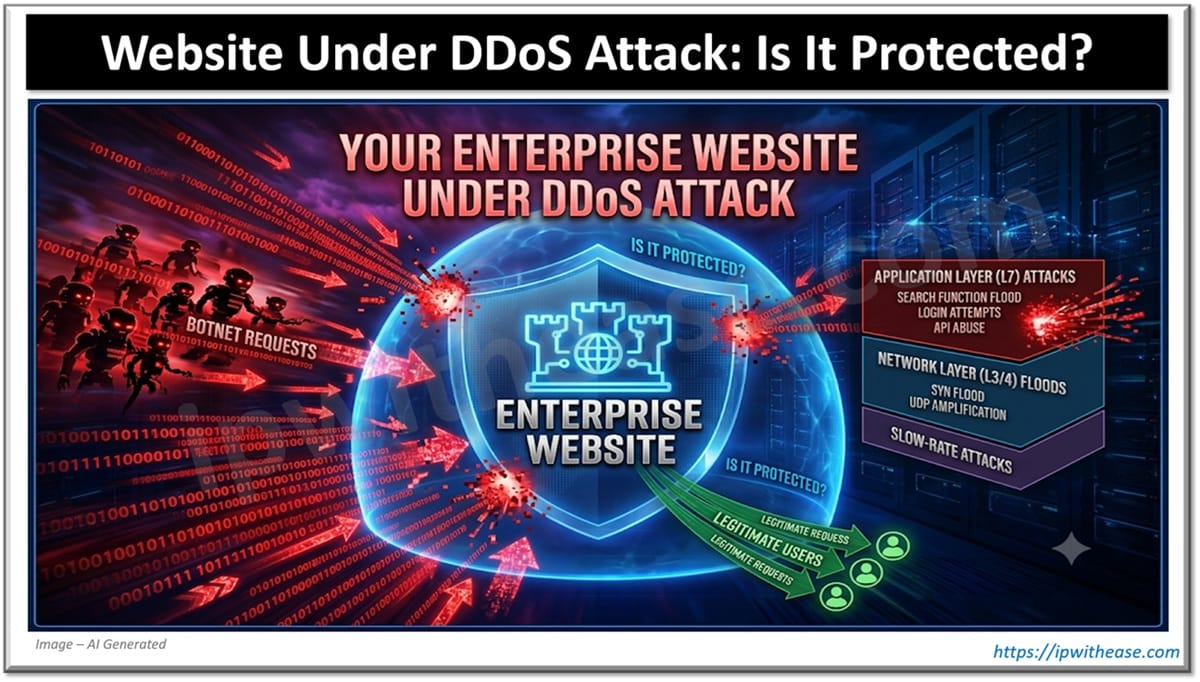
A typical person’s conception of a DDoS attack is a flood of traffic to a site such that the bandwidth of a network is overwhelmed by brute force traffic. This is a Layer 3/4 attack (network-layer) and is typically something that a firewall is designed to handle.
7 Distributed Denial-of-Service (DDoS) attacks are typically categorized as Layer 3/4 floods that attempt to overwhelm a network’s bandwidth. These types of attacks are typically the type of DDoS attack that a firewall is designed to detect and mitigate. A Layer 7 Distributed Denial-of-Service (DDoS) attack, on the other hand, is designed to target a specific application or service.
These types of attacks are typically designed to exhaust all of the resources of the targeted application or service. For example, a Layer 7 DDoS attack could consist of repeated requests to a search function on a CMS platform, launched using bots that impersonate legitimate users.
Each request looks like a normal search, which is exactly what makes this kind of attack difficult to catch. Cloudflare’s enterprise threat research has highlighted this trend directly, noting that attackers increasingly disguise their traffic using botnets designed to mimic human behavior.
These types of attacks are becoming increasingly common as they are simple to set up and can be disguised to appear as legitimate traffic to the CMS site.
Botnets can be programmed to mimic human behavior, for example, by creating fake mouse movements or activity on a page, and can maintain session cookies for each request made to the site in order to appear as if the traffic is coming from real users accessing the site with legitimate intent. Cloudflare’s enterprise threat research team has previously detailed these types of attacks and methods to counter them.
This type of traffic is so normal and legitimate that typical rate limiting and other perimeter-type defense solutions will not typically detect it until the back-end CMS application and database start to actually degrade under the load of the attacks.
| Attack Type | Target | What It Looks Like | Common Detection Method |
|---|---|---|---|
| Network-layer (L3/4) | Bandwidth, network infrastructure | Massive volume of packets | Traffic volume thresholds |
| Application-layer (L7) | CMS backend, login pages, search, APIs | Requests that mimic real users | Behavioral analysis, WAF rules |
| Slow-rate (e.g., Slowloris) | Open server connections | Incomplete requests held open | Connection timeout monitoring |
The Real Cost of a CMS Going Down
The costs of an online CMS application failure for an enterprise are:
- Losing revenue and leads during a short period of time when the campaign is launched, and there is a lot of traffic going to the CMS based website (e.g., sales, etc.).
- The site’s position in search engine results will fall, and the site will no longer be indexed by search engines. As a result, user signals of trust for the site will also fall.
- The financial exposure to an organization due to failure to meet SLA’s and compliance with the 24/7 operation of their enterprise CMS. Many organizations include uptime guarantees in their contracts with customers and partners.
What “Actually Protected” Looks Like
A typical CMS is protected by a firewall at the network perimeter. But there are many more aspects to protect a CMS. These aspects can even be located on different servers and thus be in operation at the same time.
- Cache and serve the output of your CMS from a Content Delivery Network (CDN) — then there’s less chance that sudden traffic spikes will bring down the origin server serving your CMS.
- A Web Application Firewall (WAF) for your CMS – in depth, with special rules for your website’s traffic patterns instead of generic ones.
- Behavioral rate limiting and/or bot detection at the application layer (e.g., using techniques to detect human behavior in traffic and deny traffic that does not behave like humans) – simple volume-based rate limiting is not enough to stop attacks that have been specifically designed to look human.
- Keep your CMS core up to date, your CMS plugins up to date and your CMS themes up to date. The most common method to get a CMS compromised is via outdated code.
- In order to protect a CMS against a traffic load for “legitimate” usage (e.g., a large number of new customers during a campaign), load balancing and auto-scaling have to be put into action
Testing Your CMS Before an Attacker Does
Most organizations learn how their CMS will fail in a disaster before it happens for real. Don’t be part of that group of companies, and find your CMS’s limits for failure before an attacker does.
- Run simulated load and stress tests against your CMS. We’re talking about load and stress tests that simulate huge traffic loads on your CMS, not on your network.
- Check that your application-level outage incident response plan is up to scratch for a CMS outage, and ensure that your CMS related problems are dealt with by separate playbooks to your network problems.
- The Least Monitored Attack Surface in Your CMS: Third-Party Plugins and Integrations. Audit Them. Now.
Final Thoughts
A typical DDoS protection strategy is to defend at the network layer in order to prevent traffic from reaching the enterprise network in the first place.
However, the CMS has transitioned to become a new attack surface, an application-based surface that requires monitoring, testing, and defenses different from those that would be used to protect the enterprise from network-based attacks. The only way for an enterprise to remain online during an attack is to test its CMS’s limits before someone else does.
The organizations that stay online during an attack aren’t the ones with the biggest firewall. They’re the ones who tested their CMS’s limits before someone else did.
ABOUT THE AUTHOR

IPwithease is aimed at sharing knowledge across varied domains like Network, Security, Virtualization, Software, Wireless, etc.