Table of Contents
If you’ve spent any time building with large language models over the past couple of years, you’ve almost certainly run into LangChain. It became the default starting point for anyone stitching together prompts, tools, and memory into something that resembles an application. More recently, though, a lot of that same community has started talking about LangGraph instead — sometimes replacing LangChain outright, sometimes running alongside it. That shift confuses people, understandably, because the two aren’t really competitors in the way the naming suggests. Understanding the difference matters if you’re deciding where to invest engineering time on your next AI project.
Comparison: LangGraph vs LangChain
| Parameter | LangChain | LangGraph |
| Core abstraction | Sequential chains | Graph of nodes and edges |
| Best suited for | Linear pipelines (retrieval, summarization, Q&A) | Branching, looping, multi-step agent workflows |
| Control flow | Mostly fixed, top-to-bottom | Conditional routing, loops, retries |
| State management | Limited, typically session-scoped | First-class persistent state with checkpointing |
| Human-in-the-loop | Possible, but bolted on | Built in — pause and resume natively |
| Ecosystem | Large library of loaders, retrievers, integrations | Built on top of LangChain’s ecosystem |
| Learning curve | Lower, faster to prototype | Steeper, but pays off in complex systems |
| Typical use case | Chatbot with RAG, document summarizer | Autonomous agent, multi-agent orchestration, approval workflows |
Download the comparison table: LangChain vs LangGraph
What LangChain Actually Is
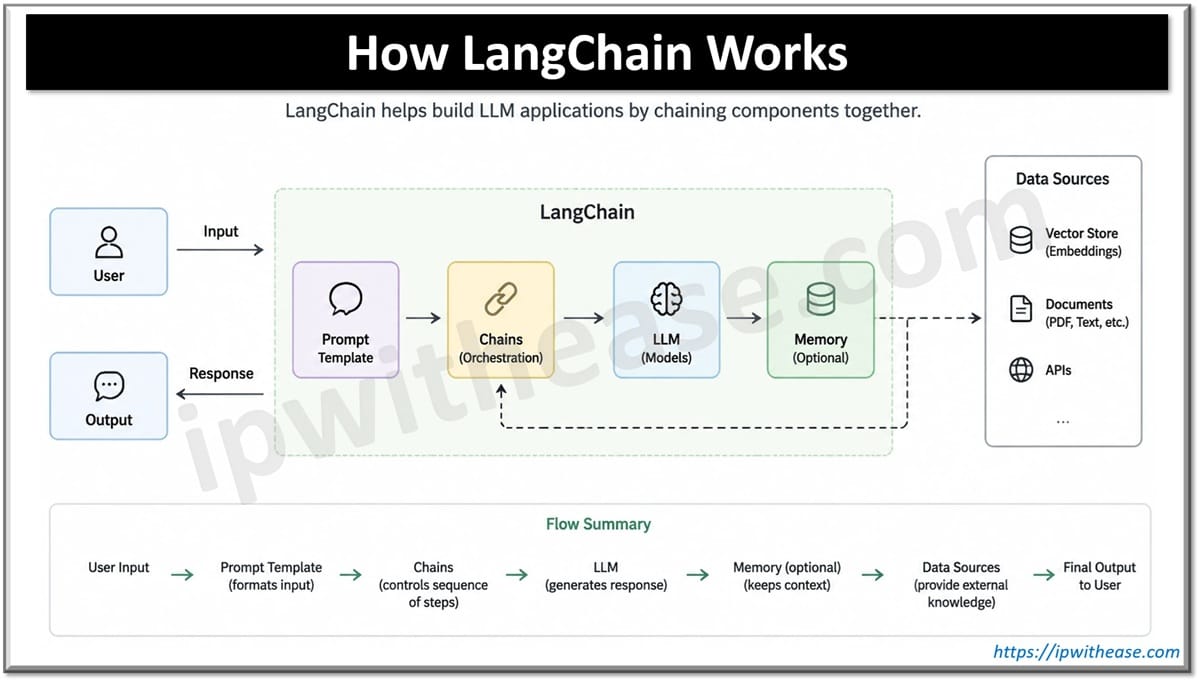
LangChain started as a framework for chaining LLM calls together with external data and tools. Think of it as a toolbox: prompt templates, document loaders, vector store integrations, output parsers, and pre-built chains for common patterns like retrieval-augmented generation. It made it fast to go from “I have an API key” to “I have a working prototype.” For linear workflows — take input, retrieve context, generate a response, maybe call a tool — it’s still a perfectly reasonable choice.
The trouble shows up once your application needs to branch, loop, or make decisions about its own next step. LangChain’s chain abstraction is fundamentally sequential. You can hack around this with agents and callback logic, but the further you push it, the more the code starts to feel like it’s fighting the framework rather than being helped by it.
What LangGraph Adds
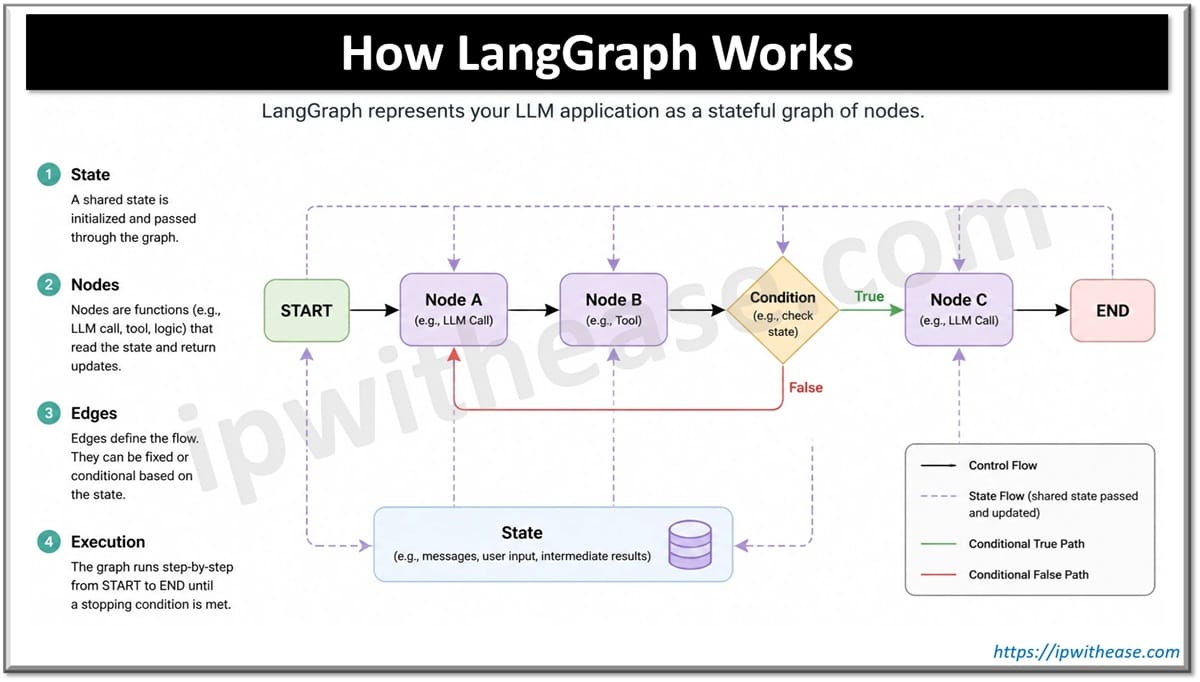
LangGraph, built by the same team, takes a different starting point: model the application as a graph rather than a chain. Each node represents a step — an LLM call, a tool invocation, a piece of business logic — and edges define how control moves between them, including conditionally. That structure maps naturally onto the kind of behavior people actually want from agents: retry a step if it fails, loop while a condition holds, route to different branches based on what the model just produced, or pause and wait for a human to approve something before continuing.
That last point is worth dwelling on. LangGraph has first-class support for persisting state and resuming execution later, which makes human-in-the-loop workflows and long-running processes far less painful to build than they’d be as a bolt-on to a chain-based system. If your use case involves anything with real state — an agent that needs to remember where it left off, or a workflow that spans multiple sessions — this is where LangGraph earns its keep.
They’re Not Mutually Exclusive
Here’s the part that trips people up: LangGraph doesn’t replace LangChain’s ecosystem, it sits on top of it. You can still use LangChain’s document loaders, retrievers, and model integrations inside LangGraph nodes. In practice, a lot of production systems use both — LangChain for the plumbing and integrations, LangGraph for orchestrating how the pieces interact.
So Which Should You Reach For?
A useful way to frame the decision:
- Simple, mostly linear pipelines — a chatbot with retrieval, a summarization pipeline, a document Q&A tool — LangChain alone is usually enough, and it’ll get you there faster.
- Anything involving multi-step reasoning, branching logic, or agents that need to loop and self-correct — LangGraph is the better foundation. Trying to force this into a chain tends to produce fragile, hard-to-debug code.
- Workflows with human approval steps, long-running state, or anything that needs to pause and resume — LangGraph’s checkpointing support isn’t optional here; it’s the reason to use it.
For teams already deep into LangChain and unsure whether to migrate, the pragmatic path is usually incremental: keep the existing integrations, and reach for LangGraph specifically for the parts of the system where control flow is getting complicated. There’s rarely a need to rip out a working pipeline just because a newer abstraction exists.
The Bigger Picture
The LangChain-to-LangGraph evolution mirrors something broader happening across the AI infrastructure space: the industry is moving from “can we get an LLM to produce a reasonable output” to “can we build a reliable, observable, stateful system around it.” That shift favors graph-based and state-machine-style architectures over simple pipelines, and it’s likely we’ll see more frameworks — not just from the LangChain team — adopt similar patterns as agentic applications become the norm rather than the exception.
For infrastructure and platform teams evaluating either tool, the real question isn’t which one is “better” in the abstract. It’s whether your workflow is fundamentally linear or fundamentally stateful and branching. Get that assessment right, and the tooling choice mostly makes itself.
Related Video
ABOUT THE AUTHOR

You can learn more about her on her linkedin profile – Rashmi Bhardwaj