Table of Contents
Document signing used to be a small office headache that everyone accepted as normal. Someone printed a contract, signed it, scanned it, renamed the file, attached it to an email, and waited for the next person to repeat the same steps. If someone missed a date field or included the wrong attachment, they had to start the whole process again. For teams that handle contracts, HR forms, vendor paperwork, client approvals, and compliance files every week, that kind of back-and-forth can take up hours.
AI-powered PDF signing is designed to make that process less fragile. The signature is still the moment everyone notices, but most of the work happens before and after it: preparing the file, checking whether fields are complete, sending it to the right reviewer, tracking the signer, and storing the final version where people can find it later. When those steps are handled in a more organized way, documents move with fewer reminders and fewer last-minute corrections.
The Evolution of PDF Signing in the Digital Workplace
Paper signatures worked well enough when everyone sat in the same office and documents moved from desk to desk. A manager could sign an agreement, pass it to finance, and leave the final copy with an assistant for filing. That routine becomes much harder when a legal reviewer is in one city, the client is in another, and the person waiting for approval is working from home.
Online PDF signing solved the most visible problem. People no longer had to print and scan every file. They could open a document on a laptop, tablet, or phone and sign it from wherever they were. AI adds help around that basic action. It can support field placement, approval routing, document checks, file organization, and follow-up. In a busy team, that support can be the difference between a document that moves cleanly and one that sits unnoticed in an inbox.
What AI-Powered PDF Signing Actually Means
AI-powered PDF signing combines electronic signature tools with smarter document preparation. A regular signing tool lets someone add signature fields and send a file. An AI-supported workflow can help recognize the type of document, suggest common fields, find missing information, and reduce the repetitive setup that often slows people down.
Think of a contract that needs a signature, initials on certain pages, a date field, and internal approval before it goes to a client. Or an offer letter that needs HR review, manager approval, and an employee signature. These are not unusual cases. They are the kinds of repeat documents teams handle every week. AI can help prepare them more consistently so people do not have to rebuild the same signing process from scratch every time.
How AI Improves the Signing Process
Most document delays begin with small issues. A date field is missing. A signature box is placed on the wrong page. Someone sends the older version of a file. An internal reviewer is skipped because the sender thought approval had already happened. None of this feels major at first, but it creates extra emails, follow-up calls, and avoidable waiting.
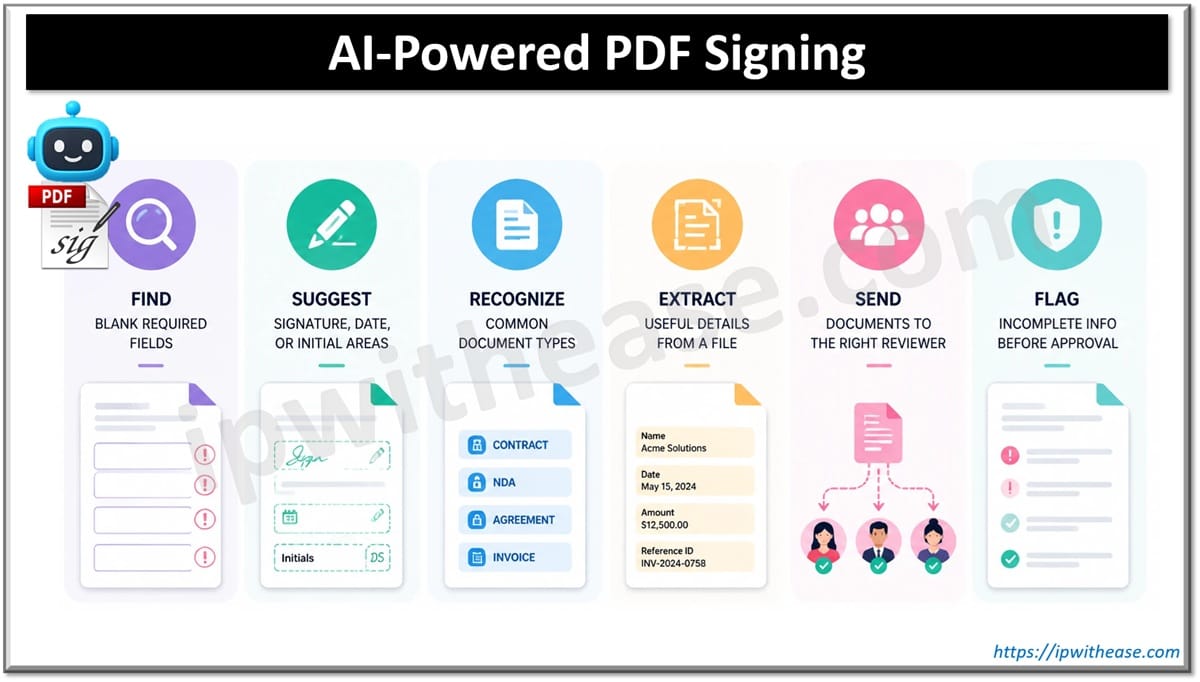
AI-supported PDF signing can help teams catch those details before the file reaches the signer. It may help with tasks such as:
- finding blank required fields;
- suggesting signature, date, or initial areas;
- recognizing common document types;
- extracting useful details from a file;
- sending documents to the right reviewer;
- flagging incomplete information before approval.
Security Benefits of AI-Powered PDF Signing
Signed PDFs often contain sensitive information that requires careful handling. Contracts, employee files, financial agreements, healthcare forms, compliance records, and client documents should not move through loose email chains without clear control. Once a document is signed, the team may also need to show who signed it, when it was signed, and whether the file changed afterward.
AI can support security by helping teams notice missing signer details, unusual activity, skipped approvals, or documents that still need attention. The strongest setup still depends on standard security practices working around it: encrypted transfers, secure storage, permission control, audit trails, identity checks, and activity tracking.
Those protections matter because a signed document is often more than a file. It may be proof of an agreement, a record for an audit, or a document someone will need months later when a question comes up. Good signing tools help keep that record clean.
Approval Workflows should not Depend on Memory
A signature is often the final step, not the whole journey. Before a file is signed, it may need input from sales, legal, finance, HR, operations, or management. When that routing is handled manually, the process depends on someone remembering who needs to review what. That is where documents get stuck.
AI can help route files based on document type, department, value, or status. A sales agreement with custom payment terms may need finance review. A vendor contract may need legal approval before it leaves the company. An HR document may need a manager’s sign-off before it reaches the employee.
This kind of workflow does more than save a few clicks. It gives the team a clearer view of where the document stands. People can see whether a file is waiting for review, ready for signature, already signed, or still missing something. That visibility is especially useful when several people are involved and no one wants to search through old email threads to find the latest version.
Reducing Errors and Delays in Document Management
Document problems are often ordinary. The attachment is missing. The wrong version is sent. The signer receives four separate PDFs and does not know which one to open first. A supporting page is left out. A signed copy gets saved in someone’s downloads folder with a vague name.
AI-powered signing tools can reduce those issues by helping teams prepare documents before sending and keep related files together. This is useful when users need to combine PDF files before sending one complete package for signature.
Compliance, Audit Trails, and Document Tracking
Signed documents often need a clear history. A company may need to know who opened the document, who signed it, when the signature was added, and whether the completed file was changed. This matters in legal services, finance, healthcare, education, real estate, and any business where records have to stand up to later review.
Digital signing platforms usually provide audit trails and activity logs for that reason. AI can add more structure by helping classify completed files, pull out useful details, and highlight documents that may need follow-up. That helps teams avoid the common practice of saving signed PDFs in whatever location is most convenient at the time.
A more consistent system makes documents easier to search, archive, retrieve, and review later. It also reduces the stress of trying to reconstruct a document trail after someone asks where a signed file went.
AI-Powered PDF Signing for Remote and Hybrid teams
Remote and hybrid work made online signing part of ordinary business. A manager may approve a document from home. A client may sign from a phone between meetings. An operations team may track the final copy from another office. The document still needs to move forward without creating five versions in five different inboxes.
AI-powered signing tools help by keeping the file easier to prepare, route, review, sign, and store. The team can see what still needs attention instead of relying on follow-up messages. That matters when people work on different schedules or across different locations.
Secure Online Document Management Habits
AI can make signing smoother, but the team still needs clear habits. Without basic rules, even a good tool can become another place where messy files collect. The goal is to make document handling predictable enough that people know what to prepare, where to review, how to sign, and where the final record belongs.
A simple working routine helps:
- Use approved templates for repeat documents.
- Review every file before sending it for signature.
- Limit access to sensitive documents.
- Use role-based permissions when several people are involved.
- Store signed files in secure folders.
- Label draft and final versions clearly.
- Check audit trails for important agreements.
Choosing a PDF Signing Solution that Fits Real Work
The right solution should match the way documents already move through the team. A small business may need a simple way to prepare a PDF, send it for signature, and store the final copy without searching through email later. A larger organization may need approval routing, tighter permissions, field checks, audit trails, editing tools, and better document organization.
It helps to look beyond the signing screen. Can the team prepare the file without starting from scratch each time? Can missing fields be spotted before the document reaches the signer? Is it clear who still needs to approve or sign? Can sensitive files be limited to the right people? Will the final PDF be easy to find three months later?
Mobile access also matters. A client may sign from a phone. A manager may approve from a laptop at home. A new employee may complete onboarding paperwork outside office hours. The process should still feel clear and secure on a smaller screen.
A Cleaner Way to Handle Signed PDFs
AI-powered PDF signing is useful because it supports the parts of document work where people usually lose time: preparing files, checking fields, waiting for approval, collecting signatures, and storing the final version. It does not remove the need for careful review, but it can make the process less dependent on memory, email chains, and manual follow-up.
For teams that already work with PDFs every day, the real value comes from keeping these steps connected. Dedicated Tools help users prepare documents, merge related files, send them for signature, add comments, and keep completed versions in the cloud. That creates a cleaner path from draft to signed record.
A signed PDF should not become another file with a confusing name in someone’s downloads folder. It should be easy to check, easy to share with the right person, and easy to retrieve later. That is the practical value of combining PDF signing with smarter document management: less chasing, fewer missed details, and a final record the team can actually rely on.
ABOUT THE AUTHOR

IPwithease is aimed at sharing knowledge across varied domains like Network, Security, Virtualization, Software, Wireless, etc.