Table of Contents
With the advent of new and high-throughput IT infrastructure to support the ever-increasing demand of real-time and bandwidth-hungry applications, IT vendors are working hard to produce passive infrastructure which meets these requirements. CAT6 category of cables have been introduced to deliver a high-performance experience to end users with a better Signal to Noise Ratio.
Cabling is the one part of the network nobody wants to touch twice. Switches get refreshed every five to seven years, but the copper inside walls and ceilings often stays for fifteen or more. So the category you pick today decides what your access layer can do for a long time. That is why CAT5e vs CAT6 is still a live question, even though both standards have been around for over two decades.
Related – CAT5 vs CAT5e
This article will focus on comparison of CAT5e and CAT6 cabling: what each one is, where they differ, what each costs to deploy, and which one fits which kind of site.
What is CAT5e?
CAT5e stands for Category 5 enhanced. It was introduced in the early 2000s as an upgrade to the original CAT5 cable, mainly to bring crosstalk under control so that Gigabit Ethernet could run reliably over all four pairs.
A CAT5e cable is made of four twisted pairs of copper, usually 24 AWG, terminated in RJ45 connectors. It is rated for frequencies up to 100 MHz and supports 1000BASE-T (Gigabit Ethernet) up to 100 meters. The “enhanced” part is a set of tighter limits on near-end crosstalk (NEXT) and return loss compared with plain CAT5.
CAT5e also got a second life in 2016, when IEEE 802.3bz added 2.5GBASE-T. That standard lets a good CAT5e run carry 2.5 Gbps over the full 100 meters, which matters now that many Wi-Fi 6 and Wi-Fi 7 access points ship with multi-gigabit uplinks.
In ISO/IEC terms, a CAT5e channel corresponds to Class D.
What is CAT6?
CAT6 was standardised by TIA in 2002. It keeps the same four-pair, RJ45 layout as CAT5e, but it is built to a much stricter electrical spec.
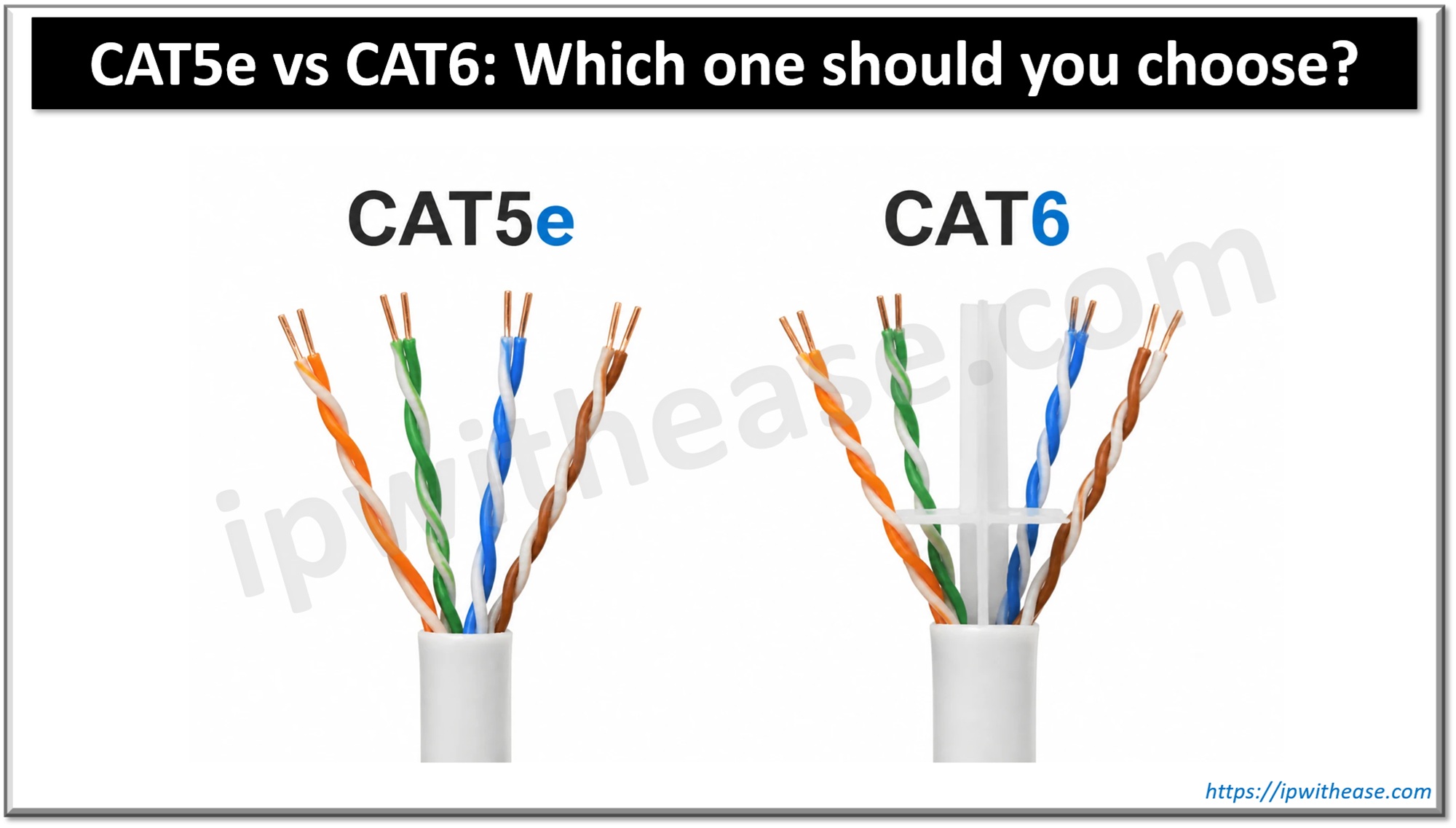
The headline number is bandwidth: CAT6 is rated up to 250 MHz, two and a half times what CAT5e offers. To get there, manufacturers use tighter twists on each pair, often a slightly thicker conductor (23 AWG is common), and in many cables a plastic spline down the middle that keeps the pairs physically apart. All of that cuts crosstalk and improves the signal-to-noise ratio.
The practical payoff is 10GBASE-T. CAT6 can carry 10 Gbps, but only over shorter runs, typically up to 55 meters, and in dense bundles the safe figure can drop closer to 37 meters because of alien crosstalk between neighbouring cables. Gigabit and 2.5/5 Gbps still work at the full 100 meters.
In ISO/IEC terms, a CAT6 channel corresponds to Class E.
CAT6 vs CAT6A: How they differ
CAT6A (Category 6 Augmented) was built to fix CAT6’s main weakness, its 10 Gbps distance limit. The key differences:
- 10 Gbps reach: CAT6 carries 10GBASE-T up to about 55 meters. CAT6A carries it over the full 100 meters.
- Bandwidth: CAT6 is rated to 250 MHz. CAT6A doubles that to 500 MHz.
- Alien crosstalk: CAT6A is the first category with a formal limit on noise between neighbouring cables in a bundle. CAT6 has no such requirement.
- Size and weight: CAT6A is thicker and heavier, often with a foil shield, so it needs more conduit and tray space and a larger bend radius.
- Cost: CAT6A typically costs 20–30% more than CAT6, and it takes more effort to install and terminate.
- ISO/IEC class: CAT6 is a Class E channel. CAT6A is Class EA.
Comparison: CAT5e vs CAT6
While both CAT 5e and CAT 6 provide Gigabit Ethernet up to a distance of 100 meters, CAT6 has the edge since it provides up to 10 Gbps speeds (on runs of up to 55 meters), which CAT 5e lags due to lower SNR and higher interference. Though CAT 6 supports higher bandwidth, it comes at a higher price and should be judiciously planned considering the IT budget of the organization.
Below table enumerates the differences between CAT5e and CAT6 –
| Parameter | CAT5e | CAT6 |
|---|---|---|
| Standard introduced | Early 2000s (TIA/EIA-568-B) | 2002 (TIA/EIA-568-B.2-1) |
| ISO/IEC channel class | Class D | Class E |
| Max frequency | 100 MHz | 250 MHz |
| 1 Gbps (1000BASE-T) | Up to 100 m | Up to 100 m |
| 2.5 Gbps (2.5GBASE-T) | Up to 100 m | Up to 100 m |
| 5 Gbps (5GBASE-T) | Possible on good runs, not guaranteed | Up to 100 m |
| 10 Gbps (10GBASE-T) | Not supported | Up to 55 m (37 m in dense bundles) |
| Typical conductor | 24 AWG | 23 or 24 AWG |
| Pair separator / spline | Rare | Common |
| Crosstalk (NEXT) and SNR | Higher crosstalk, lower SNR | Lower crosstalk, better SNR |
| Cable diameter and flexibility | Thinner, easier to bend | Thicker, stiffer |
| Connector | RJ45 | RJ45 (CAT6-rated) |
| PoE support | Yes, up to 802.3bt | Yes, up to 802.3bt, runs cooler in bundles |
| Relative cost | Lower | Higher (cable, connectors, labour) |
| Best suited for | Small offices, homes, Gigabit desktops | Head offices, growing sites, multi-gig Wi-Fi uplinks |
Download the comparison table: cat5e vs cat6
Key Differences
Bandwidth and Speed
Bandwidth (in MHz) and speed (in Gbps) get mixed up a lot, so it helps to separate them. Bandwidth is the range of frequencies the cable can carry cleanly. Speed is what the Ethernet standard squeezes out of that range using encoding. CAT6’s 250 MHz gives far more headroom than CAT5e’s 100 MHz, which is why it can handle 10GBASE-T at all.
For day-to-day traffic, though, the difference is invisible. A laptop on a 1 Gbps port will see the same throughput over either cable. The gap shows up only when you push past Gigabit.
The 10 Gbps distance catch
This is where many buyers get it wrong. CAT6 does support 10 Gbps, but not across the full 100-meter channel. Plan on 55 meters at most, and less in tightly packed cable trays. If you need 10 Gbps over the full 100 meters, the right answer is CAT6A, not CAT6.
Crosstalk and cable construction
Crosstalk is signal from one pair leaking into another. CAT6 fights it in three ways: more twists per inch, tighter manufacturing tolerances, and (in most cables) a cross-shaped spline that separates the pairs. The result is a cleaner signal and a better SNR, which is the real reason CAT6 can go faster.
The trade-off is physical. CAT6 is thicker and stiffer, so it fills conduits faster and needs a slightly larger bend radius.
Power over Ethernet
Both categories can carry PoE, including the high-power IEEE 802.3bt classes used by PTZ cameras, Wi-Fi 7 access points and LED lighting. In large bundles, though, PoE heats the cable. CAT6 often uses thicker copper, so it loses less power as heat and holds up better in big bundles carrying heavy PoE loads.
Compatibility
CAT6 is backward compatible with CAT5e. Both use RJ45, and you can mix them without anything breaking. Just remember the channel only performs to its weakest part. A CAT6 cable punched into a CAT5e patch panel gives you a CAT5e link.
Cost and Installation Considerations
CAT6 cable usually costs somewhat more per meter than CAT5e, and the connectors, jacks and patch panels are pricier too. On its own, the cable difference is rarely the deciding factor. Labour is.
CAT6 takes more care to terminate. The pairs need to stay twisted right up to the jack, the spline has to be trimmed, and sloppy work can drop a CAT6 link to CAT5e performance without anyone noticing until certification. Its thicker jacket also means fewer cables per conduit and more effort pulling through tight spaces.
That said, the cost of re-cabling later is far higher than the premium you pay today. Opening ceilings, disrupting users and re-certifying every run costs much more than the price gap between the two categories. A few points worth checking before you decide:
- Certify the channel. Test every run with a proper certifier, not a simple continuity tester, so you know you got what you paid for.
- Match every component. Cable, jacks, patch panels and patch cords should all carry the same category rating.
- Watch the bundle size. Large bundles carrying PoE run warm, which raises attenuation and shortens the safe distance.
- Think about the switch refresh. If your next switches will have 2.5G or 5G access ports, your cabling should be ready for them.
CAT5e or CAT6: Which One Should You Choose?
Like for small offices with no plan to grow in size, CAT 5e should be the optimal choice while the Head Office may surely consider CAT6 as a good proposition. That rule of thumb still holds, but a few more scenarios are worth spelling out.
Choose CAT5e when:
- The site is a small branch or home office with Gigabit desktops and no growth plan.
- You are extending or patching an existing CAT5e plant and want consistency.
- Budget is tight and the building lease is short, so a long cabling life won’t pay back.
- Your access points top out at 2.5 Gbps uplinks, which CAT5e handles over the full 100 meters.
Choose CAT6 when:
- You are cabling a new head office, campus building or floor that will be in use for ten years or more.
- You expect to deploy multi-gig switches or Wi-Fi 6E and Wi-Fi 7 access points.
- Short runs (under 55 meters) in server rooms or labs may need 10 Gbps.
- The site carries heavy PoE loads, such as cameras, access points and IoT devices on the same bundles.
Consider CAT6A instead when:
- You need 10 Gbps over the full 100 meters.
- You are cabling for high-end wireless, where industry guidance for new access-point drops increasingly points to CAT6A.
- You are building a data center or a long-life greenfield site and want maximum headroom.
For a deeper look at the higher categories
Related – CAT6 vs CAT6A vs CAT7
Conclusion
CAT5e and CAT6 look almost identical from the outside, and for plain Gigabit traffic they behave the same. The difference lies in the headroom. CAT6 offers more bandwidth, lower crosstalk and short-reach 10 Gbps, at a higher price and with more demanding installation.
If the site is small and stable, CAT5e is still a sensible, budget-friendly choice. If the building will host your network for the next decade, or you are planning multi-gig Wi-Fi and switching, CAT6 is the safer bet, and CAT6A is worth pricing up alongside it. Whatever you pick, plan it against both today’s budget and the switches you will be buying five years from now.
Related Video
FAQs
Can I use CAT6 cable with CAT5e equipment?
Yes. Both use RJ45 connectors and the same pin-out, so CAT6 works with any CAT5e switch, jack or NIC. The link will simply run at whatever the weakest component supports.
Will CAT6 make my internet faster?
Usually not. Most broadband plans are well below 1 Gbps, which CAT5e already handles. CAT6 helps with traffic inside your network, such as file transfers, NAS backups and multi-gig Wi-Fi uplinks.
Does CAT6 really support 10 Gbps?
Yes, but only up to about 55 meters, and less in dense bundles. For 10 Gbps over 100 meters, use CAT6A.
Is CAT5e obsolete?
No. It remains a solid choice for Gigabit access and supports 2.5 Gbps over 100 meters. It is just not the best pick for new, long-life installations.
Can I mix CAT5e and CAT6 in the same network?
Yes. Many sites run CAT5e to desks and CAT6 or CAT6A to access points and uplinks. Just keep each individual channel consistent end to end.
Is CAT6 better for PoE?
Generally, yes. Thicker conductors lose less power as heat, which matters most in large bundles carrying high-power PoE.
ABOUT THE AUTHOR

You can learn more about her on her linkedin profile – Rashmi Bhardwaj