Table of Contents
The change itself was routine: add a voice VLAN to 24 access ports so a batch of new desk phones could sit on their own subnet. The engineer typed six bullet points into an AI assistant late at night, pasted the result into the ticket and logged off.
At the change advisory board the next morning, the chair read the risk section aloud: “This change may potentially impact a subset of users and could result in temporary disruption.” Then she asked which users, and for how long. Nobody on the call could say, because the ticket didn’t.
The change was pushed back a week. The commands were right and the rollback was right. The document just didn’t answer the questions a reviewer needs answered. That gap is what this guide is about: how to use AI to write Network Documentation like low-level designs (LLDs), methods of procedure (MOPs) and root cause analysis (RCA) reports that people actually read, trust and approve.
Why Network documentation is the most neglected part of Network Engineering
Ask any network team what they’d cut first when a project runs late, and the answer is the documentation. Configs get pushed, circuits get turned up, and the LLD stays at “draft v0.3” for two years.
There are good reasons for this. Nobody gets paged for a missing MOP. Writing is slow for people who think in topology diagrams and CLI. And the work that gets noticed is the outage you fixed, not the write-up that would have prevented the next one.
The cost shows up later. An engineer on the night shift follows a MOP that skips a step the author “just knew.” An RCA for a BGP session flap buries a clear root cause, an MD5 password mismatch after a router swap, under three paragraphs of vague narrative, so the service manager can’t tell whether customers were affected. A change board defers good work because the risk section doesn’t say who is affected.
AI doesn’t fix the habit, but it does remove the blank page. That alone gets a lot more documentation written.
Where AI helps: LLDs, MOPs, RCAs and Change Requests
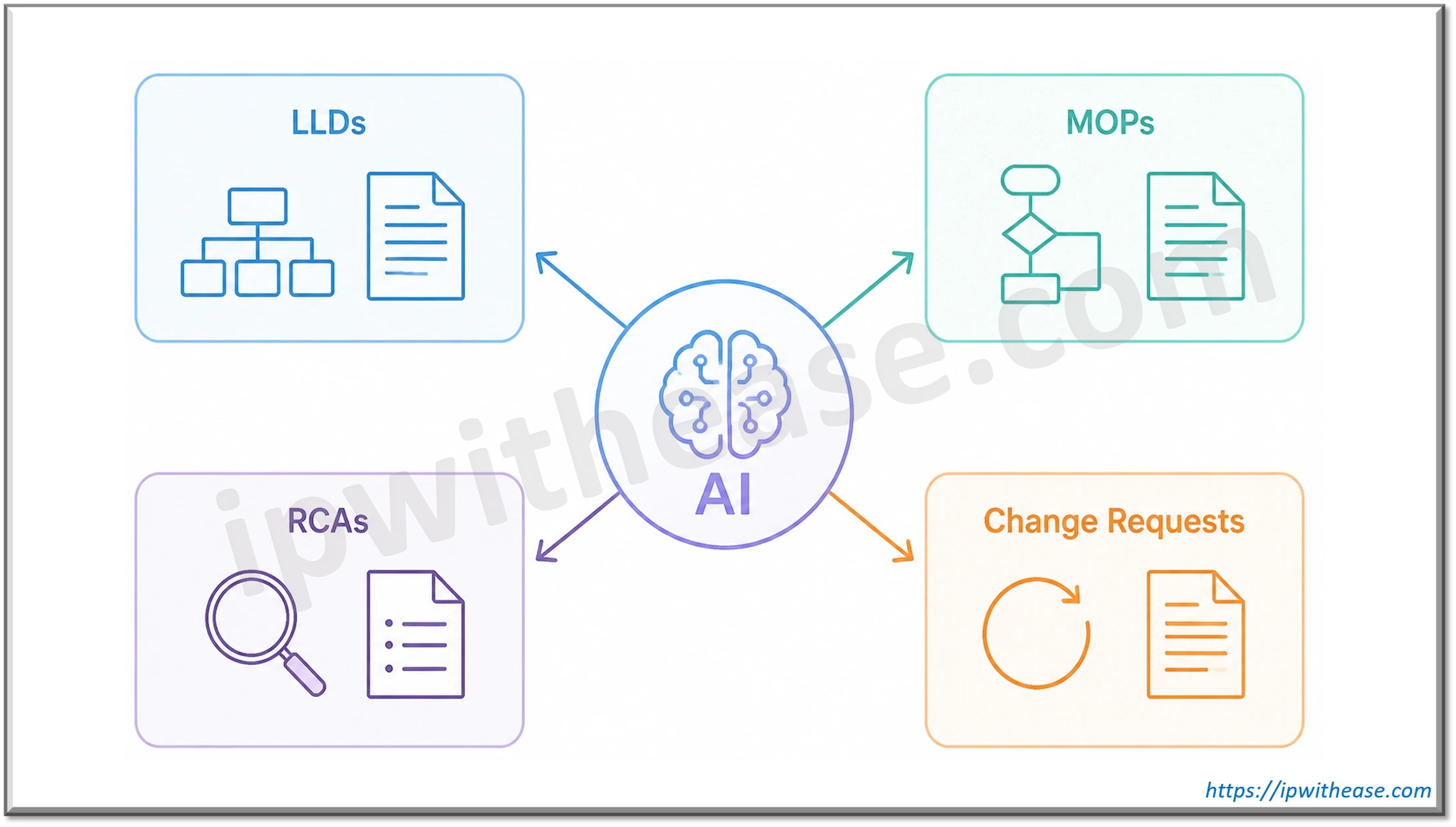
AI is good at structure and first drafts. It is poor at facts it wasn’t given. So the useful split is simple: let it write the connective prose, and keep the technical values for yourself.
| Document | What AI can draft well | What you write or verify yourself |
|---|---|---|
| Low-level design (LLD) | Section skeleton, design rationale, alternatives considered, naming-convention explanations | IP plan, VLAN IDs, AS numbers, protocol timers, device models, MUST/SHOULD requirements |
| Method of Procedure (MOP) | Step introductions, pre-check and post-check lists, “why this step exists” notes, escalation guidance | Every command, expected output, thresholds, file paths, rollback commands |
| RCA Report | Timeline narrative from your notes, customer-impact paragraph, lessons learned | Timestamps, alarm names, root cause, affected circuits, ticket numbers |
| Change Request | Business justification, risk and impact summary, plain-language description for non-engineers | Change ID, device names, interface ranges, window times, affected users |
The pattern is the same in every row. The AI produces readable sentences around facts you supply. When it starts supplying the facts itself, you have a problem, which is the subject of the review section below.
Prompting tips: give the AI the details, not a vague instruction
The quality of the draft depends on what you put in. “Write a MOP for a VLAN change” gets you a generic template padded with filler. A prompt with real context gets you something close to usable.
Compare these two:
- Vague: “Write a change request for adding a voice VLAN.”
- Specific: “Write the risk and impact section of a change request. We are adding voice VLAN 120 to ports Gi1/0/1 to Gi1/0/24 on access switch SWITCH-A, a 48-port stackable access switch on the third floor. About 40 desk phones will re-register and get new addresses, which takes a minute or two. PCs connected behind the phones may drop briefly. Rollback is removing the voice VLAN from the interface range. The window is Thursday 22:00 to 23:00. Write for a change board that wants to know who is affected and for how long. No filler phrases.”
A few habits make the difference:
- Give the topology. Which devices, how they connect, which links carry what. A one-line description of the path beats none.
- Name the device models and software versions. Command syntax and behaviour vary between platforms and releases. Without this, the AI guesses.
- State the change window and the blast radius. Who is affected, for how long, and what they will notice.
- Describe the rollback. If you don’t, the AI will invent one that sounds reasonable.
- Say who the reader is. A change board, a night-shift engineer and a service manager need different things from the same facts.
- Use placeholders for anything sensitive. SWITCH-A, VLAN-X and TICKET-1 work just as well in a prompt as the real values. Swap the real ones back in locally.
Reviewing the draft: check every command, IP and VLAN
This is the step that matters most. AI models invent technical details with complete confidence. The fabricated details look exactly like real ones, so you can’t spot them by tone.
Things that commonly go wrong:
- Commands from the wrong platform or version. A command that exists on one vendor’s OS appears in a MOP for another, or a deprecated keyword shows up for a current release.
- Invented values. An IP address, subnet mask, VLAN ID or AS number appears that you never supplied. It fits the pattern, so it slips past a quick read.
- Interface names that don’t match the hardware. A 24-port switch suddenly has a Gi1/0/48.
- Missing steps. The AI drops a save-config, a verification command or a maintenance-mode step because your notes didn’t mention it.
- Rollbacks that don’t undo the change. A rollback that removes one line but not the dependent config it introduced.
A practical way to review:
- Diff every value in the draft against your source: the running config, the IP plan, the ticket. If a value isn’t in your source, delete it or confirm it.
- Run every command in a lab or simulator on the same platform and version before it goes into a MOP.
- Read the rollback on its own, as if the change had just failed at 2 a.m. Would it get you back?
- Check the expected outputs. AI often writes what output “should” look like rather than what it actually looks like.
- Have a second engineer review the technical content before anyone works on the prose.
Making it readable
A technically correct draft can still fail if nobody reads it. AI prose has a recognisable rhythm: every sentence about the same length, paragraphs opening with “Additionally,” and hedges like “may potentially” in every line. Experienced reviewers spot it in two sentences and start reading the technical content with more suspicion.
Here is a typical AI-drafted risk paragraph:
This change request seeks to implement a modification to the VLAN configuration on the access switch in order to ensure optimal voice quality for end users. It is important to note that the change may potentially result in a brief interruption of connectivity for some devices. Additionally, comprehensive rollback procedures have been established to mitigate any potential risks.
And the same paragraph after an edit for readability and the missing facts:
On SWITCH-A we’re adding voice VLAN 120 to ports Gi1/0/1 to Gi1/0/24, so the new desk phones get their own subnet and the existing QoS policy. Third-floor phones will re-register, which takes a minute or two, and PCs behind them may drop briefly. If phones fail to register, we remove the voice VLAN from the interface range and the ports return to their current config.
The second version answers who, how long and how to undo it. It also sounds like an engineer wrote it.
AI drafts tend to sound flat and repetitive, which makes a 20-page LLD hard to get through. After you’ve checked the technical content, you can run the narrative sections through an AI humanizer to vary the sentence structure, then do a final edit in your own voice.
A few rules keep this safe:
- Only rewrite the prose. Command blocks, config snippets and tables of values never go through any rewriting tool.
- Protect technical terms inside sentences. Interface names, prefixes, change IDs and team vocabulary like “drain” or “maintenance mode” must survive exactly. A synonym for “drain” can mean something different at 2 a.m.
- Keep RFC-style requirement words. In a design note, MUST, SHOULD and MAY carry deliberate weight. A rewrite that turns “MUST” into “needs to” has changed a requirement into a suggestion.
- Keep real uncertainty. Most hedges are filler, but some aren’t. If you haven’t confirmed the upstream provider accepts new BGP communities, say so plainly: “Not yet confirmed; if traffic hasn’t shifted within ten minutes, we roll back.”
- Work in sections and reread each one. Rewriting a whole document in one pass is how a rollback step quietly gets vaguer.
What AI should never do
AI is a drafting tool. Some decisions have to stay with a qualified engineer, however good the output looks.
- Final config validation. An AI can’t see your running config, your hardware or the state of your network. Whether a config is correct is decided by testing and peer review, not by how confident the draft sounds.
- Security policy decisions. Firewall rules, ACLs, segmentation, authentication and encryption settings carry risk the AI can’t weigh. It may suggest a permissive rule because it is the simplest working answer. Security design belongs to your security team and your policies.
- Approving its own output. “Check this MOP for errors” in the same chat that wrote it is not a review. A second engineer is.
There are also things that should never go into any online AI tool:
- Credentials of any kind: enable secrets, SNMP community strings, TACACS or RADIUS keys, VPN pre-shared keys, API tokens.
- Full running configs. Even “sanitized” ones leak hostnames, internal addressing, ACL logic and banner text.
- Customer data, such as names, circuit IDs tied to a customer and public allocations.
- Raw logs and packet captures, which carry usernames, MAC addresses and source IPs. Summarise what the log showed in your own words instead.
Check your organization’s AI acceptable-use policy before any of this. Many now specify which tools are approved, what data can be used with them, and whether AI assistance must be disclosed on formal documents.
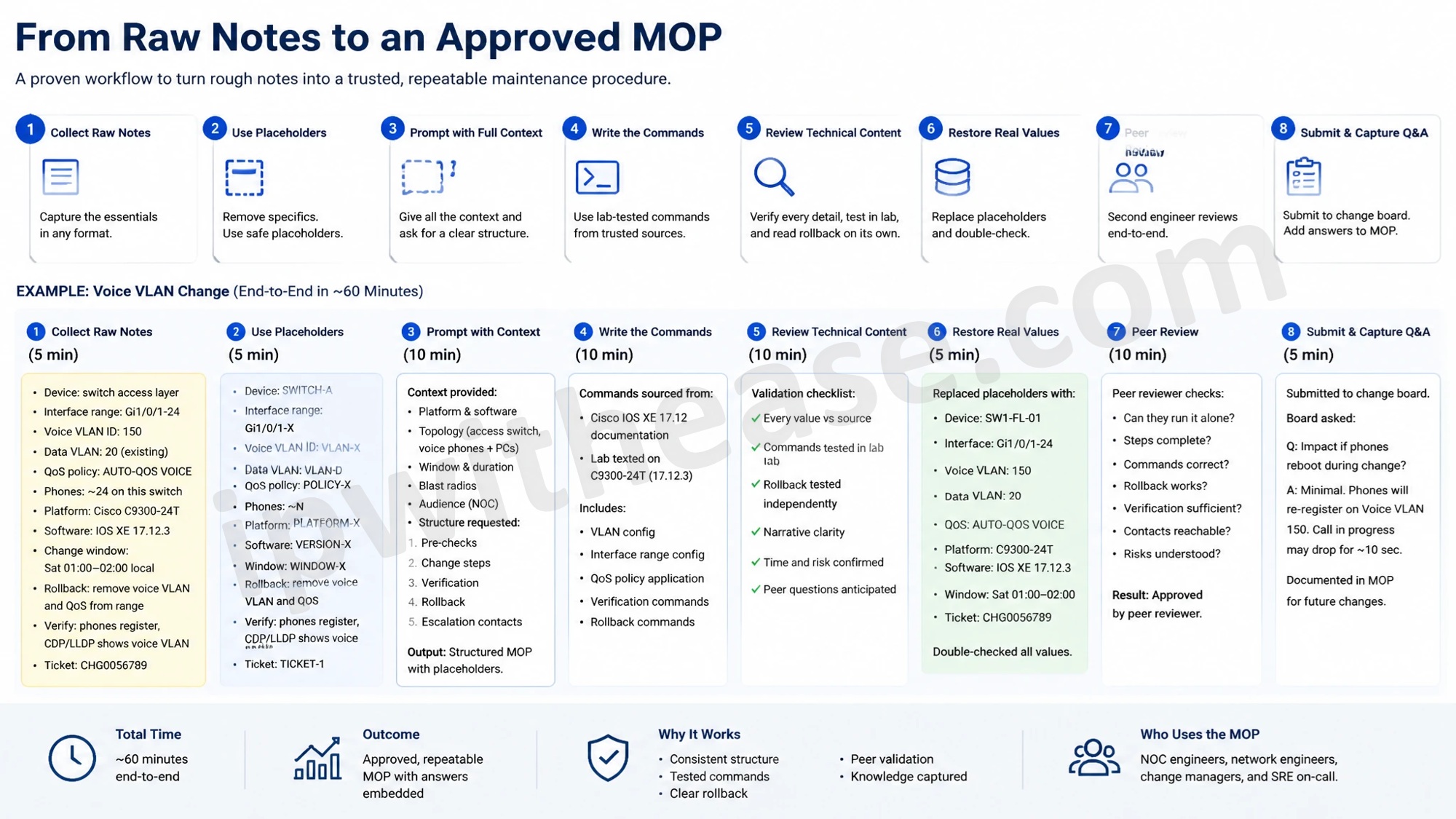
A sample workflow: From raw notes to an Approved MOP
Here is how the voice VLAN change from the opening could go from rough notes to an approved MOP in about an hour.
- Collect raw notes. Device, interface range, VLAN ID, QoS policy, phone count, change window, rollback idea. Bullet points are fine.
- Swap in placeholders. Replace hostnames, addresses and ticket numbers with SWITCH-A, VLAN-X and TICKET-1.
- Prompt with full context. Include the platform and software version, the topology, the window, the blast radius and who will read the MOP. Ask for a structure: pre-checks, steps, verification, rollback, escalation contacts.
- Write the commands yourself. Take them from your lab-tested notes or vendor documentation, not from the draft.
- Review the technical content. Diff every value against your source, run each command in the lab and read the rollback on its own.
- Make the prose readable. Edit the narrative sections for clarity, cut the filler, and add the facts reviewers will ask about: who, how long, how to undo it.
- Restore the real values locally. Put the real hostnames, addresses and change ID back in, then check them once more.
- Peer review. A second engineer reads the MOP as if they had to run it alone at night.
- Submit to the change board. If the board asks a question, add the answer to the MOP and keep it there. The same question will come up next time.
The AI saves time on steps 3 and 6. Everything else is still engineering work. That split is the point: the AI writes the sentences, and the engineer stays responsible for every fact in them.
To start, pick the last change request your change board sent back with a question. Rewrite its risk section using the steps above and compare the two versions. The difference is usually obvious, and so is the shorter meeting.
ABOUT THE AUTHOR

IPwithease is aimed at sharing knowledge across varied domains like Network, Security, Virtualization, Software, Wireless, etc.