Table of Contents
Exposing a service on a private network used to be simple. You logged into the router, added a port forwarding rule, and the service was reachable from the internet. That approach breaks more often every year. Many ISPs now put customers behind Carrier-Grade NAT (CGNAT), mobile and satellite connections rarely hand out a public IPv4 address, and some providers block common inbound ports outright.
Reverse tunnels solve this by never asking for an inbound connection in the first place. ngrok made the idea popular, but its free-tier limits and lack of UDP support push many engineers to look elsewhere, especially for game servers, VoIP, IoT devices and other non-HTTP traffic.
This guide compares six ngrok alternatives that work without port forwarding, with a focus on protocol support and how much infrastructure you have to run yourself.
Why Port Forwarding Fails Today
Port forwarding is a form of destination NAT: the router rewrites the destination of inbound packets to an internal IP and port (see SNAT vs DNAT for how the two differ). It only works if the router itself owns a public IP address.
Behind CGNAT, it does not. Your router gets an address from a shared private range, and the ISP’s NAT gateway sits between you and the internet. You can forward ports on your own router all day, and nothing from outside will ever reach them. Double NAT, ISP-blocked ports (25, 80 and 443 are common casualties, see the list of well-known port numbers) and dynamic IPs create similar problems.
How to Check If You Are Behind CGNAT
Compare the WAN address shown on your router’s status page with the public IP reported by a service such as ifconfig.me. If they differ, there is another layer of NAT upstream. A WAN address in the 100.64.0.0/10 range is a near-certain sign of CGNAT, since that block is reserved for carrier-grade NAT. Addresses in the 10.0.0.0/8, 172.16.0.0/12 or 192.168.0.0/16 ranges usually point to double NAT, often an ISP modem in front of your own router. A traceroute to any public host that shows several private hops before the first public one confirms it. In any of these cases, inbound port forwarding will not work without help from your ISP, and a reverse tunnel is the practical fix.
How Reverse Tunnels Get Around It
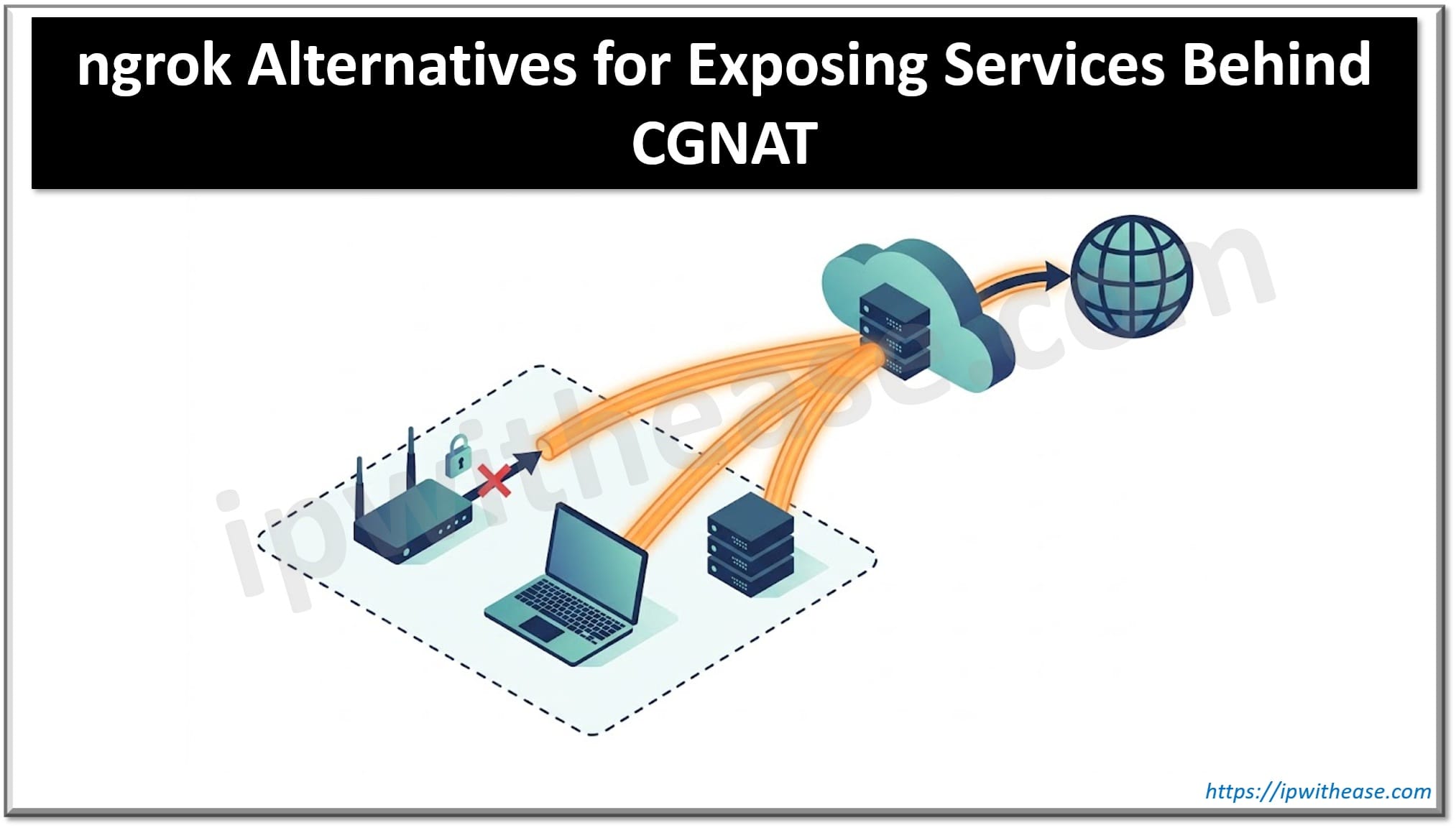
A reverse tunnel flips the direction. A client on your machine opens an outbound connection to a relay server with a public IP. The relay gives you a public endpoint and forwards incoming traffic back through that connection. Since the connection starts from inside your network, NAT and firewalls do not get in the way.
The catch: someone has to run that relay. With self-hosted tools, that means renting a VPS with a public IP and keeping it patched and secured.
What to Look For
- Protocols: HTTP/HTTPS covers web apps and webhooks. Databases, SSH and game servers need TCP, and many games, VoIP and IoT protocols need UDP.
- Who runs the relay: a managed service or your own VPS.
- Security: encryption between client and relay, plus authentication on the public endpoint.
- Stable endpoints: custom domains or reserved addresses that survive restarts.
- Setup effort: a single command versus config files on two machines.
List of ngrok Alternatives
1. LocalXpose
LocalXpose is a managed tunneling service, so there is no relay server to deploy or maintain. You install the CLI, log in, and start a tunnel to any local port.
Its main difference from ngrok is protocol coverage. LocalXpose supports HTTP, HTTPS, TCP, TLS and UDP tunnels, which makes it practical for Minecraft and other game servers, VoIP over DTLS, and UDP-based IoT protocols, not just web apps.
Key features
- HTTP, HTTPS, TCP, TLS and UDP tunnels from one CLI
- Works behind CGNAT with no router changes and no VPS
- Custom domains with wildcard support
- Web dashboard for inspecting and replaying requests
- Runs as a background service for always-on tunnels
- Unlimited bandwidth on the Pro plan
Limitations: it is a hosted service, so traffic passes through LocalXpose’s relays rather than infrastructure you control.
Best for: mixed TCP and UDP workloads when you do not want to maintain a server.
2. frp (Fast Reverse Proxy)
frp is the most established self-hosted option, with over 100,000 GitHub stars. You run frps on a server with a public IP and frpc on the machine behind NAT.
Key features
- TCP, UDP, HTTP and HTTPS proxies
- KCP and QUIC transports for lossy links
- P2P mode for direct connections when NAT allows it
- Dashboard, token authentication and TLS between client and server
Limitations: you need your own public server, and configuration lives in TOML files on both ends.
Best for: engineers who want full control and are comfortable managing a VPS.
3. rathole
rathole is a Rust reverse proxy built as a lighter, faster alternative to frp. It uses the same server and client model.
Key features
- TCP and UDP forwarding
- Low memory use, suitable for routers and embedded devices
- Optional Noise protocol or TLS encryption
- Hot-reloading of services without restarting
Limitations: narrower feature set than frp (no built-in HTTP routing by hostname) and it still needs a public server.
Best for: resource-constrained hardware and simple port-to-port forwarding.
4. zrok
zrok is built on OpenZiti, a zero-trust networking framework. It can be self-hosted or used through its hosted instance.
Key features
- Public sharing for HTTP/HTTPS services and static files
- Private sharing of TCP and UDP services between zrok users, with no public exposure
- Reserved shares for stable URLs
Limitations: UDP and TCP are only available as private shares, so a client needs zrok on both ends. Self-hosting means running the OpenZiti stack.
Best for: sharing services privately with specific people or teams.
5. Pangolin
Pangolin is a self-hostable, WireGuard-based zero-trust reverse proxy and access platform. Its connector punches out from the private network, so no open ports or public IP are needed at home.
Key features
- Public HTTP/HTTPS resources with automatic TLS
- Raw TCP and UDP public resources
- Identity-aware access with SSO, roles and audit logs
- Web dashboard for managing sites and resources
Limitations: heavier to deploy than a single binary, and it is broader than a simple tunnel.
Best for: homelabs and small teams that want a dashboard and access control in front of self-hosted apps.
6. sish
sish is an open-source ngrok and serveo alternative that uses plain SSH. Users create tunnels with the standard ssh -R command, so there is no client to install.
Key features
- HTTP(S), WebSocket and TCP tunnels
- Works with any SSH client
- Public and private tunnel workflows
Limitations: no UDP, and you run and secure the SSH server yourself.
Best for: quick tunnels on machines where installing software is not an option.
Comparison Table
| Tool | HTTP/HTTPS | TCP | UDP | Needs your own server | Setup effort |
|---|---|---|---|---|---|
| LocalXpose | Yes | Yes | Yes | No | Low |
| frp | Yes | Yes | Yes | Yes | Medium |
| rathole | Basic | Yes | Yes | Yes | Medium |
| zrok | Yes | Private shares | Private shares | Optional | Medium |
| Pangolin | Yes | Yes | Yes | Optional | High |
| sish | Yes | Yes | No | Yes | Medium |
How to Choose
- Full control and comfortable with config files: frp.
- Same idea, lighter footprint: rathole.
- Private sharing with specific users: zrok.
- Homelab with a dashboard and SSO: Pangolin.
- SSH only, nothing to install on the client: sish.
- TCP and UDP with no server to run: LocalXpose.
If you are behind CGNAT, remember that every self-hosted option needs a relay with a public IP. Factor in the cost and maintenance of that VPS when comparing.
Conclusion
CGNAT has made traditional port forwarding unreliable for a large share of home and mobile connections, but reverse tunnels work regardless of what your ISP does. Self-hosted tools like frp, rathole and sish give you full control in exchange for running and securing your own relay. zrok and Pangolin add zero-trust access on top. If you would rather skip the infrastructure and need UDP alongside HTTP and TCP, a managed tunnel removes that step entirely.
ABOUT THE AUTHOR

IPwithease is aimed at sharing knowledge across varied domains like Network, Security, Virtualization, Software, Wireless, etc.