Table of Contents
Plenty of cloud security problems start with an ordinary setting. A port left open after a quick test, a policy copied from a tutorial, a subnet that ended up public because it was the default. None of these feel risky at the time, which is exactly why they stick around.
The good news is that most of them are easy to spot and fix once you know where to look. Below are 7 common misconfigurations in virtual networks, security groups, and identity and access management (IAM), with a practical fix for each.
*Names differ slightly between providers (a VPC may be called a VNet, and security groups may appear as network security groups or firewall rules), but the ideas apply to any cloud.
Common Cloud Network Misconfigurations
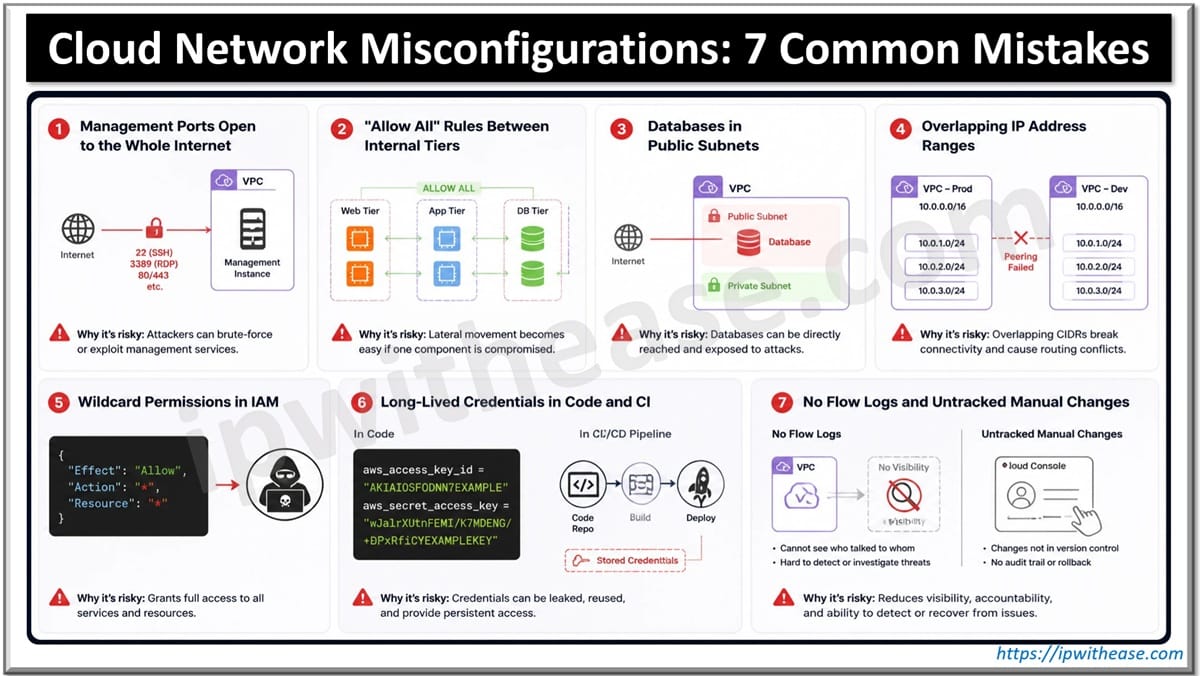
1. Management Ports Open to the Whole Internet
SSH (port 22) and RDP (port 3389) open to 0.0.0.0/0 are the classic example. Often the rule was added “just for today” and then forgotten. Automated scanners constantly sweep public IP ranges, so an exposed login port gets attention quickly.
How to fix it: Narrow down who can reach these ports. A bastion host, a VPN range or a handful of known office IPs is usually enough. Many providers also offer session-based access, where admins log in through the console or CLI and no inbound port needs to be open.
# Risky

allow  tcp/22  from 0.0.0.0/0

# Better

allow  tcp/22  from 10.20.1.0/24   # bastion subnet only
2. “Allow All” Rules Between Internal Tiers
Inside the network, it’s tempting to let the app tier and the database tier talk on every port. It saves time during setup, and everything just works. The downside shows up later: if one server is compromised, the attacker can reach everything next to it.
How to fix it: Open only what each tier really uses. The app tier usually needs the database on a single port, say 5432 for PostgreSQL, so allow that and nothing else. If your cloud lets you use a security group as the source, pick that over an IP range, and the rule will keep working as servers scale up and down.
3. Databases in Public Subnets
Putting everything in a public subnet is the simplest layout, so many early projects start that way. The result is databases and internal services with public IP addresses, protected by a single firewall rule that someone might change one day.
How to fix it: Move to a tiered layout. Load balancers sit in public subnets, application servers in private ones, and databases in isolated subnets with no route to the internet. Servers that need updates can reach out through a NAT gateway, and managed services can usually be accessed over private endpoints.
4. Overlapping IP Address Ranges
Many teams accept the default 10.0.0.0/16 range for every new network. It works fine until two networks need to talk through peering, a VPN, or a company merger. Overlapping ranges can’t be routed cleanly, and re-addressing a live network is slow, risky work.
How to fix it: Plan address space before creating the first subnet. Give each environment, region, and account its own non-overlapping block, leave room to grow, and keep the plan in a shared document. This is one area where experienced cloud engineers earn their keep early, since a good plan saves months of painful rework later.
5. Wildcard Permissions in IAM
Policies with * for both actions and resources are common in early projects. An app that only reads one storage bucket ends up with admin rights to the whole account, and nobody notices until something goes wrong.
How to fix it: In practice, least privilege comes down to a simple routine. Give each role only the actions it needs, on the resources it needs. Most providers can show which permissions a role has actually used over recent weeks, which makes trimming the rest much easier. A recurring review on the calendar keeps permissions from creeping back.
# Too broad

actions:   "*"

resources: "*"

# Scoped

actions:   ["storage.read", "storage.write"]

resources: ["reports-bucket/*"]
6. Long-Lived Credentials in Code and CI
Static access keys tend to spread. They end up in config files, CI variables, and sometimes in a public repository. Keys created years ago for a former employee can still be active.
How to fix it: Avoid static keys wherever you can. Applications can use roles or workload identities that issue short-lived tokens, and CI pipelines can do the same through identity federation (OIDC), so every build gets temporary credentials. Secret scanning in your repositories catches keys before they’re pushed, and you can simply delete unused old keys.
7. No Flow Logs and Untracked Manual Changes
When something strange happens on the network, the first question is “what traffic went where?” Without flow logs, there’s no answer. A related problem is drift: quick console fixes made during an incident that never get reverted or documented.
How to fix it: Turn on flow logs for the subnets that matter most, and keep them long enough to review an incident. For drift, the long-term answer is infrastructure as code. Network rules and IAM policies live in a repository, changes go through pull requests, and automated checks run in the pipeline. When someone makes a manual change, it shows up as a difference you can undo or intentionally add to the code.
Wrapping Up
Most cloud network problems come from a few small shortcuts lining up at the wrong moment. Review open ports, internal rules, subnet layout, address ranges, IAM policies, credentials, and logging, and you’ll close the easiest doors an attacker could use. Then keep them closed by treating network and IAM settings as code, reviewed like any other change.
ABOUT THE AUTHOR

IPwithease is aimed at sharing knowledge across varied domains like Network, Security, Virtualization, Software, Wireless, etc.