Table of Contents
When you send a text, you know it will likely be read within minutes. However, a problem often arises when those text messages sit outside the systems your team already uses.
If your texting platform is separate from your main database, customer details, consent status, and follow-up notes get scattered across different screens and spreadsheets. This creates extra work and leads to missed opportunities.
Bulk texting is most useful when it connects directly to your customer records. A proper SMS CRM integration helps keep business texting connected to customer records, audience segments, opt-out status, replies, and campaign activity.
By linking these two systems, you ensure that every message sent is part of a larger, organized conversation rather than a one-off blast that your sales or support teams cannot track. This connection turns a simple notification tool into a powerful part of your overall communication strategy.
What Bulk Text Messaging Means
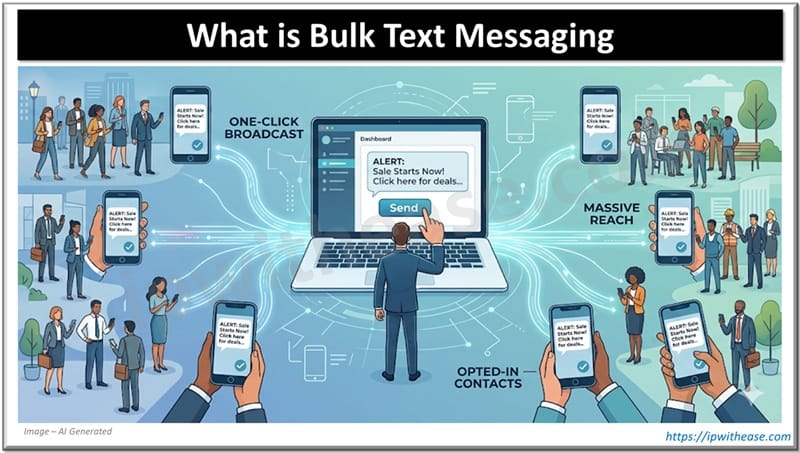
Bulk texting is the process of sending one message to a large group of opted-in contacts simultaneously. It is designed for businesses that need to reach hundreds or thousands of people with a single click.
It is important to remember that this is not the same as group texting from a personal smartphone. Business platforms are built to handle high volumes while following legal regulations that govern how companies talk to consumers.
When a company needs to send updates, reminders, alerts, or promotions to many people at once, bulk text messaging gives the team a more controlled way to manage those sends. These platforms offer professional features that personal phones lack, such as contact list management, reusable templates, and automated scheduling.
They also provide essential compliance tools, like automatic opt-out processing and detailed delivery reporting, which help ensure your messages actually reach your audience without breaking any rules.
Why Disconnected Texting Creates Problems for Businesses
Disconnected texting creates problems because it separates SMS activity from the main customer record.
- Information silos form: Texting data gets stuck in a separate tool instead of syncing with the CRM.
- Sales teams lose context: Reps may not know if a lead already replied to a marketing text.
- Support teams lack visibility: Agents may not see the history of automated messages sent to a customer.
- Customers receive repetitive messages: Disconnected tools can cause teams to send the same or similar texts more than once.
- Conflicting messages can happen: Different teams may send mixed updates to the same person.
- Opt-out tracking becomes risky: A “STOP” request in one tool may not update in the main CRM.
- Compliance risks increase: Teams may accidentally text someone who already opted out.
- Campaign tracking becomes harder: Operations teams may struggle to confirm delivery or measure SMS performance.
- Customer experience suffers: Teams lose the context needed to send helpful, timely, and relevant messages.
How CRM Data Makes SMS More Useful
Better Audience Segments
Using CRM fields allows teams to segment their lists by customer type, location, or purchase history.
Twilio recommends segmenting lists so bulk messages remain relevant to the recipient. Instead of texting your entire database, you can target specific groups, such as people who attended a recent event or those whose subscriptions are about to expire.
Better Personalization
SMS works best when it feels personal. With CRM data, you can include dynamic fields like a first name, a specific appointment date, or the name of an assigned account manager.
However, keep in mind that personalization only works when your data is clean. If a CRM field is empty or contains typos, your automated message will look unprofessional.
Better Timing
CRM triggers allow for smarter, automated messaging based on customer actions. For example, a text can be sent automatically when a quote request is submitted or a support ticket is updated.
This ensures the message arrives exactly when it is most useful to the customer, rather than at a random time.
Better Follow-Up
A CRM-connected setup ensures that replies and failed sends guide the next step in the customer journey. If a customer replies to a bulk text with a question, that response should appear in their CRM activity history.
This allows the right team member to step in and continue the conversation without asking the customer to repeat themselves.
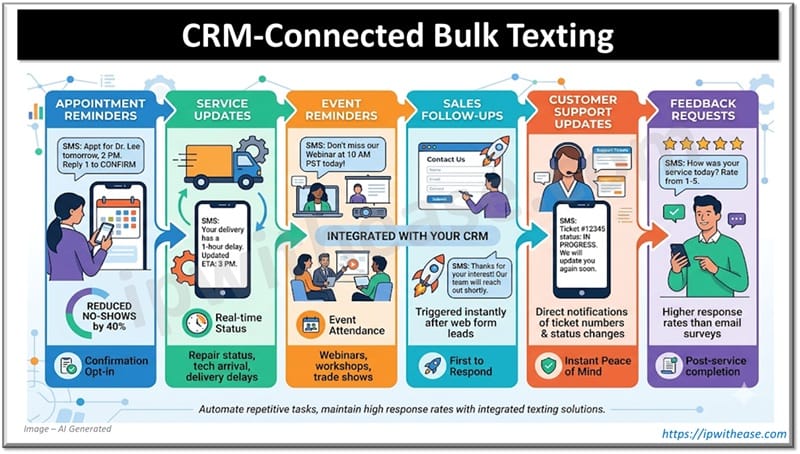
Common Use Cases for CRM-Connected Bulk Texting
Using SMS automation allows businesses to handle repetitive tasks efficiently while maintaining a high response rate. Here are a few ways companies use integrated texting:
- Appointment Reminders: Send a short appointment reminder SMS before a booking. Including the date, time, and a “reply to confirm” option can significantly reduce no-show rates.
- Service Updates: This is useful for repair status updates, delivery delays, or technician arrival notices. It keeps the customer informed in real-time without requiring a phone call.
- Event Reminders: Whether it is a webinar or a local workshop, event reminder SMS messages help increase attendance by keeping the event top-of-mind for registrants.
- Sales Follow-Ups: Automated sales follow-up SMS can be triggered immediately after a lead fills out a web form, ensuring the business is the first to respond to an inquiry.
- Customer Support Updates: Send ticket numbers or status changes directly to a customer’s phone. This provides instant peace of mind and reduces the number of “check-in” calls to the support desk.
- Feedback Requests: Sending a customer feedback SMS shortly after a service is completed often results in much higher response rates than email surveys.
What a Good Business SMS Workflow Should Include
A professional SMS workflow is about more than just hitting “send.” It requires a structured approach to ensure the messages are effective and compliant.
- Clean Contact Data: Phone numbers must be stored in standardized fields. Bad data leads to failed sends and broken personalization strings that confuse customers.
- Consent Status: Your workflow must confirm opt-in status before any message goes out. Twilio’s documentation emphasizes that opt-out configuration is a prerequisite for bulk messaging based on regional legal requirements.
- Clear Sender Identity: Never leave the customer guessing who is texting them. It is recommended to make your brand easy to identify within the message body so recipients feel safe clicking links.
- One Clear CTA: Do not overwhelm the reader. It is suggested to have one clear goal and one intended action, such as “Click here to confirm” or “Reply YES to accept.”
- Reply Handling: You must decide who receives replies and what happens if a message arrives after hours. A reply should automatically become a task for the sales or support team.
- Reporting: Track your results carefully. The platform focuses on response syncing and activity tracking, allowing you to see which campaigns actually drove engagement.
CRM Integration vs. Standalone Texting Tool
Deciding between a standalone tool and a CRM-connected system depends on your specific needs.
Standalone tools can work well for simple, one-time announcements where you don’t need to track long-term customer history. However, for most business needs, CRM-connected SMS is the superior choice.
| Use Case | Better Fit |
| Simple one-time announcement | Standalone texting tool |
| Customer lifecycle messaging | CRM-connected SMS |
| Appointment reminders | CRM-connected SMS |
| Two-way sales follow-up | CRM-connected SMS |
| Custom application workflow | SMS API |
CRM SMS software is much stronger when customer history, consent management, and team-wide visibility matter. If your goal is to build a relationship rather than just “blasting” a list, the integration is essential.
Example Workflow: From CRM Segment to Customer Reply
An effective SMS CRM workflow follows a logical path that protects the customer experience.
- Build the Segment: Use your CRM to find the right people. For example, you might pull a list of customers who have an appointment scheduled for tomorrow.
- Check Consent: The system automatically filters out any contacts who have not opted in or who have previously unsubscribed.
- Send the Message: A personalized reminder is sent with a clear sender ID and a single call to action, like “Reply C to confirm.”
- Route Replies: If the customer replies “C,” the CRM updates the appointment status automatically. If they reply with a question, the message is routed to a support agent.
- Log the Activity: The entire exchange is saved to the customer’s profile, providing a permanent record for any team member who talks to that customer in the future.
Bulk Texting Works Best When the Data is Clean
Bulk texting is a powerful tool, but it should never be treated as a separate, disconnected “blast” tool.
When you connect your texting platform to your CRM, you give your team access to better data, cleaner segments, and more reliable reporting. This integration ensures that your communication is relevant and that every reply is handled by the right person.
The goal of business texting is to send useful messages to the right people and know exactly what happened next.
A smart SMS setup helps your business communicate faster and more effectively without scattering important customer information across different tools and spreadsheets. Keep your data central, and your text messaging will become one of your most valuable assets.
ABOUT THE AUTHOR

IPwithease is aimed at sharing knowledge across varied domains like Network, Security, Virtualization, Software, Wireless, etc.