Table of Contents
In Verizon’s 2024 report, 3% of breaches that started with an exploited vulnerability hit an edge device or a VPN appliance. In the 2025 report, it was 22% (!). What the hell happened?
Two things.
First, math. Verizon took every breach that began with exploitation and asked what share hit an edge device or a VPN. That share grew almost 8X (22 over 3 is closer to 7.3, but Verizon’s own words are “almost eight-fold”).
The pie got bigger too. Exploiting a vulnerability became more common: up 34%, to about a fifth of all breaches. So it’s 22% of a bigger pie. Do the multiplication and edge devices and VPNs were the way in for roughly 4–5% of all breaches. Smaller than the headline, still a lot of front doors. And the pie kept growing. In the 2026 report, exploitation starts 31% of breaches and has overtaken stolen credentials as the most common way in. (Partly a change in how Verizon counts, to be fair: credentials still show up somewhere in 39% of breaches.)
Second, a belief that ‘attackers suddenly discovered VPNs’. nicolas-cage-frustrated.jpg. The VPNs were there all along. What changed was a pile-up of attacks. In the time the 2025 report covers (November 2023 to October 2024), attackers used holes in the products that sit at the edge of company networks.
| When | Vendor | What |
|---|---|---|
| Late 2023 | Citrix | NetScaler, “Citrix Bleed” |
| January 2024 | Ivanti | Connect Secure VPN |
| February 2024 | Fortinet | FortiOS SSL VPN |
| April 2024 | Palo Alto | GlobalProtect, CVE-2024-3400 |
| April 2024 | Cisco | ASA firewalls, the “ArcaneDoor” campaign |
| May 2024 | Check Point | VPN gateways |
Six vendors in about seven months. Many of these were zero-days. That means they were exploited before a patch even existed.
Why do attackers fancy these shiny boxes so much?
Imagine you’re the attacker and you are picking a target. You have three choices:
A laptop – it runs an EDR agent. The agent sees your exploit and says, “I saw that, b*tch.” Intune patches a laptop monthly and automatically. Its owner reports weird pop-ups to IT. Not a low-hanging fruit. Skip.
The firewall. It faces the internet by design, so scanning services like Shodan already list every one of them. You can’t install a normal EDR agent on it, so nobody watches what happens inside. Its logs are thin. It gets patched by hand, on a free Saturday, by whoever owns the network. And one bug works on thousands of identical boxes worldwide. The firewall says nothing about your exploit, because nobody gave it a way to.
Same firewall, but count what it holds. VPN sessions, credentials, and a direct line to everything behind it. You picked the box that guards the building, and it doesn’t call anyone.
The firewall is the only device in the building that faces the entire internet and has never once been asked to install antivirus, so attackers went for the door with no camera.
Are you thinking, “Fine, the door is a problem. So why don’t people just lock it?” Me too.
Because locking it means closing the building for a while. A laptop installs its patch in the background and reboots over lunch. A firewall or a core switch runs new firmware only after a reload, and while it reloads, everything behind it is offline: VPN sessions drop and desk phones go quiet. Unless you paid for a redundant pair, a quiet upgrade is off the table.
So people put it off. Verizon checked: only 54% of edge-device vulnerabilities were fully remediated during the year, and those took a median of 32 days. That’s something that sits in my stomach. The reload is the first obstacle of several. Most Cisco image downloads need a service contract (without one, you ask TAC for the free security upgrade, serial number and advisory link in hand). The reload itself waits for a weekend window and someone’s Saturday. If the new image doesn’t boot at a remote site, somebody gets in the car with a console cable and a private quiet horror. And the RMM’s patch report shows none of it, since a switch has no agent.
Each of those is a fair reason to wait one more month. The schedule below makes each step cheaper.
Schedule Network Firmware Patches
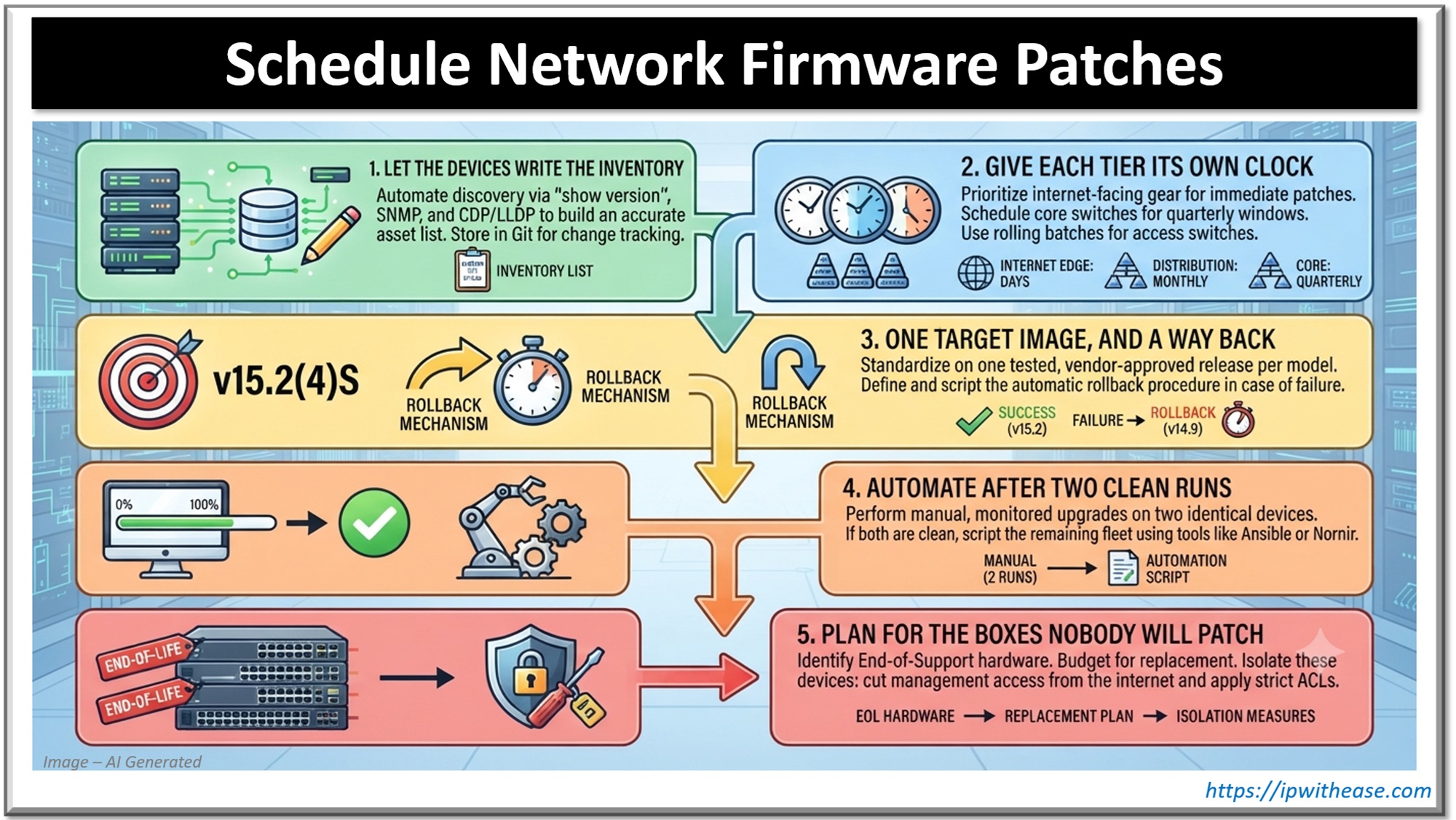
1. Let the devices write the inventory
Valiant efforts aside, a spreadsheet inventory is as fresh as the last person who opened it, and the devices know better. show version gives you the model and running image; SNMP gets the same from every box at once (sysDescr, ENTITY-MIB). show cdp neighbors detail, or LLDP on mixed gear, makes each switch list what’s plugged into it, which is how the forgotten switch in the warehouse turns up.
Pull it into Git nightly and the diff shows what changed. Add two columns by hand: who owns the box (one name; three names means you have too many cooks in the kitchen), and whether the internet can reach it.
Then check versions against vendor advisories and CISA’s KEV catalog of vulnerabilities known to be exploited. In September 2025, after attackers chained CVE-2025-20333 and CVE-2025-20362 on Cisco ASA, CISA’s Emergency Directive 25-03 gave US federal agencies about a day to find every ASA and Firepower device. jesuschrist.jpg. With an inventory the devices wrote, that’s one search.
2. Give each tier its own clock
Sort the inventory by exposure (who can reach the box) and blast radius (who loses the network while it reboots). Internet-facing gear goes first and out of cycle, as soon as a fix ships or the CVE lands in KEV: Palo Alto’s CVE-2024-3400 (GlobalProtect, CVSS 10) was exploited in April 2024 before the hotfix existed. Sometimes the first fix is a config line. A switch web UI that the internet can reach is one of those poor life decisions. In October 2023, CVE-2023-20198 let attackers create admin accounts through the Cisco IOS XE web UI, and Cisco’s first advice was to switch off the HTTP server:
show running-config | include ip http server|secure|active
configure terminal
 no ip http server
 no ip http secure-server
The core switch is close to unreachable from outside, but its reload takes everyone down, so it gets planned windows and a rollback. Access switches go in rolling batches, timed around the phones on that floor. A sane starting rhythm: days for internet-facing gear, a quarterly window for the core, monthly batches for access.
3. One target image, and a way back
Pick one target release per model. Cisco marks its suggested release with a gold star on the download page, a safer default than the newest build. Read the release notes from cover to cover first, changed defaults especially: a release that drops an old SSH algorithm can lock out your own backup tool. On Catalyst 9000 switches in install mode, the upgrade looks like this:
copy running-config tftp://10.0.0.5/sw-access-01.cfg
verify /md5 flash:cat9k_iosxe.<version>.SPA.bin
! match the hash on Cisco's download page
install add file flash:cat9k_iosxe.<version>.SPA.bin
install activate auto-abort-timer 120
! the switch reloads; log back in and run the checks
install commit
install activate auto-abort-timer 120 reloads the switch into the new image and starts a 120-minute countdown. If nobody runs install commit before it ends, the switch rolls back to the old image by itself. (Install mode already runs a longer default timer; the 120 just shortens it to something you’ll actually sit through.) I have a soft spot for that timer: it covers the ugly case where the upgrade breaks management and you can’t reach the switch at all.
Before you commit, compare show ip ospf neighbor, show ip bgp summary and show interfaces status with the output you saved before the upgrade; afterwards, install remove inactive clears the old files. Other platforms roll back their own way, so check your vendor’s docs.
4. Automate after two clean runs
Run the steps by hand on two switches of the same model. If both go clean, script them with the Ansible cisco.ios collection, or Nornir and Netmiko if your team writes Python. A script repeats your mistakes as faithfully as your fixes, on forty switches at once. Meraki and Mist stage and schedule firmware from the controller, so there the automation is a setting.
If you run an MSP, you already patch laptops and servers from an RMM, and RMMs differ in what they do with network gear (SNMP monitoring, config backups, scripts on switches). Before you build all of this yourself, a comparison of RMM platforms helps you see which one covers what.
5. Plan for the boxes nobody will patch
Some hardware gets no more fixes at all. Cisco’s end-of-life bulletins include an “End of Vulnerability/Security Support” date (a round of applause for the blunt name), and after it, security fixes stop. Put that date in the inventory next to the owner column and budget the replacement before it. Until the new box arrives, cut what you can: management off the internet, and access lists on whatever has to stay reachable.
ABOUT THE AUTHOR

IPwithease is aimed at sharing knowledge across varied domains like Network, Security, Virtualization, Software, Wireless, etc.