Table of Contents
A setup can feel old before the computer is done. Slow startup, cramped desk space, fuzzy text, noisy fans, and worn-out accessories can make daily use feel worse than it should. However, most people replace their PC too early when a few targeted upgrades would fix the problem.
Smarter software and better AI tools and solutions are changing what “good enough” looks like for a PC you already own. The goal is not to chase every upgrade. It is to fix the parts of your setup that slow you down most.
Refresh Your PC Setup
Start With the Changes You Feel Right Away
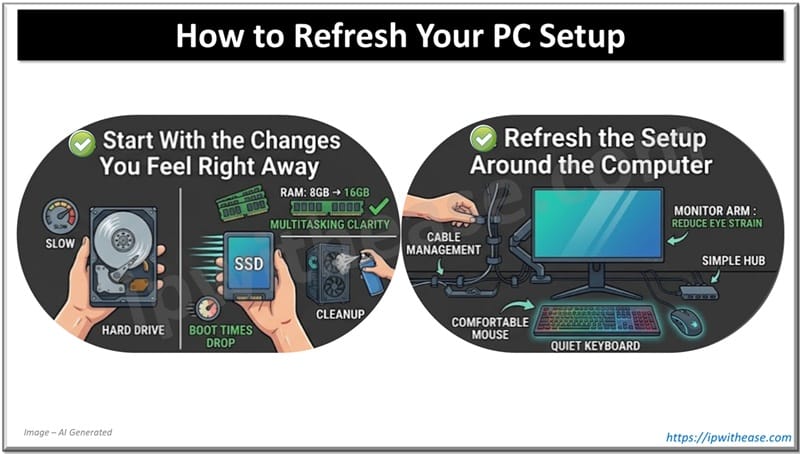
For most people, the biggest gains come from storage, memory, and cleanup. If your computer still uses a hard drive, replacing it with an SSD is usually the single best upgrade you can make. Boot times drop. Apps open faster. The machine feels less sluggish from day one.
RAM is the next place to look. Moving from 8 GB to 16 GB can make a clear difference for web browsing, schoolwork, office apps, video calls, and multitasking. Before you buy anything, clean up the system first. Remove startup apps you do not need. Uninstall old software. Free up storage. Check for dust buildup and heat issues. For adventurous PC builders, this step helps reveal whether the machine still has room to improve. Many “modern-feeling” gains still come from these basic fixes and not from buying a whole new tower.
Refresh the Setup Around the Computer
A setup is more than the box under the desk. The parts you look at and touch all day can feel dated before the processor does. An old monitor, a cheap mouse, poor screen height, or messy cables can make a working PC feel much older than it is.
That is why quality-of-life changes matter. A better monitor can make text clearer and reduce eye strain. A laptop stand or monitor arm can raise the screen to a better height. A quieter keyboard and a more comfortable mouse can improve daily use more than a small internal upgrade. Even cable clips, a desk mat, or a simple hub can make the space easier to use.
If you follow the latest AI hardware news, you’ll notice that a “modern setup” is no longer defined by raw speed alone. It is about reducing friction – faster storage, smoother multitasking, better ergonomics, and tools that make everyday work easier.
To understand what actually needs upgrading, it helps to know where your system fits in today’s computing landscape. Most personal systems fall into the bottom tier of this stack – AI-capable PCs designed for everyday tasks like browsing, productivity, gaming, and light creative work. As you move up, systems become more specialized. Workstations handle heavier modeling and data workloads, while servers and data centers are built for large-scale AI training.
For most users, this distinction matters more than chasing raw performance. You do not need to move up the stack to get a better experience. You need to get more out of the system you already have.
So What is an AI PC?
AI PCs are systems designed to run AI-powered features directly on your device, helping things run faster while keeping your data more private. In some cases, this can also reduce reliance on cloud tools and lower long-term costs. These capabilities are becoming more common in everyday computing.
For users who need more performance, systems like AI-capable mobile workstations can handle more demanding workloads. But for most people, the biggest improvements still come from targeted upgrades like faster storage, more memory, and a setup that is easier and more comfortable to use every day
Match the Upgrade to the Way You Use It
The best upgrade depends on what you do most. A home office setup has different needs than a casual gaming rig or a student laptop. The goal is not to buy the most exciting part. It is to fix the biggest bottleneck first.
- Home Office Workers: Start with an SSD (Solid State Drive) if needed, then 16 GB RAM, then a better monitor or chair for long days at the desk.
- Casual Gamers: SSD and 16 GB RAM usually come first. A smoother monitor can help a lot. A GPU upgrade only makes sense if the rest of the system can support it.
- Students: Faster storage, more RAM, and a better desk setup can make research, writing, and video calls easier.
- Creators and Streamers: More RAM, a larger SSD, a better mic, a better webcam, and a second monitor can improve workflow more than a small CPU bump.
- Aging Family PCs: An SSD first, then a small memory bump if it is cheap, plus better basic accessories, can make an old family computer feel usable again.
Know When to Refresh and When to Stop
Refreshing makes sense when the machine still runs the software you need, gets security updates, and handles daily tasks, but feels slow, noisy, or awkward to use. Desktops are usually easier to extend because storage, RAM, graphics cards, and power supplies are more accessible. Laptops are more limited. Some allow storage changes. Many do not allow memory upgrades at all.
There is a point where it stops being smart. If you are replacing several major parts at once, fighting old sockets, weak power limits, or repeated failures, a new machine may be the better choice. It is important to keep expectations realistic. An SSD and more RAM can make an older PC feel much better. They do not turn a very old system into a high-end gaming or editing machine.
ABOUT THE AUTHOR

IPwithease is aimed at sharing knowledge across varied domains like Network, Security, Virtualization, Software, Wireless, etc.