Table of Contents
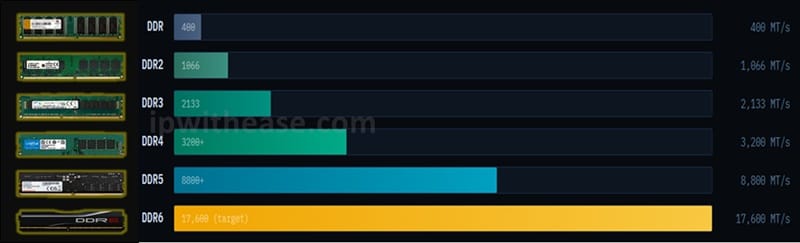
From the modest 400 MT/s of original DDR to the blazing 17,600+ MT/s of DDR6, memory technology has evolved dramatically. Here’s everything you need to understand each generation — how it works, where it fits, and whether you need to upgrade.
RAM — Random Access Memory — is your computer’s short-term workspace. Every program you run, every browser tab you open, every game you play lives in RAM while it’s active. The “DDR” generations you see on spec sheets aren’t just marketing — each represents a genuine leap in speed, efficiency, and architecture. This guide decodes them all.
What Does “DDR” Actually Mean?
DDR stands for Double Data Rate. It refers to a type of synchronous dynamic RAM (SDRAM) that transfers data on both the rising and falling edge of each clock cycle — effectively doubling throughput compared to older single data rate (SDR) memory.
Before DDR, computers used SDR SDRAM, which could only transfer data once per clock cycle. DDR was the industry’s solution to the growing “memory wall” — the gap between how fast CPUs could process data and how fast memory could supply it.
Key Metric: MT/s vs MHz
You’ll often see RAM marketed in MHz, but the correct unit is MT/s (Megatransfers per second). A DDR4-3200 stick runs at 1600 MHz clock but delivers 3200 MT/s because of the double-data-rate architecture. Both terms are widely used — just know they refer to the same spec.
Each successive DDR generation improves on four core dimensions: speed (more transfers per second), bandwidth (GB/s throughput), voltage (lower power draw), and capacity (higher density per module).
DDR Generations
DDR Legacy · Obsolete
| DDR | Double Data Rate SDRAM — The Original | Peak Speed 400 MT/s |
| Introduced 2000 · End-of-Life | ||
The original DDR standard was a watershed moment in PC memory. Replacing SDR SDRAM, it doubled bandwidth overnight by reading data twice per clock cycle. The most common speeds were DDR-200, DDR-266, and DDR-400, corresponding to 200, 266, and 400 MT/s respectively.
DDR ran at 2.5V–2.6V, which was actually lower than SDR (3.3V) — an early sign of the power-efficiency trend that would define every subsequent generation. A standard 184-pin DIMM form factor was used for desktops, and SO-DIMM for laptops.
| Voltage 2.5 – 2.6V | Speed Range 200–400 MT/s | Max Module 1 GB | DIMM Pins 184 |
DDR2 Legacy · Obsolete
| DDR2 | Double the I/O, Half the Voltage | Peak Speed 1066 MT/s |
| Introduced 2003 · End-of-Life | ||
DDR2 doubled the I/O bus clock speed relative to DDR while reducing operating voltage to 1.8V — a meaningful drop that reduced heat and power consumption. The internal cell array still ran at the same rate as DDR, but external data rate doubled through a technique called 4-bit prefetch (up from DDR’s 2-bit).
DDR2 modules used a new 240-pin connector — physically incompatible with DDR slots, preventing accidental mismatches. Peak speeds reached DDR2-1066 (1066 MT/s). By the mid-2000s, DDR2 was in virtually every consumer PC.
| Voltage 1.8V | Speed Range 400–1066 MT/s | Max Module 4 GB | DIMM Pins 240 |
DDR3 Legacy · Declining Use
| DDR3 | The Long Reign — Nearly a Decade | Peak Speed 2133 MT/s |
| Introduced 2007 · Declining | ||
DDR3 enjoyed one of the longest production runs of any RAM standard, powering everything from budget laptops to server farms from 2007 through the mid-2010s. It introduced an 8-bit prefetch architecture (doubling DDR2’s 4-bit), which enabled much higher speeds despite lower power.
Voltage dropped to 1.5V (with a low-power DDR3L variant at 1.35V), significantly improving laptop battery life. The 240-pin DIMM form factor remained — though the notch was repositioned to prevent cross-generation installation. Intel’s Sandy Bridge and Ivy Bridge CPUs made DDR3 ubiquitous in the mainstream market.
| Voltage 1.5V (1.35V L) | Speed Range 800–2133 MT/s | Max Module 16 GB | DIMM Pins 240 |
DDR4 Active · Mainstream Standard
| DDR4 | The Modern Standard — Still Dominant | Peak Speed 3200 MT/s+ |
| Introduced 2014 · Current Mainstream | ||
DDR4 took the throne in 2014 and, despite DDR5’s arrival, remains the most widely installed RAM standard in 2026. It brought voltage down to 1.2V, improved density with up to 32GB per module, and introduced bank group architecture that reduced latency by allowing simultaneous access to multiple bank groups.
DDR4 modules use a 288-pin DIMM and are incompatible with DDR3 slots. Standard consumer speeds range from DDR4-2133 to DDR4-3200 for JEDEC specs, with XMP/EXPO overclocked kits reaching DDR4-5000 and beyond. For most everyday tasks — office work, gaming, browsing — DDR4 still delivers more than enough bandwidth.
DDR4 Sweet Spot
For DDR4 systems, DDR4-3200 CL16 represents the best price-to-performance balance in 2026. Higher speeds show diminishing returns for most workloads unless you’re running an AMD Ryzen platform, which benefits more from faster RAM due to its Infinity Fabric interconnect.
| Voltage 1.2V (1.05V L) | Speed Range 1600–5000 MT/s | Max Module 64 GB | DIMM Pins 288 |
Related: DDR4 vs DDR5 RAM
DDR5 Active · Premium & New Builds
| DDR5 | The New High-End — Dual-Channel Native | Peak Speed 8400+ MT/s |
| Introduced 2021 · Rapidly Growing | ||
DDR5 represents the most architecturally significant leap since the original DDR. The most notable change: each DDR5 module now contains two independent 32-bit sub-channels instead of a single 64-bit channel. This enables more efficient burst transfers and higher effective bandwidth even at the same clock speed.
Voltage drops to 1.1V, and the power management IC (PMIC) moves from the motherboard onto the RAM module itself — improving voltage regulation accuracy. DDR5 also doubles the base burst length to 16 (from 8 in DDR4) and increases maximum module density dramatically with 128GB modules now available. Intel 12th gen (Alder Lake) and AMD Ryzen 7000 both support DDR5 exclusively or as an option.
| Voltage 1.1V | Speed Range 4800–8800 MT/s | Max Module 128 GB | DIMM Pins 288 |
BUY
Early DDR5 Latency Trade-off
First-generation DDR5 had noticeably higher primary latencies (CL40–CL46) compared to DDR4’s CL14–CL18, partially offsetting raw bandwidth gains for latency-sensitive tasks. Modern DDR5-6400 CL32 kits largely close this gap and outperform DDR4 across the board in 2024–2025 platforms.
DDR6 Emerging · Not Yet Consumer
| DDR6 | The Next Frontier — Double the Channels | Target Speed 17,600 MT/s |
| Spec Ratified 2024 · Early Sampling 2026 | ||
DDR6 is JEDEC’s latest standard, with specifications ratified in 2024. While consumer products are in early sampling as of 2026, DDR6 promises another landmark jump. The most transformative change: DDR6 moves to four 16-bit sub-channels per module (doubling DDR5’s two 32-bit sub-channels), allowing even finer-grained parallel access.
JEDEC’s baseline DDR6 spec targets 8800 MT/s minimum with a roadmap extending to 17,600 MT/s at the high end. Voltage is expected to drop to approximately 1.0V–1.1V. DDR6 will use a new physical interface incompatible with DDR5 slots. It is anticipated to first appear in high-end workstations and AI/ML servers before trickling into consumer platforms — similar to how DDR5 debuted in Intel 12th gen systems.
| Voltage ~1.0 – 1.1V | Speed Range 8800–17,600 MT/s | Max Module 256 GB (est.) | DIMM Pins TBD |
Should You Wait for DDR6?
For most consumers in 2026: no. DDR6 consumer platforms are at least 18–24 months away from mainstream availability and pricing parity. Build or upgrade with DDR5 today if your budget allows — you’ll have a platform that remains competitive well into the DDR6 era.
Comparison: DDR vs DDR2 vs DDR3 vs DDR4 vs DDR5 vs DDR6
| Generation | Year | Voltage | Speed (MT/s) | Prefetch | Max Module | Pins (DIMM) | Status |
|---|---|---|---|---|---|---|---|
| DDR1 | 2000 | 2.5V | 200 – 400 | 2n | 1 GB | 184 | Obsolete |
| DDR2 | 2003 | 1.8V | 400 – 1,066 | 4n | 4 GB | 240 | Obsolete |
| DDR3 | 2007 | 1.5V | 800 – 2,133 | 8n | 16 GB | 240 | Legacy |
| DDR4 | 2014 | 1.2V | 1,600 – 5,000+ | 8n | 64 GB | 288 | Mainstream |
| DDR5 | 2021 | 1.1V | 4,800 – 8,800+ | 16n | 128 GB | 288 | Premium |
| DDR6 | 2024 (spec) | ~1.0V | 8,800 – 17,600 | TBD | 256 GB+ | TBD | Emerging |
Download the comparison table: DDR vs DDR1 vs DDR2 vs DDR3 vs DDR4 vs DDR5 vs DDR6
Physical Compatibility: Pin Counts
Every DDR generation uses a different physical connector. They are never cross-compatible — a DDR5 stick will not fit in a DDR4 slot, even though both use 288 pins (the key notch is repositioned).
| DDR1 184 | DDR2 / DDR3 240 | DDR4 / DDR5 288 |
| pins · DIMM SO-DIMM: 200-pin | pins · DIMM SO-DIMM: 204-pin | pins · DIMM SO-DIMM: 260-pin |
LPDDR: Low Power for Mobile & Laptops
Alongside desktop DDR standards, there exists a parallel family called LPDDR (Low Power DDR), designed for smartphones, tablets, and thin laptops. LPDDR versions correspond roughly to their desktop counterparts (LPDDR5X ≈ DDR5 era) but are optimised for power efficiency over raw throughput.
LPDDR modules are soldered directly to the motherboard in most mobile devices (not user-replaceable), and operate at even lower voltages — LPDDR5 runs at just 0.5V–1.05V depending on operating mode. Apple’s Unified Memory Architecture in M-series chips is a custom LPDDR-based implementation integrated alongside the processor die.
LPDDR5X in 2026
LPDDR5X (the extended version of LPDDR5) is the current flagship mobile memory spec, delivering up to 8,533 MT/s in Snapdragon 8 Elite and Dimensity 9400 devices. Qualcomm’s upcoming platforms are expected to support LPDDR6 when it becomes available.
Which RAM Do You Actually Need?
The right answer depends almost entirely on your platform — your CPU and motherboard determine which generation you can use. You cannot choose DDR5 if your board only supports DDR4. Here’s a by-use-case breakdown:
| Everyday PC / Office Use Browsing, documents, video calls, light productivity. Speed above DDR4-3200 produces zero real-world difference for these tasks. DDR4-3200 16GB (2×8GB) | PC Gaming Games benefit from both capacity and speed. AMD Ryzen benefits more from fast RAM than Intel due to the Infinity Fabric link. DDR4-3600 or DDR5-6000 32GB | Video Editing / 3D Rendering Memory bandwidth directly impacts timeline performance in Premiere and DaVinci. More capacity matters as much as speed. DDR5-6400 64GB or more |
| AI / ML Workloads (CPU) Running large language models on CPU (llama.cpp etc.) is entirely bandwidth-bound. Faster RAM = faster token generation. More is more. DDR5-6400+ 96GB or 128GB | Laptops Most laptops have soldered LPDDR5 or LPDDR5X. Check before buying if you need more RAM later — many cannot be upgraded. LPDDR5X · Check upgradeability | New Build in 2026 If building fresh on a DDR5 platform, go DDR5. The price premium over DDR4 has largely evaporated, and future platform longevity is better. DDR5-6000 CL30 32GB (starter) |
Understanding Timings (CAS Latency)
Alongside speed (MT/s), RAM is rated by CAS latency (CL) — the number of clock cycles between a memory controller requesting data and the data being available. Lower CL numbers mean faster response. But CL must be interpreted relative to clock speed: a DDR5-6000 CL30 has the same absolute latency as DDR4-3000 CL15 (both ≈10ns), since the higher clock speed of DDR5 compensates for the higher CL number.
For overclocked kits, look for kits with both high speed and tight timings. A DDR5-6400 CL32 kit outperforms a DDR5-7200 CL40 kit in most real-world scenarios despite the lower headline speed.
Final Words
RAM technology has come a long way from DDR’s 400 MT/s debut in 2000 to DDR6’s projected 17,600 MT/s — a 44× increase in peak bandwidth over a quarter century. Each generation brought not just speed, but architectural improvements: better prefetch, lower voltage, higher density, and smarter channel designs.
For most users in 2026: if you’re on a DDR4 system, stay there — it’s still excellent. If you’re building new or upgrading to a DDR5 platform, take the leap — the price gap has narrowed considerably and the performance ceiling is much higher. And unless you’re specifically building for AI inference or extreme workstation needs, there’s no reason to wait for DDR6.
The number that matters most isn’t the generation — it’s whether your system has enough RAM for what you do. Speed optimisations matter, but going from 8GB to 16GB will benefit far more users than going from DDR4-3200 to DDR4-3600.
⚠️ DISCLAIMER
This blog contains affiliate links. If you purchase through these links, we earn a small commission at no extra cost to you, but that is what keeps this website alive and the helpful content coming your way.
Prices listed are approximate and may vary on Amazon/Flipkart at time of purchase as per the available offers. Always check the latest price before buying.
ABOUT THE AUTHOR

You can learn more about her on her linkedin profile – Rashmi Bhardwaj