Table of Contents
In the world of networking, downtime isn’t just an inconvenience, it’s a major problem. Whether you’re managing a small office network or a large enterprise data center, ensuring your network keeps running smoothly when the primary link fails is the top priority.
The most elegant and reliable way to achieve this is the floating static route. In this guide, we’ll explore in detail what a floating static route is, why it’s called “floating,” and how you can configure it to provide seamless backup for your primary dynamic routing protocol such as OSPF or EIGRP.
What is a Floating Static Route?
A floating static route is a static route configured with a higher administrative distance than the primary route, so it is only used as a backup if the main route fails. A floating static route has a higher AD than the primary route, so it “floats” in the routing table and becomes active only when the primary route disappears.
The Logic Behind the “Magic”: Administrative Distance (AD)
To understand how this works, you have to understand how a router chooses its favorite path. If a router learns about a destination from two different sources, it looks at the AD:
| Route Source | Default AD |
|---|---|
| Connected Interface | 0 |
| Static Route | 1 |
| EIGRP | 90 |
| OSPF | 110 |
| RIP | 120 |
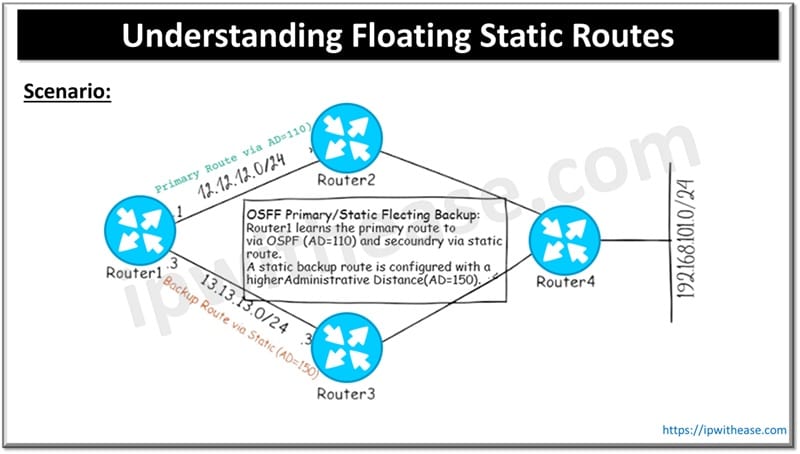
The Scenario
If you have an OSPF route (AD 110) as your primary and you want a static route to be the backup, you cannot leave the static route at its default AD of 1. If you do, the router will always use the static route and ignore OSPF.
To make it a “floating” route, you must manually set its AD to something higher than OSPF, for example, 150.
Why Use Floating Static Routes?
- Redundancy without Complexity: You don’t need to run complex protocols on your backup link (like a close 4G/5G connection or a secondary ISP).
- Bandwidth Conservation: Many backup links are “pay-as-you-go” or have low bandwidth. A floating route ensures this link is only used when absolutely necessary.
- Stability: It prevents “route flapping” from affecting your primary traffic during normal operations.
Real-World Use Case: OSPF Primary with Static Backup
Imagine a Branch Office connected to a Head Office.
- Primary Link: A high-speed Fiber line running OSPF.
- Backup Link: A lower-speed Broadband or LTE connection.
We want the router to use the Fiber line for everything. If a construction crew accidentally cuts the fiber, we want the router to automatically switch to the LTE link without any manual intervention.
Step-by-Step Configuration Guide (Cisco IOS)
Let’s look at the configuration for Router1 based on the topology we discussed earlier.
1. Configure the Primary OSPF Route
First, we ensure OSPF is running and learning the route to the destination network (192.168.101.0/24).
Router1(config)# router ospf 1

Router1(config-router)# network 12.12.12.0 0.0.0.255 area 0
At this point, Router1 learns the path via Router2 with an AD of 110.
2. Configure the Floating Static Route
Now, we add the static route but assign it a higher Administrative Distance. We will point this toward Router3 (the backup path).
Router1(config)# ip route 192.168.101.0 255.255.255.0 13.13.13.3 150Notice the 150 at the end. This is the AD. Since 150 is greater than OSPF’s 110, this route will “float” and not appear in the routing table yet.
3. Verification (The “Show” Commands)
To see if the setup is working, use:
- show ip route: Under normal conditions, you will only see the OSPF (O) route for 192.168.101.0.
- show ip route static: You will see the static route here, but it won’t be in the main routing table.
Testing the Failover
This is where the magic happens. If you shut down the interface connecting to the primary path:
Router1(config)# interface gigabitEthernet 0/0

Router1(config-if)# shutdown- OSPF detects the neighbor is down.
- The OSPF route (AD 110) is removed from the routing table.
- The Router looks for the next best thing.
- It finds our Static Route with AD 150.
- Traffic immediately starts flowing through the backup path.
Once you no shutdown the primary interface and OSPF reconverges, the OSPF route (110) will kick out the static route (150) because it has a better AD, and the static route will go back to “floating.”
Pro-Tip: The Importance of “Next-Hop” Reachability
A floating static route only disappears if the interface goes down or the next-hop becomes unreachable. If the link stays “Up/Up” but the provider’s network further down the line is broken, the route might stay in the table.
To solve this, advanced engineers use IP SLA (Service Level Agreement). IP SLA pings a destination (like 8.8.8.8) constantly. If the pings fail, it tells the static route to disappear even if the interface is still physically up.
ABOUT THE AUTHOR

You can learn more about her on her linkedin profile – Rashmi Bhardwaj