Table of Contents
Cabling is the backbone of data networks, and it is such a critical component of the architecture because, even if all the hardware, including devices and cables, are 10G capable, performance can be limited by this physical medium if not done right. But what exactly is poor cabling? Let’s highlight the common improper cabling mistakes and the technical impact they have on the network.
Typical Poor Cabling Mistakes
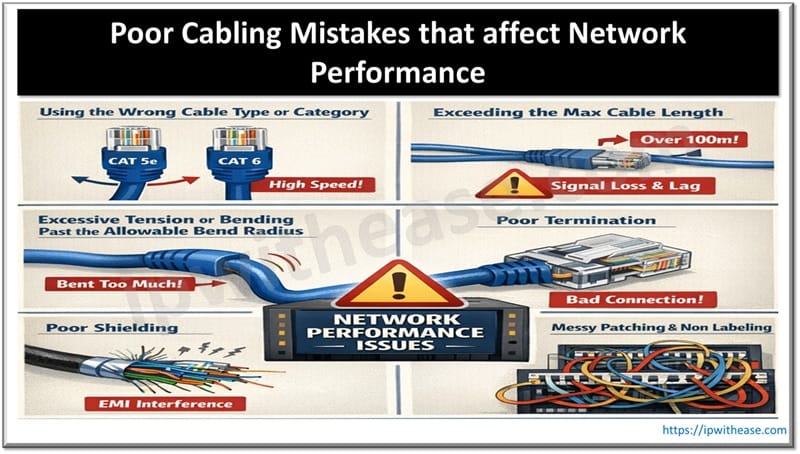
1. Using the Wrong Cable Type or Category
Using the wrong cable could mean something like deploying a Cat5 twisted pair cable to handle multi-gig uplinks or dense WiFi 7, 6, or 6E access points. It could also mean using copper wires to transmit data at distances over 100 meters.
Such mismatches cause performance bottlenecks that manifest as unstable links and attenuation. If you deploy a cable that can’t handle the required speeds, for instance, the cable won’t be able to support the higher signaling rates, meaning the SNR will drop and bit errors will rise. These high error rates will trigger auto-negotiated speed drops and retransmissions.
This wrong cable selection mistake might not even be about the performance. It could be installing a cable with a CM or CMR jacket in plenum spaces where cables with CMP jackets are more suitable. This creates a code and safety issue, which is still critical.
2. Exceeding the Max Cable Length
The standard channel length for twisted pair Ethernet cables (except Cat8) is 100 meters, where 10 meters is left to the patch cords. So you only have 90 meters to play with. Cabling mistakes here include installing long horizontal runs that exceed the 90 meters coupled with long patch leads, all of which combine to exceed 100 meters. It could also involve daisy chaining switches using long cords instead of deploying short home-run links.
Once the specified length is exceeded, you can expect the following.
- A reduced SNR that leads to signal attenuation
- More packet losses and bit errors, resulting in lower speeds or receivers requesting for retransmissions
- Increased latency because retransmissions and error handling add jitter and delay
So the network might pass the link up tests, but the throughput will be inconsistent, especially under heavy loads.
3. Excessive Tension or Bending Past the Allowable Bend Radius
Overly tensioning cables when running them through conduits or sharp 90° bends around door frames, rack rails, and tray edges constitute poor cabling. Cable kinking or crushing is also a poor practice and here’s why.
Severe bends, kinking, or crushing alter the geometry of the twisted pairs, leading to reflections and impedance mismatches. This causes attenuation around each bend.
On stretching, the excessive tension forces the conductors closer together, causing an increase in electromagnetic coupling between the pairs, resulting in NEXT (Near-End Crosstalk) and FEXT (Far-End Crosstalk). In fiber optic cables, excessive bending causes light to escape from the glass core, increasing attenuation.
Overall, these signal losses affect the cable’s throughput, resulting in random link drops, poor video quality, and slow file transfers.
4. Poor Termination
Typical termination errors include untwisting the pairs too far back when crimping (should not exceed half an inch), using non-compliant connectors, mixing 568A and 568B, mispunching conductors on the IDC blocks, and exposing conductors excessively outside the plug or jack.
Such connections can work at low loads, but they will definitely fail when traffic shoots. The reasons for this failure include an increase in crosstalk (NEXT and FEXT), higher bit error rates and packet losses, and return losses due to the reflections caused by impedance discontinuities.
5. Poor Shielding
This physical data layer is very sensitive to EMI, especially when using copper conductors. So simple mistakes like bundling data cables with power cables in the same tray or running unshielded cables next to noise sources (HVAC equipment, elevator gears, motors, fluorescent ballasts, etc.) will affect signal integrity big time. Routing such cables near transformers, high-powered UPSs, and large power supplies constitutes poor cabling as well.
The data cables will pick up noise from these sources via induction, which can lead to frame corruption, packet losses, and non-responsive applications on the user end.
6. Messy Patching and Non Labeling
This poor cabling aspect might not have a negative impact on performance, but it affects maintainability.
Spaghetti patch cords that consist of dense, unmatched bundles impede airflow across servers and switches, causing them to throttle, run hotter, and sometimes fail prematurely.
Non labeling, on the other hand, leads to longer troubleshooting because technicians will have to trace each cable and guess the end point. While doing so, this guesswork means wrong ports will be unplugged, resulting in unnecessary outages and downtimes.
Symptoms of Poor Cabling
The common symptoms that arise from poor cabling include:
- Port-Specific Jitter: Where access ports and trunks serving specific areas indicate higher latency in network monitoring tools.
- Frequent Packet Losses: On VLANs or specific ports.
- CRC (Cyclic Redundancy Check) and FCS (Frame Check Sequence) Errors: These indicate corrupted layer 2 frames.
- Late Alignment or Collision Errors: These suggest cable damage in marginal or half-duplex links.
- Automatic Negotiation Flapping: Where links negotiate speed repeatedly and drop from 1Gbps to 100Mbps.
Impact of Poor Cabling on Businesses
On the business side of the networking spectrum, poor cabling will result in these issues.
- Lost Revenue and Productivity: The result of the frequent downtimes and outages will be slow file access, unstable VoIP (poor call quality when handling clients), and high latency when handling time-sensitive tasks, such as trading in the capital markets.
- Increased Downtime: Which is due to the defective, unlabeled, and tangled cabling, which lengthens the troubleshooting time.
- Higher Maintenance Costs: Frequent technician site visits to fix recurring issues and ad-hoc repairs will increase maintenance costs.
- Safety and Security Risks: Safety risks come up when using the wrong cable, such as CM or CMR in plenum spaces. As for security, the frequent repairs and fixing exposes layer 1 to temporary unmonitored connections, bypassed cable routes, and forgotten devices that can give bad actors access to critical organizational and customer data.
Conclusion
Proper cabling is not just a cosmetic issue; it is critical towards achieving the required performance as envisioned when setting up the infrastructure, while also boosting network security and reducing maintenance costs over time. To achieve proper cabling, you only have to avoid the mistakes listed above and insist on using high-quality cables from reputable manufacturers that specialize in manufacturing custom cable assemblies for specific applications, which in this case can be shielded high-speed twisted pairs for industrial installations or Cat8 cables for 25G or 40G switch-to-switch connections.
ABOUT THE AUTHOR

IPwithease is aimed at sharing knowledge across varied domains like Network, Security, Virtualization, Software, Wireless, etc.