Table of Contents
Most teams set up DMARC once, see a green check somewhere, and move on. Months later, emails start landing in spam, a vendor reports a spoofed invoice using the company domain, or a mailbox provider starts rejecting messages. In many of these cases, the DMARC record was never working the way the team thought it was.
Checking your DMARC record takes less than a minute. Understanding what the result means, and what to do next, is where most people get stuck. This guide walks through both.
What DMARC Actually Does
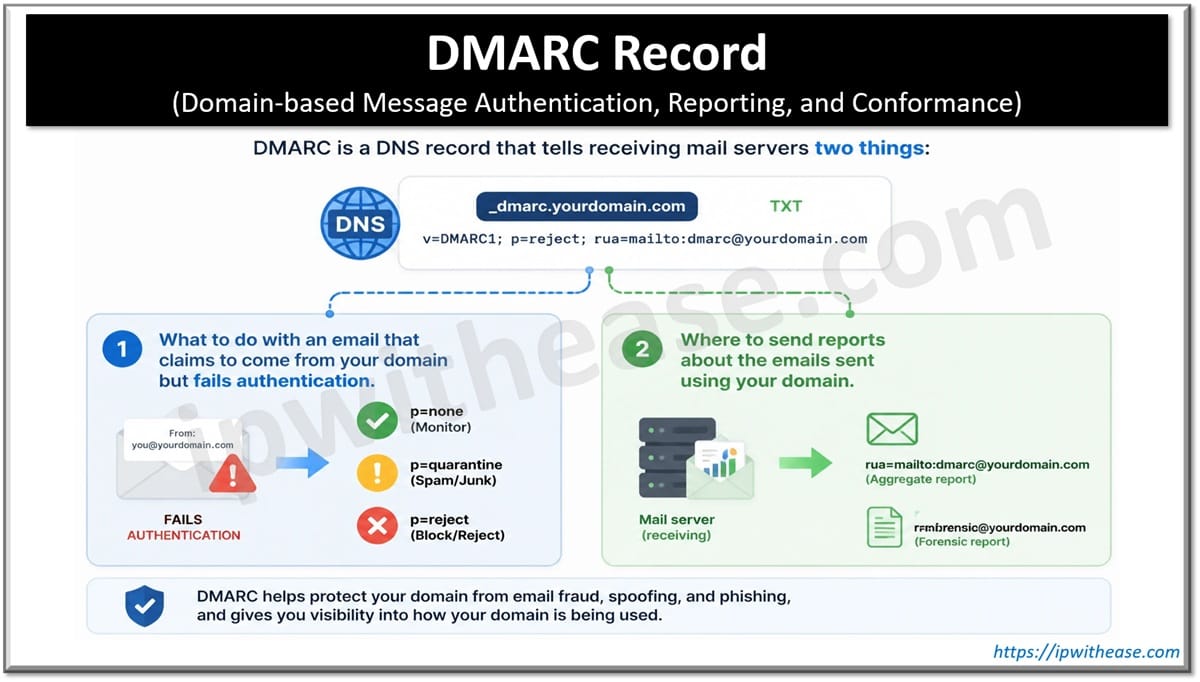
DMARC (Domain-based Message Authentication, Reporting, and Conformance) is a DNS record that tells receiving mail servers two things:
- What to do with an email that claims to come from your domain but fails authentication.
- Where to send reports about the emails sent using your domain.
DMARC does not check emails on its own. It relies on SPF and DKIM. A message passes DMARC when at least one of them passes and matches, or “aligns” with, the domain in the visible From address. That alignment rule is what stops a scammer from passing SPF on their own domain while showing yours to the reader.
Since 2024, Google and Yahoo require DMARC for anyone sending large volumes of email to their users, and Microsoft added similar rules for Outlook in 2025. So even if spoofing is not your main worry, a missing or broken record can hurt your delivery.
How to Check Your DMARC Record
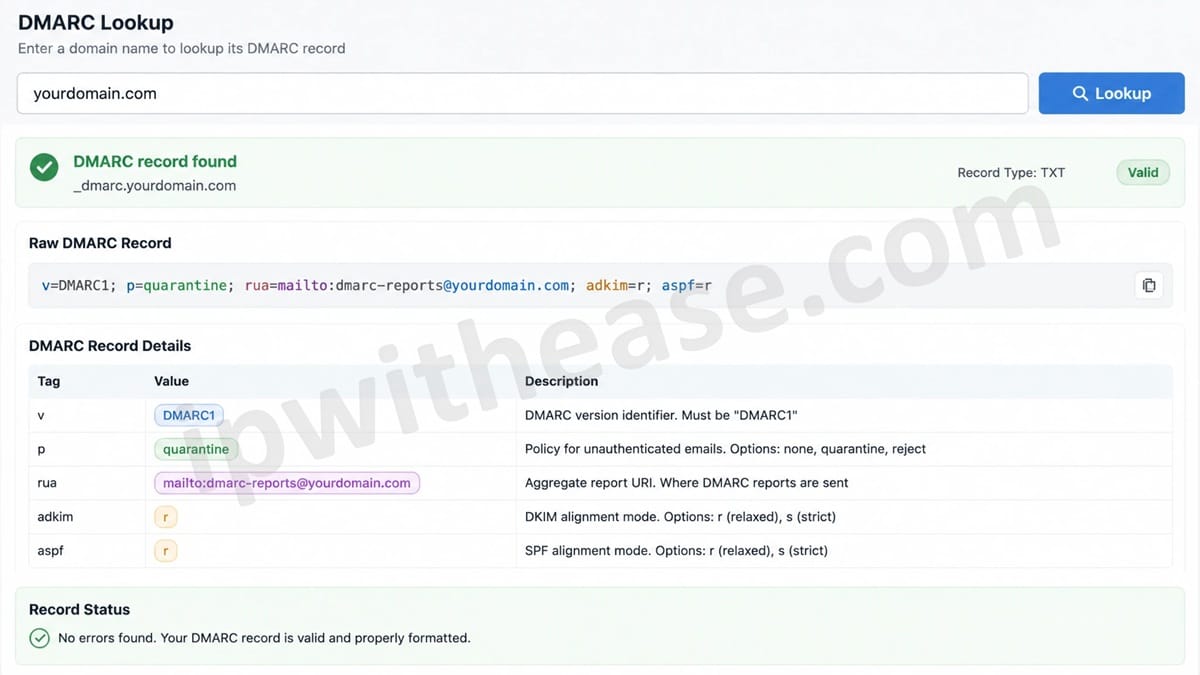
Your DMARC record lives in DNS as a TXT record at _dmarc.yourdomain.com. You can pull it with a command line query, but a web tool is faster and easier to read. Run a DMARC Lookup on your domain and you will see the raw record, each tag broken out, and any errors that stop it from working.
A basic, valid record looks like this:
v=DMARC1; p=quarantine; rua=mailto:dmarc-reports@yourdomain.com; adkim=r; aspf=r
How to Read the Result
Here are the tags you will see most often and what each one tells you.
v=DMARC1 is the version. It must be first and must be written exactly like this, or receivers ignore the whole record.
p= is the policy. It has three options:
- none means monitor only. Failing emails are still delivered.
- quarantine means failing emails go to spam.
- reject means failing emails are blocked.
rua= is where aggregate reports go. Without it, you have a policy but no data on who is sending as you.
ruf= is where failure reports go. Many providers no longer send these, so do not rely on them.
sp= sets a separate policy for subdomains. If it is missing, subdomains follow the main policy.
adkim= and aspf= set alignment. r (relaxed) allows subdomains to match the main domain. s (strict) needs an exact match.
pct= applies the policy to only part of failing mail. It is useful during rollout but easy to forget.
Common DMARC Record Problems
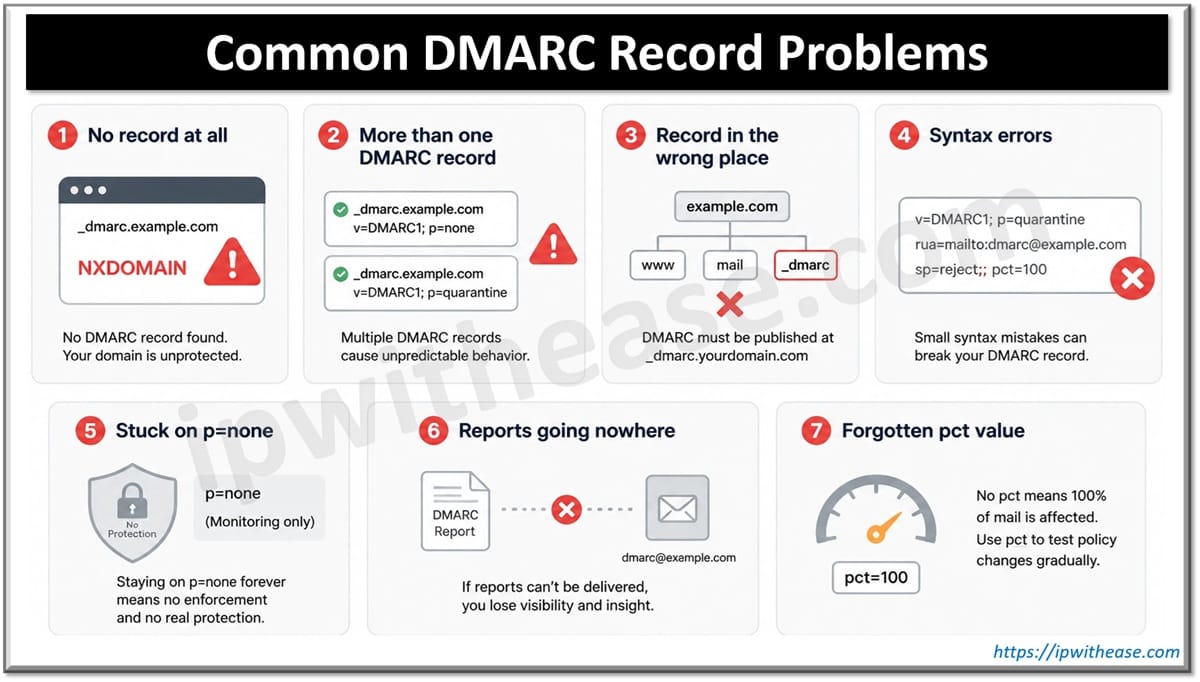
These are the issues that come up again and again when checking real domains.
No record at all
If the lookup finds nothing, receivers have no instructions for your domain. Anyone can send mail that shows your address, and you get no reports about it. Adding even a p=none record with a rua address is a big step forward.
More than one DMARC record
A domain must have exactly one DMARC record. If two exist, often because two people or two tools added one, receivers may ignore both. Merge them into one record and delete the other.
Record in the wrong place
The record must sit at _dmarc.yourdomain.com, not at the root domain. Some DNS panels add the domain name automatically, so entering the full host name can create _dmarc.yourdomain.com.yourdomain.com. Check what the host field really saves.
Syntax errors
A missing semicolon, a typo like p=rejct, or v=DMARC1 placed in the middle of the record can break it. Tags should be separated by semicolons, and v and p should come first.
Stuck on p=none
A none policy is where you should start, not where you should stay. Many domains sit at p=none for years. That gives visibility but no protection. Fake emails still reach the inbox.
Reports going nowhere
A rua address that points to a mailbox no one reads, or to an outside domain that has not authorized receiving your reports, means you are collecting data that nobody uses. If reports go to another domain, that domain needs a matching authorization record.
Forgotten pct value
A pct=20 set during testing means only 20 percent of failing mail gets your policy. If you moved to reject but left pct=20, most spoofed mail is still treated more gently than you think.
Fixing the Real Cause: SPF and DKIM Alignment
A clean record is only half the job. DMARC fails when your legitimate senders are not set up correctly. This is the part to fix before you tighten your policy.
Start by listing every service that sends email as your domain. This usually includes your main mailbox provider, a marketing platform, a CRM, a help desk, billing software, and sometimes a website contact form. Then, for each one:
- Add it to your SPF record if it sends from its own servers, and stay under the limit of 10 DNS lookups.
- Turn on DKIM signing using your own domain, not the vendor’s default domain.
- Confirm the domain it uses lines up with your From address.
Your aggregate reports show which sources pass and which fail. Work through the failing legitimate sources one by one.
Moving to Enforcement Safely
A safe path usually looks like this:
- Start with p=none and collect reports for two to four weeks.
- Fix every legitimate sender that shows up as failing.
- Move to p=quarantine, and use pct if you want to ramp up slowly.
- Watch reports closely for anything real landing in spam.
- Move to p=reject once your legitimate mail passes consistently.
- Remove or raise pct to 100 so the policy covers all failing mail.
Skipping steps is the most common reason teams roll back. If you jump straight to reject, invoices and password resets from a forgotten tool can disappear without anyone noticing.
When to Check Again
A DMARC record is not a one-time task. Run a quick check:
- After adding any new email service
- After a DNS migration or registrar change
- When delivery problems appear suddenly
- Every few months as routine upkeep
Changes made by other teams or vendors can quietly break a record that worked last month.
Final Thoughts
DMARC is one of the simplest ways to protect your domain from impersonation and keep your email trusted by inbox providers. The record itself is short, but small mistakes can leave it doing nothing. Check it, read each tag, fix your senders, and move step by step toward p=reject. A few minutes of checking can save weeks of chasing delivery issues and spoofing complaints later.
ABOUT THE AUTHOR

IPwithease is aimed at sharing knowledge across varied domains like Network, Security, Virtualization, Software, Wireless, etc.