Table of Contents
If you’ve ever typed a website address into your browser and wondered how it magically finds the right server halfway across the world, the answer starts with something called a DNS A record. It’s one of the oldest and most fundamental building blocks of the Domain Name System (DNS), and understanding it is essential for anyone working in networking, system administration, or web infrastructure.
In this article, we’ll break down what a DNS A record is, how it works, why it matters, and how it compares to other common DNS record types.
What is a DNS A Record
DNS A Record (short for “Address record”) is the type of syntax which is used in DNS records. “A” record specifies the real IP address of the domain for which entry is defined in the DNS server. DNS A Record is usually required in order to access or associate a domain name with an IP address, and can be in the form of many host name or sub domains.
Let’s take an example where a user wants to browse www.ipwithease.com which redirects to the Provider DNS server (also called Resolver Address). If provider DNS doesn’t hold the A record entry then, request is forwarded to root server from where request is moved to TLD Server. The TLD server manages address information for top level domains like .com, .net and .org etc. TLD directs the request to Authoritative name server for ipwithease.com. The authoritative name server contains the A records and responds to client with the IP address of www.ipwithease.com. Imperative to share that once resolver (Provider DNS) receives this information, it caches entry and responds with IP address of ipwithease.com is subsequent requests.
Declaring the “A” records with domain name example –
If we have a domain name with www.ipwithease.com Or mail.ipwithease.com or ftp.ipwithease.com in that case “www”, “mail”, and “ntp” are specified “A” records.
Similar to “A Records”, there are other records that are also required in DNS. Those are CNAME, MX, PTR, NS, SOA, SRV and TXT records. Notable is that “AAAA” record is used for mapped domain name or FQDN name with IPV6 address.
Related: What is a DNS SPF Record? Sender Policy Framework
Why Do We Need A Records?
Computers and network devices communicate using numerical IP addresses, not human-friendly names. Nobody wants to remember a string like 203.0.113.45 to visit their favorite website. DNS exists to bridge that gap, and the A record is the core mechanism that performs the actual name-to-address translation for IPv4.
Without A records, every device on the internet would need to know the raw IP address of every server it wants to reach, which simply isn’t practical at scale.
How Does a DNS A Record Work?
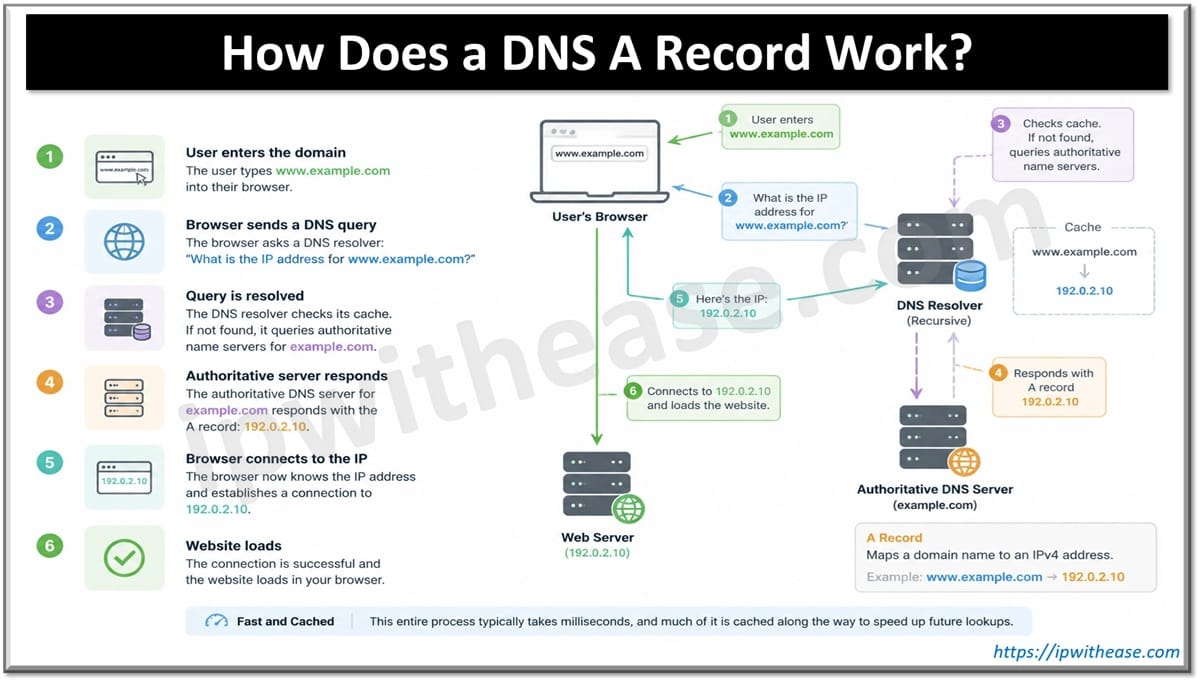
Here’s a simplified walkthrough of what happens when a user visits a website:
- The user types www.example.com into their browser.
- The browser sends a DNS query asking, “What is the IP address for www.example.com?”
- The query is forwarded through a DNS resolver, which checks its cache or queries authoritative name servers.
- The authoritative DNS server for example.com responds with the A record value, for instance 192.0.2.10.
- The browser now knows exactly which server to connect to and establishes a connection over that IP address.
- The website loads.
This entire process typically takes milliseconds, and much of it is cached along the way to speed up future lookups.
Related: How to disable DNS lookup in Cisco?
Anatomy of an A Record
A typical A record in a DNS zone file looks something like this:
example.com. IN A 192.0.2.10Breaking this down:
- Name: The domain or subdomain the record applies to (example.com)
- Class: Almost always IN (Internet)
- Type: A, indicating this is an address record
- Value: The IPv4 address the domain resolves to
- TTL (Time to Live): Often shown separately, this defines how long resolvers should cache the record before checking again (commonly ranging from a few minutes to 24 hours)
A Record vs. Other DNS Record Types
It’s easy to confuse an A record with other DNS records, so here’s a quick comparison:
- A Record: Maps a domain to an IPv4 address
- AAAA Record: Maps a domain to an IPv6 address (the modern successor to IPv4)
- CNAME Record: Maps a domain to another domain name, rather than an IP address
- MX Record: Directs email traffic to the correct mail server
- TXT Record: Stores text data, often used for domain verification and email security (SPF, DKIM, DMARC)
A domain can have multiple A records pointing to different IP addresses, which is often used for load balancing and redundancy across several servers.
Common Use Cases for A Records
- Hosting a website: Pointing a domain directly to the web server’s IP address
- Subdomain configuration: Assigning a subdomain like blog.example.com to a separate server
- Load balancing: Distributing traffic across multiple servers by listing several IP addresses under one domain
- Failover and redundancy: Configuring backup IP addresses for high availability setups
- Internal networking: Resolving hostnames to IP addresses within private, enterprise DNS zones
Best Practices When Managing A Records
- Keep TTLs reasonable: A very high TTL delays propagation of changes, while a very low TTL increases DNS query load. Most organizations strike a balance depending on how often infrastructure changes.
- Avoid unnecessary A record sprawl: Too many records pointing to outdated or unused IPs can create confusion and security risks.
- Pair with monitoring: Since A records point to specific servers, any IP change (such as during a migration) needs to be reflected promptly to avoid downtime.
- Use A records alongside AAAA records: With IPv6 adoption growing, maintaining both ensures compatibility across all client types.
Final Thoughts
The DNS A record may be a small piece of the internet’s infrastructure, but it plays an outsized role in how users reach the servers, applications, and services they depend on every day. Whether you’re managing a corporate network, hosting a personal website, or studying for a networking certification, understanding how A records work is a foundational skill that underpins almost everything else in DNS and network architecture.
ABOUT THE AUTHOR

You can learn more about her on her linkedin profile – Rashmi Bhardwaj