Table of Contents
Ransomware has moved well beyond the office. According to the Dragos 2026 OT/ICS Cybersecurity Year in Review, 3,300 industrial organizations worldwide were hit by ransomware in 2025, almost twice as many as the year before. The number of ransomware groups targeting industry grew by 49%, from 80 to 119. Not every attack reached a production line, but those that got into OT environments stayed hidden for 42 days on average. A well-designed DMZ network gives you a safe buffer between IT and OT and a single point where traffic can be monitored. This guide explains how it all fits together, step by step.
What Is a Network DMZ?
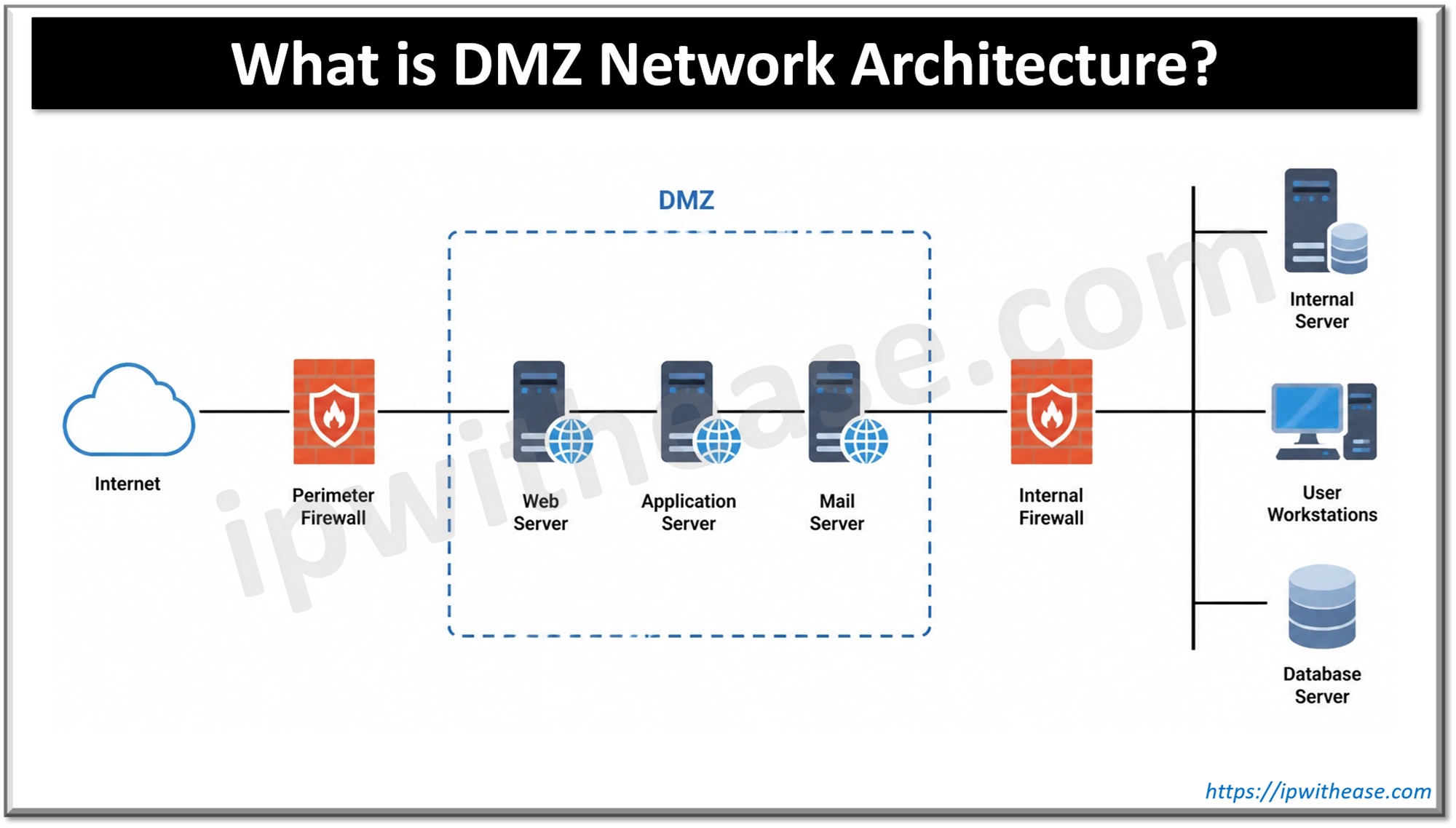
A DMZ separates the corporate (IT) network from control systems. The two sides never talk directly; each one talks only to the zone in between. In the Purdue model, this intermediate zone is known as Level 3.5. It sits above Level 3 (site operations) and below Level 4 (business systems).
Think of the security desk at a factory entrance. Visitors check in there instead of wandering onto the production line. Solid IT/OT segmentation works the same way: if malware lands on an office laptop, it has to pass a checkpoint before it can get anywhere near a PLC.
Why a DMZ Network Beats a Flat Plant Network
Flat networks are easy to set up but hard to defend, because one infected PC can see every other machine. A DMZ network prevents that and brings several other advantages:
- Fewer direct paths to the controllers.
- A single place where data flows can be logged and inspected.
- Production keeps running even if the office network goes down.
- Simpler audits, because the boundary is clearly defined.
The IEC 62443 zones-and-conduits model formalizes this approach. A zone is a group of assets with similar security requirements. A conduit is a communication path between two zones. The DMZ is a zone, and every link into or out of it is a conduit with its own rules.
A Simple DMZ Network Architecture
A common design uses two firewalls in series. The first sits between the corporate network and the DMZ, the second between the DMZ and the controllers. Shared services live in the middle. Because no single device connects both sides, breaching one firewall does not open up the whole system.
A single three-legged firewall (one device with three interfaces) is cheaper, but it becomes a single point of failure. Choose based on your risk level, and revisit the decision as the plant grows.
For the most sensitive areas, consider a unidirectional gateway. It physically allows data to flow in only one direction: up to the business side, never back down.
What Lives Inside the DMZ
A DMZ network usually hosts these core services:
- Jump server. Administrators reach the control systems only through this one host, and every login is tied to a named user.
- Historian replica. The primary historian stays at Level 3 and replicates its data to a copy in the DMZ. Business users query the copy, never the original.
- Update server. A patch management server in the DMZ stages updates. You test them first, then release them to the control side, so updates follow your schedule rather than the vendor’s.
- Outbound proxy. Plants sometimes need to reach external services, such as vendor update portals or cloud analytics platforms. Instead of letting this traffic go straight to the internet, route it through a proxy in the DMZ. You can run your own proxy server or use a third-party proxy provider; if you go with a provider, compare options by IP type, connection speed and stability, and logging capabilities. The proxy restricts which destinations are allowed, logs every request, and ensures that control systems never connect to the internet directly.
Firewall Rules and Traffic Routing
Before writing any rules, build an OT asset inventory: you can’t protect devices you don’t know about. Run passive discovery, list every device and protocol, and keep the inventory up to date as the plant changes.
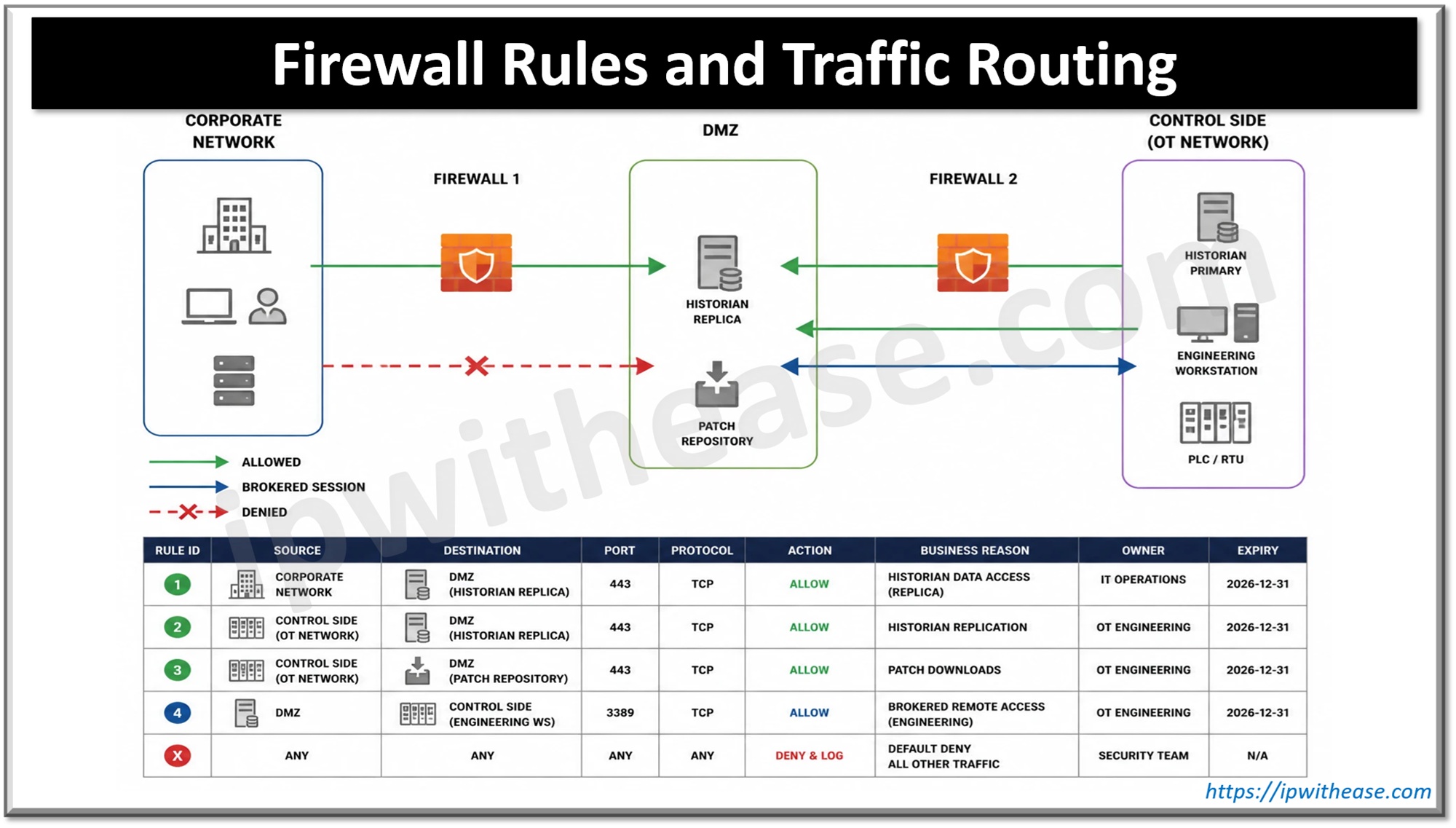
A DMZ network is only as strong as its rules. Start with “deny all” and allow only flows you can name and justify. Every industrial firewall rule should specify the source, destination, port, protocol, and a business reason. A typical rule set looks like this:
- Corporate → DMZ: only to named services, such as the historian replica.
- Control side → DMZ: historian replication and patch downloads.
- Corporate → control side: never directly.
- DMZ → control side: only brokered sessions to approved hosts.
- Everything else: deny and log.
Give every rule an owner and an expiry date, because temporary rules have a habit of becoming permanent. Wherever possible, let the control side initiate connections; that means fewer inbound openings.
Remote Access for Contractors
Sometimes a vendor needs to log in at 2 a.m. Vendor remote access should go through the DMZ network, never around it. A simple procedure looks like this:
- The vendor connects to a VPN gateway in the DMZ using multi-factor authentication.
- The gateway opens a session on the jump server.
- The jump server connects to the specific machine the vendor needs.
- The session is recorded, and access expires when the job is done.
Layered setups like this are standard practice: many secure remote-access designs place a buffer zone with a VPN on each side. For higher-security sites, a hardware VPN combined with a jump server is a common choice for remote SCADA access.
Common DMZ Mistakes
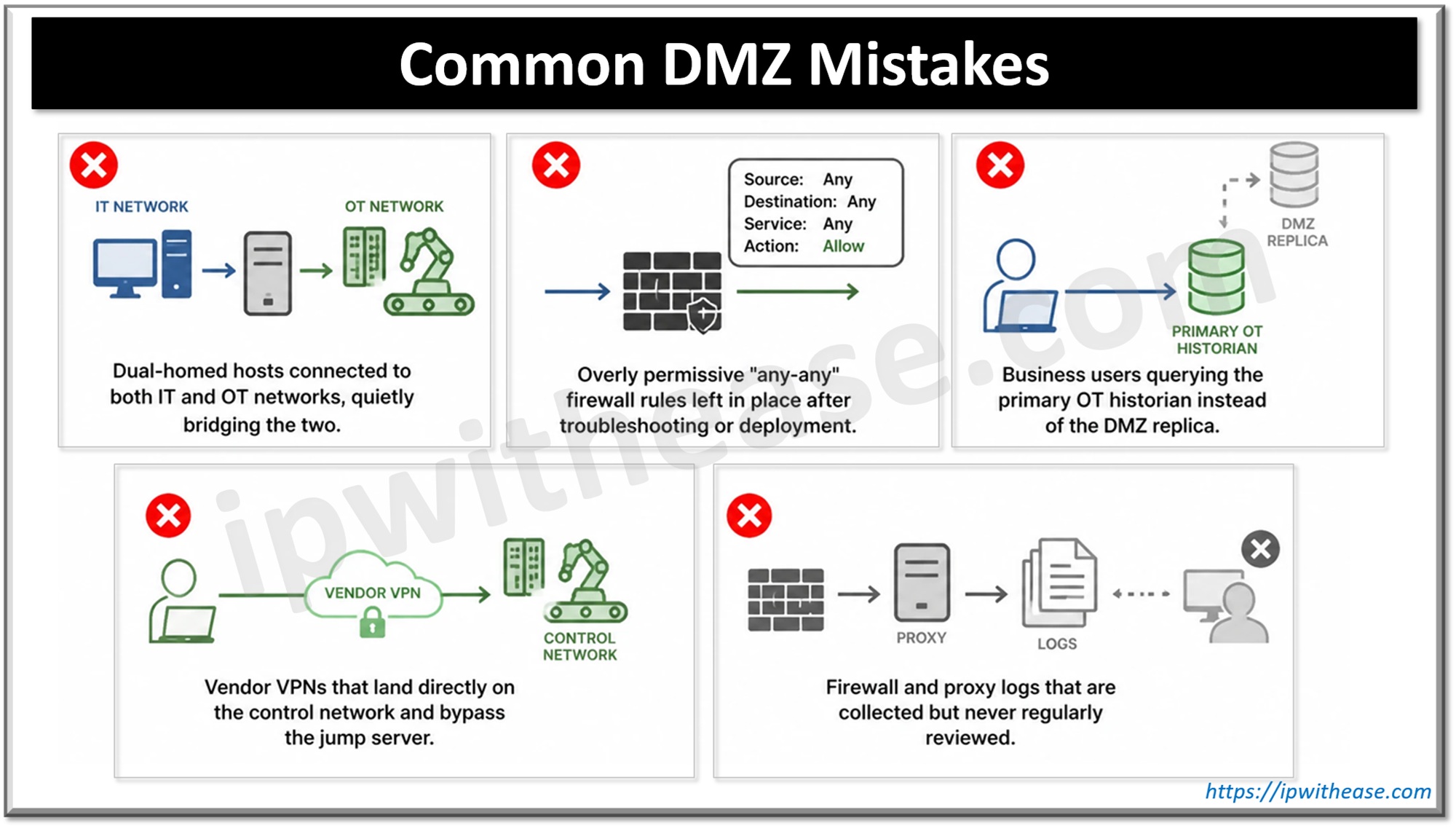
Even well-funded OT security projects fail when small architectural errors slip in. Watch out for these common pitfalls:
- Dual-homed hosts connected to both IT and OT networks, quietly bridging the two.
- Overly permissive “any-any” firewall rules left in place after troubleshooting or deployment.
- Business users querying the primary OT historian instead of the DMZ replica.
- Vendor VPNs that land directly on the control network and bypass the jump server.
- Firewall and proxy logs that are collected but never regularly reviewed.
Wrap-Up
A solid DMZ network doesn’t have to be perfect from day one. Start with an asset inventory, add two firewalls and a few core services, then tighten the rules a little every quarter. Treat the DMZ network as an ongoing project, and review it after every change and every incident. Small, steady steps add up, and each one makes your plant a harder target.
ABOUT THE AUTHOR

IPwithease is aimed at sharing knowledge across varied domains like Network, Security, Virtualization, Software, Wireless, etc.