Table of Contents
Understanding Virtual Servers
A Virtual Server is a server that shares hardware and software resources with other operating systems (OS). Since Virtual servers are cost efficient and provide quicker resource control, virtual servers are popular in Web hosting environments. Rather than implement multiple dedicated physical servers, several virtual servers may be implemented on one server. A virtual server looks like dedicated server to the end user.
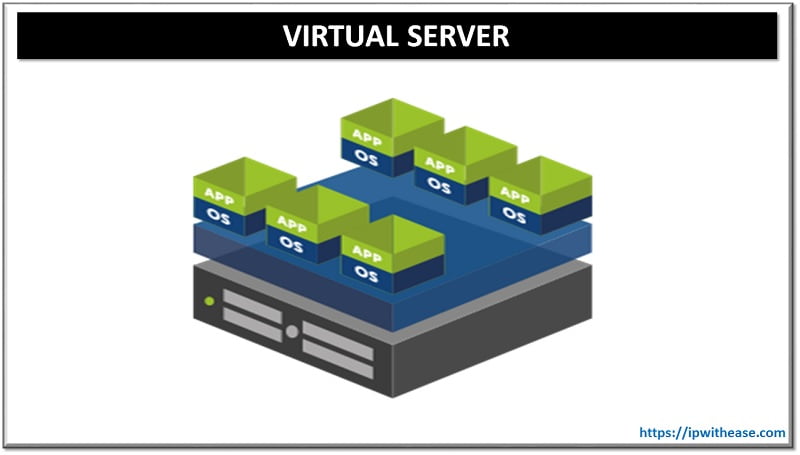
Each virtual server is designated a –
- Separate OS
- Software and
- Independent reboot provisioning.
Virtual Web servers are a very popular way of providing low-cost web hosting services. VDS server (Virtual Dedicated Server) is a similar virtualization-based solution that provides users with dedicated resources within a virtualized environment, offering greater isolation and control than a traditional shared virtual server
An overflow of virtual servers in a physical machine may lead to resource hogging, and if a virtual server uses more resources than another, performance issues usually result.
How does a Virtual Server work?
A virtual server works by using a hypervisor to carve up a physical machine’s CPU, memory, storage, and network resources into isolated slices, each running its own OS as if it were a standalone machine. The hypervisor sits between the hardware and these virtual instances, scheduling and allocating resources so each virtual server operates independently without knowing others exist on the same host. This lets one physical machine run many separate “servers” simultaneously, each fully functional and isolated from the rest.
Are Virtual Servers the same as Cloud Servers?
Not exactly. A virtual server is the underlying technology — a virtualized instance running on a hypervisor. A cloud server is a virtual server delivered as a service over the internet by a cloud provider (AWS, Azure, GCP, etc.), typically with on-demand provisioning, usage-based billing, and provider-managed infrastructure. So: all cloud servers are virtual servers, but not all virtual servers are cloud servers — a company can run virtual servers entirely on-premises using its own hypervisor (VMware, Hyper-V, KVM) without any cloud involvement.
Benefits of Server Virtualization/ Virtual Server
- Cost reduction: CAPEX and OPEX both are benefited by server virtualization. With virtual servers, it is possible to cut cost on the infrastructure that you would need to install and maintain physical servers at the workplace. In other words, not only do you cut down on the initial capital investment that is required to buy and install the infrastructure, but also the added working cost that is necessary for maintaining it at top working quality.
- Better utilization and increased productivity: Setting up virtual servers will greatly reduce space and help in scope for more productivity. Reason – Virtual servers are mostly utilized 80% of their capacity as opposed to physical servers which normally reach up to 15-20 % on resource utilization. Hence, consolidation of application reduces number of servers and increase overall productivity with virtualization
- Reduce hardware vendor lock-in: While not always a bad thing, sometimes being tied down to one particular server vendor or even one particular server model can prove quite frustrating. But because server virtualization abstracts away the underlying hardware and replaces it with virtual hardware, data center managers and owners gain a lot more flexibility when it comes to the server equipment they can choose from. This can also be a handy negotiating tool with the hardware vendors when the time comes to renew or purchase more equipment.
- Increased uptime: Thanks for Features like vMotion, DRS and VMware high availability – all result in virtualized servers being up and running so much more than those same servers that were running directly on physical hardware.
- Faster server deployment. Since virtual servers can be standardized, they can be easily replicated, allowing one to deploy them faster. This results in a more efficient and faster speed to market.
- Improved efficiency. With fewer servers in your data center, virtualization technology provides for better space management. The subsequent drop in power consumption improves efficiency and saves money.
Continue Reading
What is DNS (Domain Name System)?
Configuring Connectivity Between Ghost Server & Client Across VLANs
ABOUT THE AUTHOR

You can learn more about her on her linkedin profile – Rashmi Bhardwaj