Table of Contents
IT teams do not connect to a device just to poke around. They are patching servers, resetting credentials, and troubleshooting production issues, often on systems they cannot afford to lock themselves out of. Consumer-grade screen sharing tools were never built for that kind of workload, and treating them as interchangeable with business-grade platforms is where a lot of avoidable risk creeps in.
That is why more IT departments are standardizing on a remote access solution for IT teams, built around the authentication, logging, and scale that internal support and infrastructure work actually demands.
Credential-based attacks and edge device exploits are both climbing fast, and picking the wrong remote connectivity tool is not just an inconvenience. It is a direct security decision, one that shapes how exposed your organization is every single day.

Key Takeaways
- IT teams should prioritize strong authentication, detailed logging, and centralized control when picking remote connectivity software, not just screen sharing.
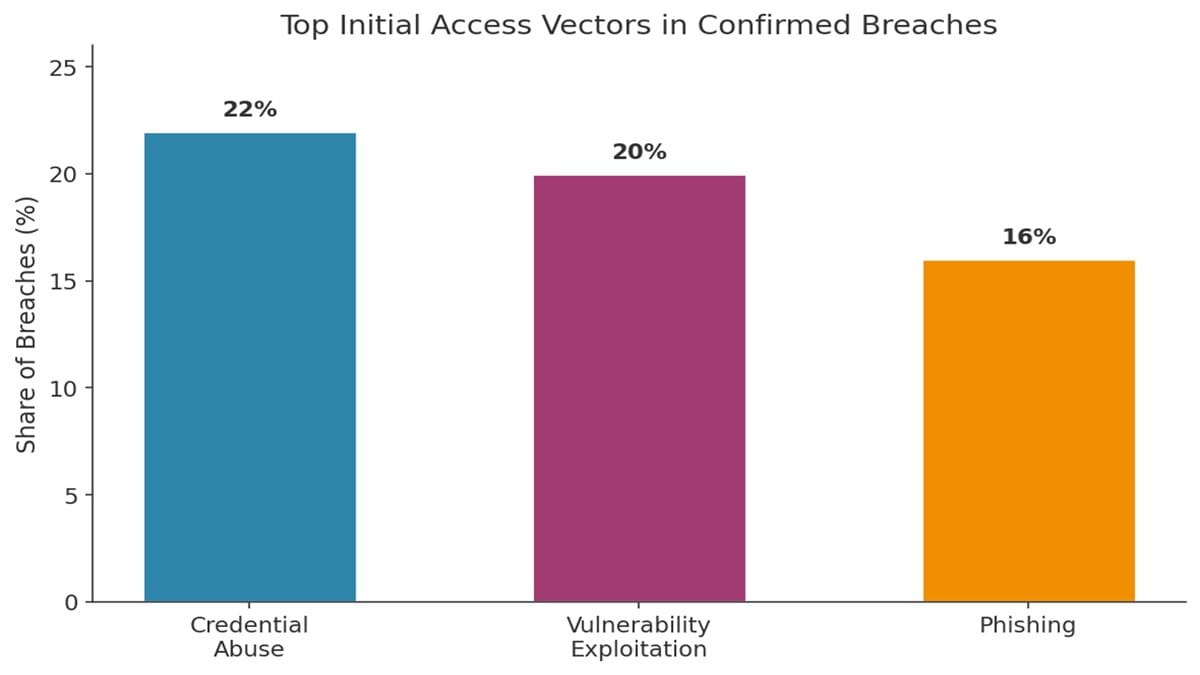
- Credential abuse was tied to 22% of confirmed breaches, the leading initial access vector, per Verizon’s DBIR.
- Exploits against perimeter devices like VPN concentrators grew almost eightfold year over year, making them a bigger target than ever.
- Role-based permissions and session recording matter as much as connection speed once a team scales past a handful of admins.
- Consumer tools built for personal use rarely meet the audit and compliance bar that internal IT support requires.
Why This Decision Carries More Weight Than It Used To
Remote connections into internal systems used to be a convenience. For most IT departments today, they are one of the main ways day-to-day work actually gets done, from patching servers overnight to helping a remote employee recover a locked account. That shift also makes these connections one of the more attractive targets for attackers.
Verizon’s most recent Data Breach Investigations Report found that credential abuse was the single most common initial access vector, present in 22% of breaches, with vulnerability exploitation close behind at 20%. The report also flagged a sharp rise in attacks against internet-facing perimeter equipment, the exact category a poorly configured connectivity tool can fall into.
“Exploitation of vulnerabilities in edge devices, including firewalls, VPN concentrators, and remote access gateways, grew nearly eightfold compared to the previous year.” — Verizon Data Breach Investigations Report, 2025
| Pro Tip: Treat your remote access tool as part of your attack surface, not just a support utility. It deserves the same scrutiny as any other system that can reach production. |
What to Look for in a Remote Access Solution
Strong Authentication and Access Controls
A shared password is not a security model, no matter how convenient it feels in the moment. Look for multi-factor authentication as a baseline, along with role-based permissions so a help desk technician and a network administrator are not working with identical access to every system on the network.
Encryption and Session Visibility
Every session should be encrypted end to end, and every connection should leave a record: who connected, to which device, when, and for how long. That log becomes essential during an incident review or a compliance audit, not just a nice-to-have feature buried in a settings menu.
Scalability Across a Growing Device Fleet
A tool that works fine for ten endpoints can fall apart at a thousand. Confirm the platform can handle your current device count plus reasonable growth over the next few years, without forcing a painful migration eighteen months in because licensing or performance did not scale with you.
Compatibility With Existing IT Workflows
A remote access tool that lives outside your ticketing system creates extra clicks and gaps in documentation. Favor platforms that integrate with the help desk software your team already relies on, so technicians are not switching between four different windows to close out one ticket.
Vendor Support and Platform Reliability
Downtime on a connectivity platform is downtime for your entire support function. Check the vendor’s published uptime history, response times for business-tier support, and how quickly they patch disclosed vulnerabilities. A platform with a slow patch cycle can become the weak link it was supposed to protect against.
Consumer-Grade vs. Enterprise-Grade Remote Access Tools
Many free or personal tools work fine for occasional one-off connections. IT teams supporting a whole organization need something built differently, with the controls above treated as requirements rather than optional extras.
| Factor | Consumer-Grade Tool | Enterprise-Grade Tool |
|---|---|---|
| Authentication | Password only, often shared | Multi-factor, per-user accounts |
| Access control | All-or-nothing access | Role-based, granular permissions |
| Session records | Little or none | Full audit trail by default |
| Scale | Handful of devices | Hundreds to thousands of endpoints |
| Support | Community forums | Dedicated business support |
This is not about dismissing free tools entirely. It is about matching the tool to the stakes involved once a team is managing production systems for an entire organization instead of one personal laptop. The gap between the two categories tends to show up first during an incident, when a team realizes it has no session log to work from.
How This Fits Alongside VPNs and Zero Trust
A dedicated connectivity platform does not replace every layer of network security on its own. Many teams still run site-to-site vs remote access VPN setups for broader network connectivity, and compare that against RDP versus VPN for remote connections when deciding how administrators should reach individual machines.
Some organizations are moving further and adopting a zero trust network access model, which verifies every request instead of trusting anything already inside the perimeter. A good starting point for understanding the mechanics behind traditional connections is how remote access VPNs work, since many zero trust rollouts still run alongside older VPN access during the transition period.
For teams that want authoritative guidance on this shift, CISA, the FBI, and NSA jointly published federal guidance on securing remote connections, which covers how attackers commonly abuse legitimate software of this kind and what controls limit that risk.
A Simple Evaluation Checklist for IT Teams
- List every system type staff will need to reach: servers, workstations, network devices, and any unattended machines that run without a user present.
- Confirm multi-factor authentication and role-based permissions are available out of the box, not as a paid add-on tacked onto a higher pricing tier.
- Test session logging and confirm the records meet your compliance or audit requirements before you commit to a contract.
- Check integration with your existing ticketing and identity management systems before committing, since retrofitting integrations later rarely goes smoothly.
- Pilot with a small group first, then review adoption, support tickets, and any friction points before a full rollout.
Frequently Asked Questions
What is the difference between remote access and remote support?
Remote access is the broader capability of reaching a device from elsewhere. Remote support usually refers to a specific attended session where a technician helps a user in real time, one use case within remote access.
Is a free remote access tool ever appropriate for an IT team?
It can work for a very small team with minimal compliance needs, but most IT departments quickly outgrow the lack of logging, role controls, and support that free tools provide.
Do IT teams need both a VPN and a dedicated remote access tool?
Many do. A VPN often handles broader network connectivity, while a dedicated tool handles reaching and controlling specific devices, with each serving a different part of the workflow.
How important is unattended access for daily IT operations?
Very, for most teams. Unattended access lets technicians reach servers or workstations overnight for patching and maintenance without waiting on someone to approve each individual session in real time.
What compliance standards should a remote connectivity platform support?
This depends on your industry, but session logging, encryption, and multi-factor authentication are common requirements across frameworks like SOC 2, HIPAA, and PCI DSS.
How many remote access tools should an IT team run at once?
Ideally one standardized platform. Running several different tools across a team makes auditing harder and increases the number of potential entry points an attacker could exploit.
Making the Right Call for Your Team
Choosing how staff connect to internal systems is no longer just a convenience decision. It shapes how quickly your team can respond to incidents, how cleanly you pass an audit, and how much attack surface you are quietly adding to the network.
Teams that get the most value tend to start with security requirements first and layer in convenience second, rather than the other way around. Whatever platform you land on, treat it as core infrastructure that deserves ongoing review, not a side utility you set up once and forget. Revisiting the choice every year or two, as your device count and compliance obligations grow, keeps the decision from quietly going stale.
ABOUT THE AUTHOR

IPwithease is aimed at sharing knowledge across varied domains like Network, Security, Virtualization, Software, Wireless, etc.