Table of Contents
Enterprise WiFi is in the middle of its biggest refresh in years. IT teams are swapping out aging access points for Wi-Fi 6E and Wi-Fi 7 hardware faster than at any point since the original 802.11ac rollout. Yet the same mistake keeps showing up on rollout postmortems: teams buy new gear, mount it where the old APs used to sit, and assume coverage will simply be better because the standard is newer.

A network engineer conducting an on-site wireless survey to map real-world signal coverage.
It usually isn’t. Physical RF behavior doesn’t care what generation of hardware is transmitting it. Walls, elevator shafts, warehouse racking, and even the number of people in a conference room still shape how a signal travels. Skipping a proper site survey, or treating one as an afterthought, is still the single most common reason enterprise wireless projects come in over budget and underperform. This article explains why that risk is higher than ever during the current refresh cycle, what a survey should catch, and how IT teams can build one into every phase of a rollout.
Enterprise Wireless Deployments
Why Wireless Site Surveys Matter More Than Ever in 2026
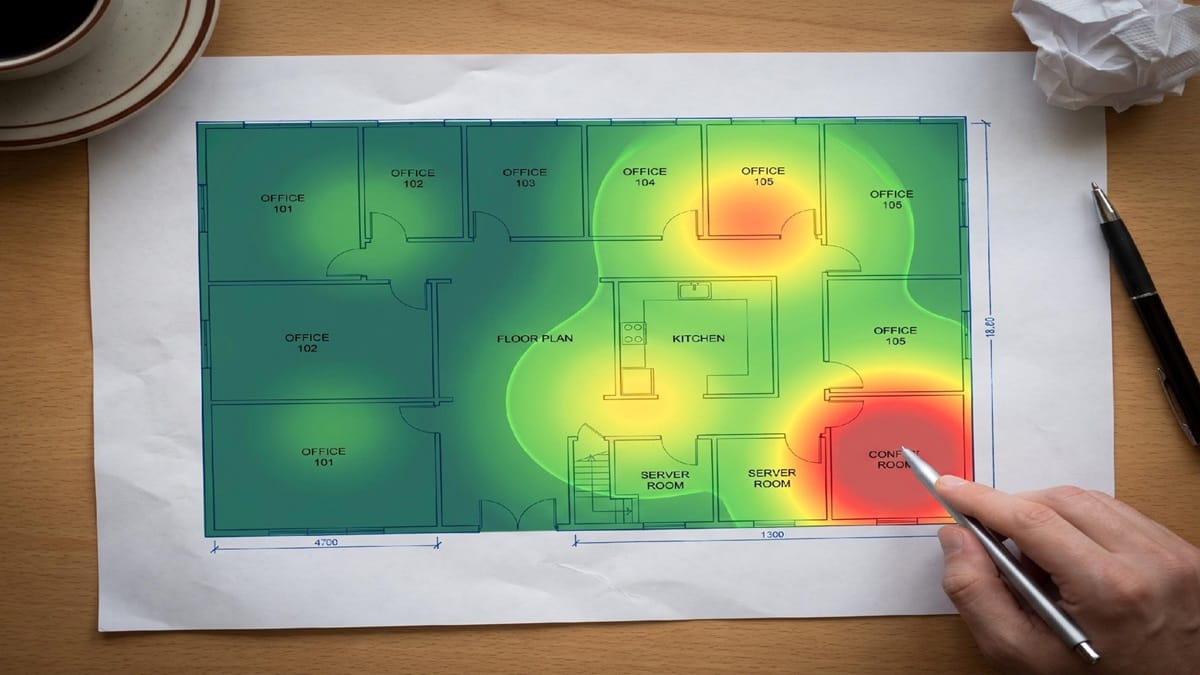
A predictive Wi-Fi heatmap showing projected signal coverage across a facility floor plan.
The scale of the current hardware refresh is easy to underestimate until you look at what enterprises are actually buying. Wi-Fi 7 now accounts for close to half of all new enterprise access point revenue, up from almost nothing two years ago. This isn’t early adoption anymore. It’s mainstream replacement, happening on a compressed timeline that leaves little room for guesswork.
This is where working with a team that offers dedicated wireless site survey services earns its keep. Rather than guessing at AP placement based on a previous-generation layout, a professional survey validates how 6 GHz and legacy bands will actually propagate through your specific facility before a single access point goes on the ceiling. For teams mid-refresh, that validation step is what separates a clean rollout from a six-month remediation project.
The catch is that Wi-Fi 6E and Wi-Fi 7 both open up the 6 GHz band, and 6 GHz doesn’t behave like the 2.4 GHz and 5 GHz spectrum most network teams have spent years tuning for. It attenuates faster through walls and furniture, which means an AP placement plan built around legacy propagation assumptions can leave real coverage gaps even with objectively better hardware. NIST’s guidance on industrial wireless deployment recommends organizations run a preliminary spectral occupancy survey before any deployment, precisely because assumptions about interference sources and signal behavior rarely hold up once you’re standing in the actual space with a spectrum analyzer, not just a floor plan.
Wi-Fi 7 accounted for 44.5% of enterprise WLAN access point revenue in the first quarter of 2026, up from under 1% just two years earlier, according to IDC’s Q1 2026 WLAN market tracker. Dell’Oro Group projects Wi-Fi 7 access point shipments will reach 117.9 million units in 2026, up from 66.5 million in 2025 and 26.3 million in 2024, per its most recent adoption forecast.
The Real Cost of Skipping a Site Survey
Under-planned wireless deployments don’t fail quietly. They show up as dead zones in the conference rooms where executives sit, dropped calls on the warehouse floor during peak shift, and support tickets that take weeks to diagnose because nobody has data on what coverage should look like.
The financial exposure has climbed sharply. The median enterprise network outage now costs $9,000 per minute, according to a 2025 ITIC survey, up from $7,900 in 2023 and $5,600 in 2019. That same research found 35% of enterprises reported at least one outage exceeding $1 million in total cost. Network outages are now the leading cause of IT service incidents, responsible for 31% of the total, and a meaningful share trace back to wireless coverage problems a survey would have flagged before deployment.
There’s also a quieter cost that rarely makes it into an incident report: over-provisioning. Teams that skip predictive planning tend to compensate by throwing extra access points at a space “just in case,” inflating hardware spend and adding unnecessary channel overlap. If you’re troubleshooting an existing deployment, identifying your access point’s connection details can help pinpoint which AP is serving a problem area before assuming the whole layout needs rework.
Passive, Predictive, and Validation Surveys: What Each One Actually Tells You
Not every survey answers the same question, and conflating the three types often confuses teams new to structured RF planning.
A predictive survey happens before installing any hardware. It uses floor plans, building materials, and modeling software to project coverage and generate an initial AP placement plan. It’s fast and useful for budgeting, but it’s a simulation, not a measurement.
A passive survey happens on-site, typically during a walkthrough of an existing space, and measures actual signal strength, noise floor, and channel utilization with dedicated hardware. This is where theoretical models meet physical reality: walls that weren’t in the original blueprint, metal shelving nobody accounted for, or a neighboring tenant’s network bleeding into your spectrum.
A validation survey comes last, after installation, and confirms the deployed network actually delivers the coverage and capacity it was designed for. Skipping this step is how organizations discover coverage gaps only after employees start complaining, months into occupancy. For teams building a shared vocabulary across these steps, especially with IT staff who aren’t RF specialists, this reference on wireless networking terminology helps keep everyone aligned on what terms like “signal-to-noise ratio” actually mean in context.
Each survey type answers a different question at a different point in the network’s lifecycle. Mature deployment processes use all three rather than treating one as a substitute for the others.
Interference and Spectrum Planning: What Engineers Often Miss
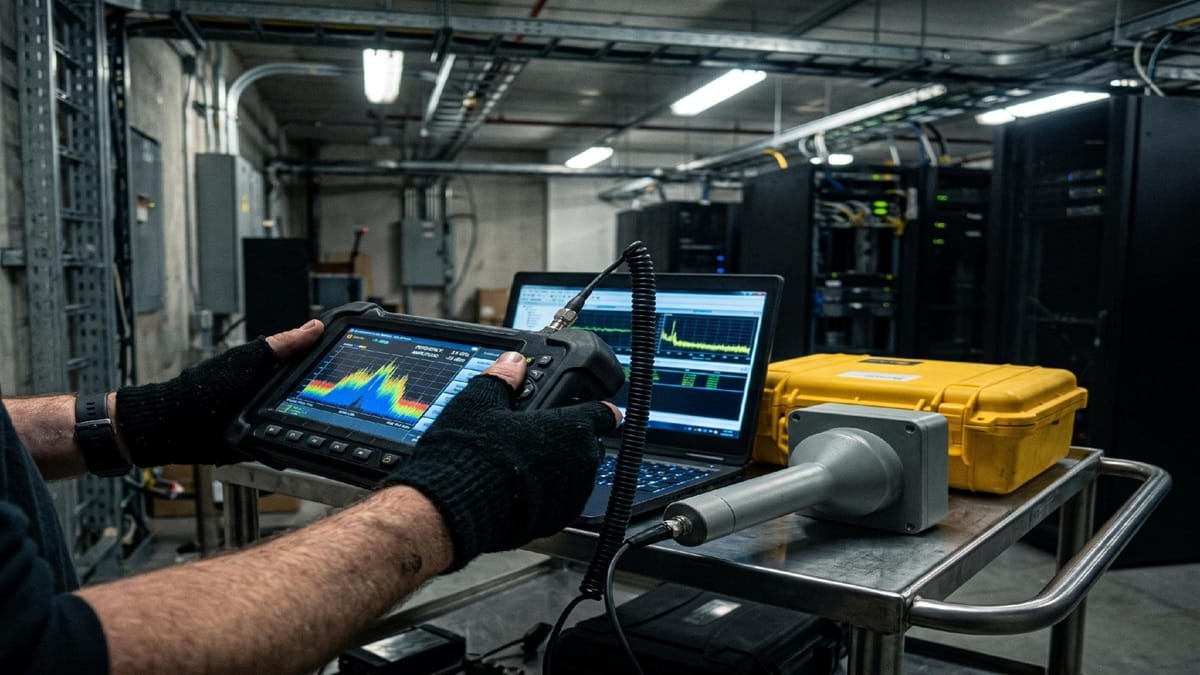
Professional site surveys rely on spectrum analyzers and precision RF measurement tools, not consumer WiFi apps.
Even experienced network engineers sometimes underestimate how crowded the 2.4 GHz band still is. Of the 14 channels available in that band, only channels 1, 6, and 11 are non-overlapping, according to NIST/FCC spectrum guidance, meaning a poorly planned deployment can create self-inflicted interference before a single external device is factored in. Older IoT sensors and building automation systems often still rely on 2.4 GHz, so you can’t simply deprioritize it just because newer clients prefer 5 or 6 GHz.
The 6 GHz band solves much of the overlap problem by offering far more non-overlapping channels, but it introduces coexistence questions of its own, particularly around how legacy devices that can’t see 6 GHz at all are handled during a mixed-fleet transition. CISA’s guidance on securing enterprise Wi-Fi networks is a useful reference here too, since interference planning and security planning increasingly overlap.
Common interference sources that a proper survey catches before they become support tickets include personal hotspots, microwave ovens near open office kitchens, Bluetooth device density in conference rooms, and neighboring tenant networks in shared buildings. None of these show up on a predictive model built from a floor plan alone. They only show up when someone walks the space with the right equipment.
Scaling Site Surveys Across Multi-Site Enterprise Deployments
Organizations running a single office can get away with treating a site survey as a one-time project. Organizations running twenty, fifty, or two hundred locations can’t, and this is where most enterprise wireless programs break down.
The core challenge is standardization. A survey methodology that works well for a headquarters office doesn’t automatically translate to a warehouse, a retail floor, or a branch office with a different footprint. Without a consistent process and reporting format across sites, IT leadership ends up comparing coverage data that isn’t actually comparable, making it hard to prioritize which locations need remediation first.
Budget sequencing adds another layer of complexity. Most large enterprises will run mixed Wi-Fi 6E and Wi-Fi 7 environments for years rather than completing a clean cutover, simply because replacing infrastructure across dozens or hundreds of sites at once isn’t financially realistic. That means site surveys need to account for interoperability between older and newer access points on the same network, not just optimal placement for whichever standard is newest. A phased rollout plan grounded in real survey data, site by site, catches these interoperability issues long before they turn into a help desk backlog.
Building Site Surveys Into the Network Lifecycle
The enterprise wireless refresh happening right now isn’t a one-time event IT teams can plan for once and forget. Wi-Fi 7 adoption is accelerating, spectrum behavior is changing as 6 GHz becomes standard, and the cost of getting deployment wrong keeps climbing.
Treating a site survey as a single checkbox item early in a project is how organizations end up with dead zones, over-provisioned hardware, and remediation projects that cost more than doing it right the first time. Organizations that navigate this refresh cycle well build surveys into every phase of the network lifecycle: predictive planning before install, passive validation during rollout, and ongoing verification as the environment changes.
A structured process doesn’t just prevent one bad launch. It’s what keeps a wireless network reliable as the building, the headcount, and the standard itself keep evolving around it.
ABOUT THE AUTHOR

IPwithease is aimed at sharing knowledge across varied domains like Network, Security, Virtualization, Software, Wireless, etc.