Table of Contents
Private IP is used within a local network and isn’t accessible from the internet. Public IP is assigned by an ISP and is used to identify devices on the internet. Private IPs are reusable across networks, while public IPs must be unique globally. In this blog, we discuss the differences between the two types of IP addresses, i.e. Public IP vs Private IP Address in detail.
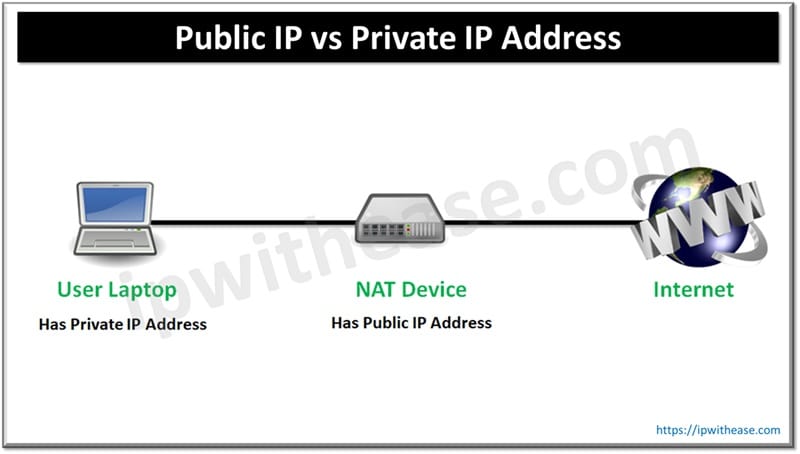
IP address is a unique string of numbers assigned to each device connected to a network. It acts like a mailing address, ensuring data gets to the right place. There are two main types of IP addresses in networking – Public IP address and Private IP address.
What is a Public IP Address
A Public IP address is the one which is globally recognizable and our ISP (Internet Service Provider) or IANA provides the same. Public IP identifies our home network to the outside world. It is an IP address that is unique throughout the entire Internet. Each customer who uses the Global/Public IP Block needs to pay the Service Provider or IANA.
Features
- It is Globally unique, no two devices on the public internet can have the same public IP.
- This is the address websites and services “see” when you connect to them which is why it’s worth knowing what someone can do with your IP address.
- Your ISP gives you a public IP when you connect to the internet.
- E.g. – If you search “what is my IP” on Google, the result is your public IP.
What is a Private IP Address
Unlike Public Addresses, Private IP addresses never leave the LAN network, just as the public IP address is never used inside your network. Additionally, customer need not pay for private IP blocks used inside the LAN environment.
Features
- Only used inside local networks
- Cannot be accessed directly from the internet
- Assigned by your router (via DHCP)
Difference: Public IP vs Private IP
Further, below table details on the difference between Public IP Addresses and Private IP addresses:
| Private IP | Public IP |
|---|---|
| Used with LAN or Network | Used with Public Network |
| Not recognized over Internet | Recognized over internet |
| Assigned by LAN administrator | Assigned by service Provider/IANA |
| Unique only to LAN | Unique globally |
| Free of charge | Cost associated with using Public IP |
| Range – Class A – 10.0.0.0 to 10.255.255.255 Class B – 172.16.0.0 to 172.31.255.255 Class C – 192.168.0.0 to 192.168.255.255 | Range – Class A – 1.0.0.0 to 9.255.255.255 11.0.0.0 to 126.255.255.255 Class B – 128.0.0.0 to 172.15.255.255 172.32.0.0 to 191.255.255.255 Class C – 192.0.0.0 to 192.167.255.255 192.169.0.0 to 223.255.255.255 |
Download the comparison table: Private IP vs Public IP
Reason to use a Private IP
- Private IPs add a layer of security as they keep internal devices hidden from the public internet. For example, you don’t want your printer or smart fridge exposed to hackers online!
- They also help conserve the limited number of public IPv4 addresses by allowing multiple devices to share one public IP using NAT.
FAQs
Q.1 How do devices with private IPs access the internet?
Through Network Address Translation (NAT), usually performed by your router or firewall. When a device at 192.168.1.20 opens a website, the router replaces the private source address with its own public IP and records the session in a translation table. When the reply comes back, the router checks that table and forwards the traffic to the correct internal device. Most home and office networks use PAT (Port Address Translation), a form of NAT that lets hundreds of devices share one public IP by tracking each session with a unique port number.
Q.2 Why do we need private IP addresses at all?
IPv4 has about 4.3 billion addresses, and that pool ran out years ago. Private addressing lets millions of organisations reuse the same internal ranges without conflict, because those ranges never appear on the public internet. Without private IPs, every laptop, printer, phone and smart bulb would need its own globally unique address, and IPv4 would have run dry much sooner than it did.
Q.3 Is a private IP address more secure than a public one?
Somewhat, though not in the way people often assume. A private IP can’t be reached directly from the internet, so it isn’t exposed to random inbound scans. That protection comes from routing and NAT, not from any security feature of the address. Once malware, a phishing link or a compromised VPN account gets inside the network, private addresses offer no protection. Treat private addressing as a side benefit, and keep your firewalls, segmentation and endpoint security in place.
Q.4 Can two devices have the same IP address?
Two devices on different private networks can, and this happens all the time. Your router at home and your neighbour’s router are probably both 192.168.1.1, and neither notices. Public IPs must be unique worldwide. Inside a single network, a duplicate IP causes an address conflict and one or both devices lose connectivity. Overlapping private ranges also become a real headache when two companies merge or when you connect on-premises networks to the cloud over VPN, which is why IP address planning matters from day one.
Q.5 What is CGNAT, and why does my router’s WAN IP look private?
Many ISPs, especially mobile and broadband providers in India, don’t have enough public IPv4 addresses for every customer. They use Carrier-Grade NAT (CGNAT), which adds a second layer of translation at the ISP level. Your router gets an address from the 100.64.0.0/10 range (RFC 6598), and the ISP translates it to a shared public IP. The catch is that hosting services, running a game server or setting up port forwarding becomes difficult or impossible, because you don’t control the public-facing address. If you need inbound access, ask your ISP for a static public IP, usually a paid add-on.
Q.6 Do public and private addresses exist in IPv6 too?
Yes, with a different design. IPv6 Global Unicast Addresses (from 2000::/3) are the public equivalent. Unique Local Addresses (fc00::/7, in practice fd00::/8) play a similar role to RFC 1918 space. The big difference is that IPv6 has enough addresses for every device to have a globally routable one, so NAT is not needed for address conservation. Security then depends on a stateful firewall rather than on the side effect of NAT.
Q.7 How do public and private IPs work in the cloud?
In AWS, Azure and GCP, every virtual machine gets a private IP inside its VPC or VNet, and that’s what it uses to talk to other cloud resources. A public IP is optional and gets mapped to the instance through the provider’s internet gateway. Since 2024, AWS charges for every public IPv4 address, including ones attached to running instances, so architects now prefer private subnets with NAT gateways, load balancers or private endpoints, and assign public IPs only where they are actually needed.
Continue Reading
ABOUT THE AUTHOR

You can learn more about her on her linkedin profile – Rashmi Bhardwaj