Table of Contents
When done right, a well-planned network infrastructure project evolves into something that allows reliable networking, data transmission, and business continuity. There is a lot more involved in a proper implementation than simply purchasing switches and routers; it requires careful planning and effective communication.
Network infrastructure projects can quickly become complicated due to delays in equipment delivery, overlapping cabling and configuration tasks, or conflicting maintenance windows and business activities. A visual planning tool, such as an online Gantt chart maker, helps teams visualize the different phases of the project, dependencies between tasks, task assignments, and timelines in a single tool. This is a great way to get rid of scheduling conflicts before the project begins.
Steps to Plan Network Infrastructure Project
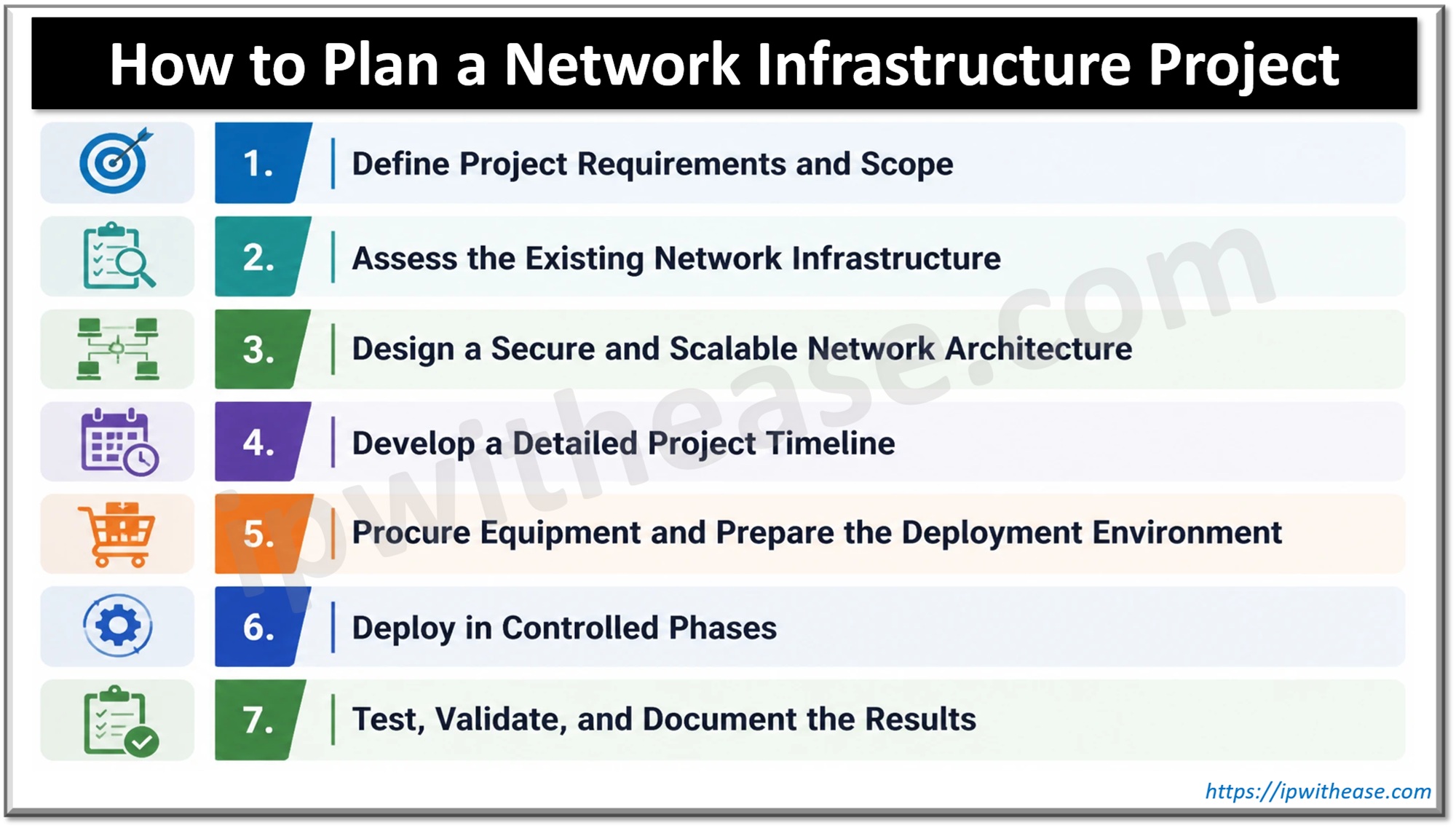
1. Define Project Requirements and Scope
Every project must start with a clear vision of what you intend to achieve. Without a problem to solve, your team might focus its resources on unnecessary “improvements”. It is not that rare for teams to purchase equipment that does not meet the requirements because the members were unsure about what they were supposed to do. A long roll of the wrong type of network cable can cost money and time for both you and your client.
Talk to the stakeholders of the project, like the network administrator, security personnel, application owners, and so on. You should also calculate the number of users and the exact number of devices on the network.
Determine whether the job involves a new LAN, a WAN upgrade, wireless extension, data center networking, or networking in the cloud. You should also set the boundaries of the project in terms of scope, budget, timeline, and acceptance criteria during this phase.
This creates a benchmark for evaluating the project.
2. Assess the Existing Network Infrastructure
Before jumping into building a whole new network infrastructure from scratch, you should first thoroughly examine and document the older system. A complete evaluation will save you a boatload of time when certain issues arise, most commonly device incompatibility and unpredictable dependencies.
Make a list of available routers, switches, firewalls, wireless access points, servers, connections, and related software. The necessary information includes the model of the device, software version, settings, service status, and how the device is being utilized.
Examine both the physical and logical network.
The physical examination should include checking for orderly wiring, fiber optic connections, provision for equipment, power supply, cooling system, and arrangement of the equipment. If you are providing a wireless service, it is nearly impossible to figure out the dead spots, possible interference issues, and future access points without inspecting the site.
For the logical examination, there are a few areas that must be checked out, like a review of the IP addresses, subnetwork allocation, VLANs, routing protocols, access control policy, and the network segmentation. You should also conduct a traffic analysis to identify the congestion spots in your system. It will also allow you to gauge whether the current system is capable of handling the required demand. Remember to highlight every major dependency such as the internet circuits, DNS, DHCP, authentication services, and business applications.
3. Design a Secure and Scalable Network Architecture
Document the current network environment. Build the architecture of the target network next.
The physical network diagram shows the placements of all your devices. It shows all the network connections. Logical diagrams show how addressing and VLAN configurations will work. Both work in tandem. So engineers get a complete understanding of the network. Plus, it becomes an easy point of reference during deployment.
Next, choose topology. It needs to be based on the size of your organization. It needs to be based on the requirements in terms of performance. Consider how many users, devices, traffic, and new points are likely to show up in the organization. Plan ahead. Plan all the necessary bandwidth, ports, and addresses so the network works properly.
Network modularity will help the company implement the network components much more widely. Keep the network reliable and use multiple extenders to ensure you are always getting the optimum speeds.
4. Develop a Detailed Project Timeline
A network design is only useful when it can be implemented within realistic time and resource constraints.
Break the project down into several executable steps such as resource gathering, site evaluation, design approval, acquisition, equipment installation, configuration, testing, migration, and project handover. Assign a manager to every step, estimate how long it will take, set a deadline, and determine how it will be evaluated.
Certain factors outside the development of the network infrastructure must also be considered during the project appraisal. Things like vendor/contractor availability, planning lead times, and even client approvals can take more time than you expected. Always plan for contingencies to be prepared and react faster.
If requirements change, for example, the deadline is moved up by a week, make sure everyone on your team is on the same page and update the timeline accordingly.
5. Procure Equipment and Prepare the Deployment Environment
Once the design gets approved by the client, always remember to check for compatibility issues with the existing system before buying any equipment you might need for the project. Things like interface speeds, port count, transceiver types, power requirements, software licensing, firmware support, and interoperability with the existing system need to be checked. The equipment should also be compliant with all the routing, switching, security, and management features the client requires.
Back up the configurations currently in use before the migration process. This backup may prove very useful should anything go wrong during this migration.
Whenever possible, try staging the equipment in a controlled environment before sending it into production. Use the appropriate firmware, configure management access, and perform initial configuration tests.
6. Deploy in Controlled Phases
Begin with a deployment sequence that reduces the risk to operations. In the case of big projects, it is advisable to pilot first, utilizing a test environment, smaller site, or a limited number of users before deploying to everyone.
Try to keep an alternate management option available, such as console access or out-of-band management, wherever applicable. Doing so will allow the engineers to restore access in case typical connectivity is lost due to a configuration change.
If important acceptance checks fail or rollback conditions are met, it is better to revert to a previously successful configuration instead of forcefully trying to implement the unsuccessful change.
7. Test, Validate, and Document the Results
The deployment isn’t considered successful the moment the infrastructure goes online; it also needs to perform according to the client’s expectations. Conduct certain connectivity tests, usually routing, VLAN operation, IP addressing, and application access testing; measure the throughput, latency, and packet loss; check firewall policies, access rights, segmentation, and so on.
Check if logging and monitoring are working properly, whether alerts are sent (since permissions or alert misconfiguration often cause failures), and if the system can be accessed by authorized personnel.
Before handing over the infrastructure, update the documentation to accurately represent the deployed environment. Main records include physical and logical diagrams, device inventories, and IP address assignments. You can also add supplementary details like configuration backups, software versions, and operational procedures if needed.
Conclusion
A successful network infrastructure project depends on getting each stage right, from planning and design to procurement, implementation, and testing. Each step builds on the previous one, so a delay in one area can quickly affect the entire project.
While the tools and technology are important, good project management makes the real difference. Define the scope properly, validate the design, test everything before deployment, and ensure accurate documentation is present during the handover. Ultimately, a project is truly successful when the network runs reliably on its own, without depending on the people who built it.
ABOUT THE AUTHOR

IPwithease is aimed at sharing knowledge across varied domains like Network, Security, Virtualization, Software, Wireless, etc.