Table of Contents
If you work in networking or infrastructure long enough, you eventually want a lab that isn’t a toy. Not a single router and a switch sitting on a shelf, but something that actually behaves like the environments you design and troubleshoot for a living — with real segmentation, real redundancy thinking, and real failure modes you can learn from before they show up in production.
The good news is that you don’t need a rack of enterprise gear or a data center budget to get there. You need a deliberate design, a handful of the right components, and an honest understanding of where a home lab has to compromise against enterprise standards — and where it doesn’t.
Setting Up a Home Lab Mirroring Enterprise Network Design
Start With the Design, Not the Shopping List
The instinct with home labs is to buy hardware first and figure out the topology later. That’s backwards, and it’s the same mistake junior architects make in real deployments. Sketch the network the way you’d sketch it for a client: core, distribution, access — even if “core” is a single Layer 3 switch and “distribution” is a VLAN boundary on that same box.
A lab built around a real design teaches you things a flat network never will:
- How VLAN segmentation actually behaves when you’re troubleshooting inter-VLAN routing at 11 PM
- Where BGP or OSPF adjacencies break when a link flaps
- How firewall rules and Zero Trust segmentation interact with routing decisions, not just security policy on paper
Even a two-switch, one-router lab can mirror a spine-leaf mental model if you design it that way from the start — segment by function, not by convenience.
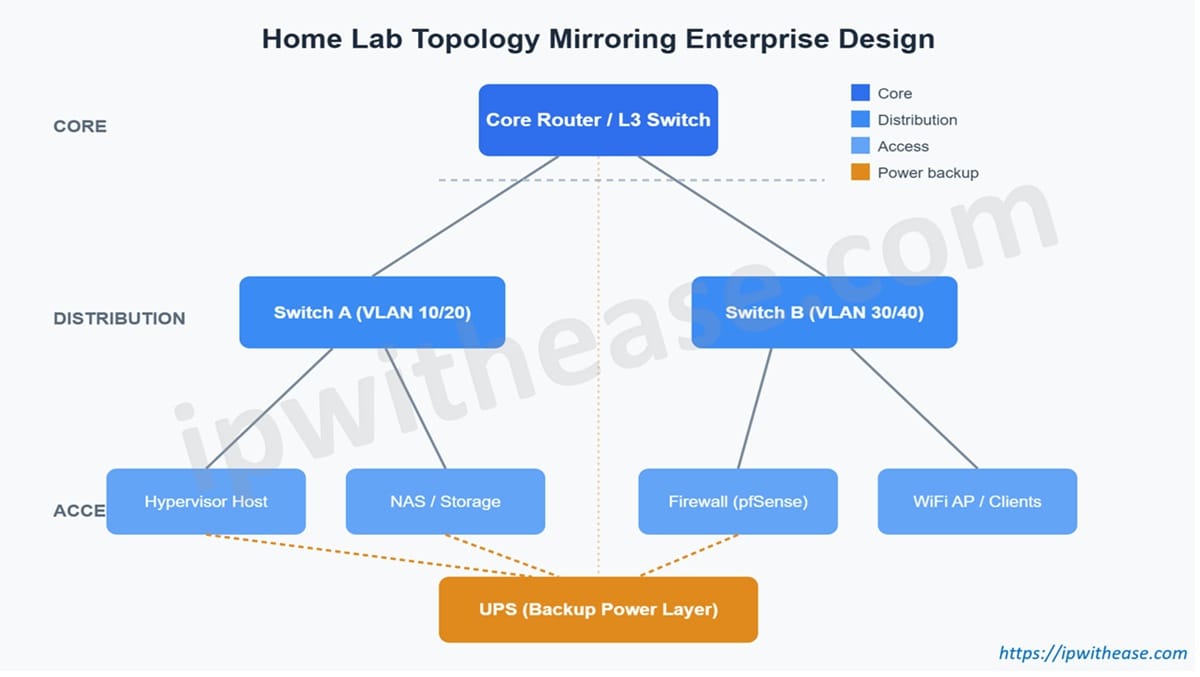
“A minimal home lab can still map cleanly onto core, distribution, and access layers — the same mental model you’d use for an enterprise design.“
Compute and Virtualization: Your Server Layer
This is where most home labs actually start, and reasonably so. A single decent mini-PC or a repurposed enterprise server running a hypervisor gives you the ability to spin up multiple virtual routers, firewalls, and test environments without buying physical gear for each one.
Tools like pfSense, OPNsense, or even Cisco’s CML/EVE-NG let you simulate enterprise routing and security scenarios entirely in software, layered on top of your physical lab. This is genuinely how a lot of practicing architects keep their BGP and multi-homing skills sharp between projects — not on production gear, but on a lab that behaves close enough to production to matter.
Cooling: The Part Everyone Underestimates
Enterprise data centers spend enormous effort on airflow management for a reason — heat kills hardware and destabilizes performance long before it causes outright failure. A home lab tucked into a closet or a spare room doesn’t have hot-aisle/cold-aisle containment, but it still needs to respect the same principle: don’t let exhaust heat recirculate back into intake air.
A few basics carry most of the way:
- Keep equipment off the floor and away from walls to allow airflow
- Add a simple exhaust fan if the space is enclosed
- Monitor temperatures — even a cheap smart plug with temperature sensing will tell you if a closet is quietly cooking your gear
You’re not trying to hit Tier III cooling standards. You’re trying to avoid the slow, silent hardware degradation that comes from ignoring airflow entirely.
Power: Where Home Labs Most Often Fail
This is the part that gets skipped, and it’s the part that causes the most real damage. Enterprise environments never run critical infrastructure without redundant power feeds and battery backup, and the reasoning behind that isn’t optional just because your lab is smaller — a hard power cut mid-write on a hypervisor host or a NAS running RAID can corrupt a filesystem in a way that a graceful shutdown never would.
A dependable UPS is the single most underrated piece of gear in a home lab, and it’s the cheapest insurance you can buy against losing hours of configuration work to a five-second outage. If you’re just starting to build out your power layer, a Home Office Backup UPS is a reasonable, budget-friendly starting point for a small lab — enough runtime to gracefully shut down a hypervisor host and networking gear rather than pulling the plug on them mid-operation.
A few things worth thinking through when you size it:
- Calculate actual load — add up the wattage of your switch, router, and server(s), not just what fits on the label
- Prioritize graceful shutdown over long runtime — for a home lab, you’re rarely trying to ride out an hour-long outage; you’re trying to buy enough time to shut down cleanly
- Automate it if you can — tools like Network UPS Tools (NUT) let your hypervisor trigger an automatic graceful shutdown when the UPS hits a battery threshold, which is exactly the kind of automation enterprise environments rely on and your lab should too
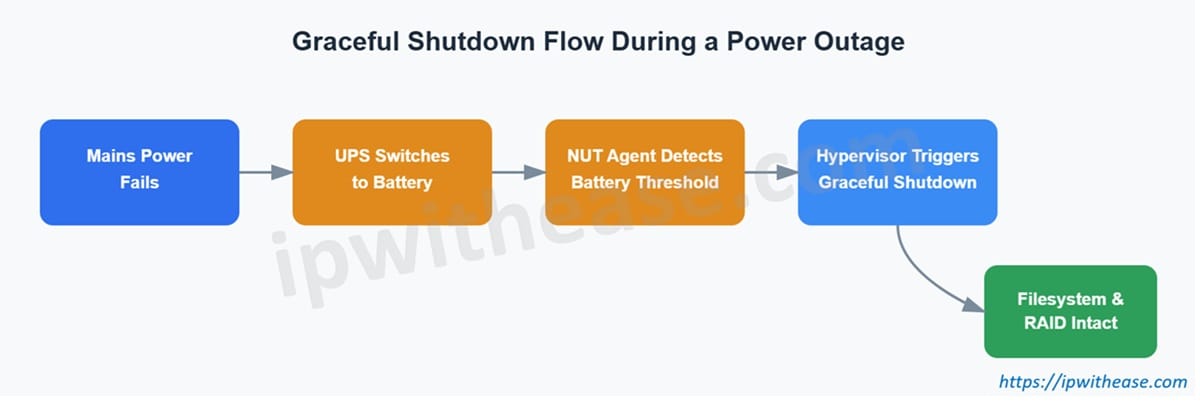
“The automated path from a power failure to a clean shutdown — the same failover discipline enterprise environments build in by default.“
Backup and Redundancy Thinking, Even at Small Scale
Enterprise design leans heavily on redundancy — dual power feeds, redundant links, failover paths. You won’t replicate all of that at home, and you don’t need to. What you can replicate is the thinking:
- Run two switches instead of one, even if it’s just to practice STP or MLAG concepts
- Keep a secondary internet path (even a phone hotspot) to understand failover behavior
- Back up your lab’s configuration files the same way you’d expect a production network’s configs to be backed up — versioned, off-box, and recoverable
Why This Actually Matters for Your Career
A home lab built with real design discipline does something a certification exam can’t: it forces you to live with your own design decisions. You’ll find the VLAN you forgot to route. You’ll find the power outage that corrupts a VM. You’ll find the cooling mistake that throttles a switch under load. Those are the same categories of problems you’ll deal with in enterprise environments, just at a scale where the mistakes are cheap and the lessons are permanent.
Start with the design. Build compute and virtualization on top of it. Take cooling seriously even at small scale. And don’t skip the UPS, it’s the least exciting purchase in the entire lab, and the one most likely to save your work.
Disclaimer: This blog contains affiliate links. If you purchase through these links, we earn a small commission at no extra cost to you, but that is what keeps this blog alive and the helpful content coming your way.
Related Video
ABOUT THE AUTHOR

You can learn more about her on her linkedin profile – Rashmi Bhardwaj