Table of Contents
One curious potential customer sends an inquiry through SMS; a loyal regular places a phone call, and ten other clients route messages through Microsoft Teams. It might seem like a good thing, as the business is obviously doing well if it gets so many interactions; however, responding to these messages across the platforms and keeping all the insights synchronized is a source of a constant headache.
That’s why the concept of unified communications has been gaining relevance lately. Today, we can easily integrate SMS in Microsoft Teams to keep all our conversations and data unified. Even better, we can use built-in tools to track response times and delivery rates through such regular information syncing. This development has become life-changing for IT professionals and network administrators, so find out how unified communication works and what makes Microsoft Teams SMS integration so helpful.
The Architecture of Unified Communications
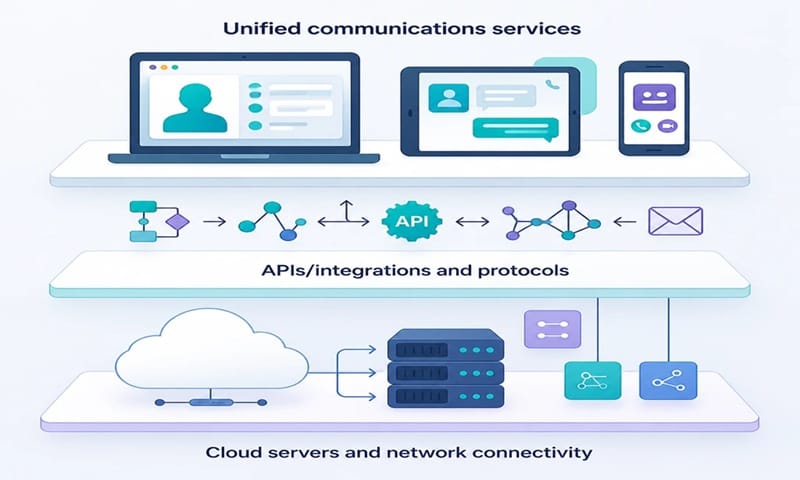
Unified communication is the technical backbone that unites different channels and allows them to work as part of one system. Let’s dissect it layer by layer:
- The underlying architecture of unified communications combines voice messages, SMS, videos, and instant chatting into one single platform.
- It’s based on gateways and APIs that connect external telecom networks with a company’s internal collaboration tools.
- This architecture fully relies on centralized servers or cloud services: this is the only way to manage communication across multiple channels at once.
- Modern systems with unified communications come with monitoring dashboards, which let IT admins observe the way everything works in real time.
By using unified communication, teams can share valuable information in an integrated environment. Such systems are essential, so let’s review them through practical examples.
Integrating SMS in Microsoft Teams: Whys and Hows
Routing SMS through Microsoft Teams is a powerful example of unified communication. One is a traditional telecom channel; another one is a modern collaboration platform. They might seem incompatible, but today, integrating them has become surprisingly simple.
Why Integrate SMS in Microsoft Teams
Some people think that SMSs have gotten outdated. Who needs them when you can just drop a message right through a chat or write an email?
In reality, a lot of clients prefer to communicate through SMS. It’s a perfect middle ground between chats, which seem too informal, and emails, which are too formal. Plenty of adults and older people rely on them, and companies know it. That’s why they support this method of communication and look for ways to integrate it with their Microsoft Teams setup.
Here are the benefits of this integration:
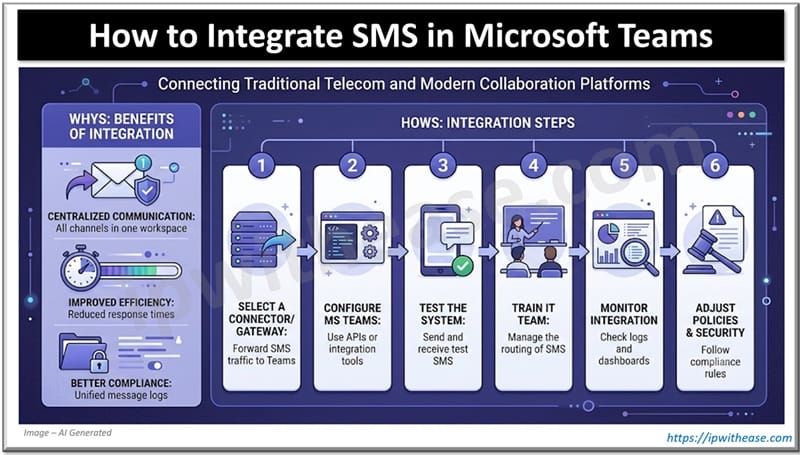
- Many organizations use SMS to send reminders, alerts, and order or delivery confirmations. By doing it through Microsoft Teams, staff can manage external communication without leaving the unified workspace.
- Such telecom integration can ensure that employees have to juggle fewer tools and apps; it’s highly convenient to communicate through one platform rather than keeping track of ten of them at once.
- Compliance documentation becomes easier to manage as SMS logs are stored right alongside other communication records. In turn, this enhances IT efficiency: admins can apply the same rules and standards across all channels simultaneously.
These benefits are undeniable, so more and more companies look for ways to integrate their SMS channels with Microsoft Teams.
How to Do the Microsoft Teams SMS Integration
The next logical question is, how to pull this integration off? For IT experts, it won’t be a problem. Consider the following steps:
- Select a connector or a gateway that can forward SMS traffic to your Microsoft Teams workspace. A reliable third-party service can be of great help here.
- Once you choose this service, you’ll need to configure your Microsoft Teams accordingly. Use APIs or built-in integration tools; by collaborating with the third-party service, your input will be minimal.
- Test how well the system works now by sending and receiving SMS through Microsoft Teams chats and other internal channels.
- If everything works, you’ll need to train other people from the IT department to manage the routing of SMS through Microsoft Teams.
- Monitor the integration carefully at all times by checking logs and dashboards. Collect reports from other employees: if they experience any problems, it’s vital to resolve them ASAP to make certain that the company doesn’t suffer losses.
- Finally, when you ascertain that everything works as it should, adjust policies and security settings so that SMS traffic follows the same compliance rules as other channels of communication in your company.
The integration itself takes place quickly and requires minimal effort. Sure, you’ll need to spend some weeks monitoring the way everything works, but if you choose a third-party connector wisely, you won’t encounter any serious issues.
Communication inside your company will become more synchronized, and the employees will feel more comfortable. If someone needs to check the logs and analyze them, they won’t have to look through tons of unrelated snippets.
Keep Your Communication in One Place
Some people believe that SMSs have lost their relevance, but experienced companies know better. They still get multiple messages through this communication channel, and a lot of their clients react to alerts and propositions only once they get an SMS.
With this in mind, it’s much more comfortable when companies get a chance to speak to their clients through one platform, regardless of what means of communication they prefer. Integrating SMS in a centralized workspace like Microsoft Teams is a sure way to boost productivity and maintain consistency throughout the organization.
This consistency matters to both regular employees and IT experts or network administrators. With the help of such integrations, they can perform centralized management and improve the operational efficiency of their company. Making SMS part of Microsoft Teams is simple; it barely takes an hour, but the benefits it brings last for as long as a business operates.
ABOUT THE AUTHOR

IPwithease is aimed at sharing knowledge across varied domains like Network, Security, Virtualization, Software, Wireless, etc.